1. Вовед
This manual provides comprehensive instructions for the installation, operation, maintenance, and troubleshooting of your Matrox G450 DualHead PCI 32MB Graphics Card. The Matrox G450 is designed to enhance your computing experience by providing reliable graphics performance and advanced multi-monitor capabilities, specifically supporting two displays simultaneously.
Please read this manual thoroughly before installing and operating the graphics card to ensure proper functionality and to prevent potential issues.
2. Поставување и инсталација
2.1. Системски барања
- Available PCI slot.
- Compatible operating system (e.g., Windows 98/ME/2000/XP, Linux).
- Minimum 64MB system RAM (recommended 128MB or higher).
- CD-ROM drive for driver installation (if not downloading).
2.2. Физичка инсталација
- Исклучено: Целосно исклучете го компјутерот и исклучете го кабелот за напојување од штекерот.
- Отворен случај: Open your computer's case according to its manufacturer's instructions.
- Лоцирајте го PCI слотот: Identify an available PCI expansion slot on your motherboard.
- Отстранете го капакот на слотот: Carefully remove the metal slot cover corresponding to the chosen PCI slot.
- Вметни картичка: Align the Matrox G450 graphics card with the PCI slot and press firmly but gently until it is securely seated. Ensure the card's connectors are fully engaged.
- Безбедна картичка: Secure the graphics card with the screw or retention clip provided by your computer case.
- Затвори случај: Replace the computer case cover and reconnect the power cord.
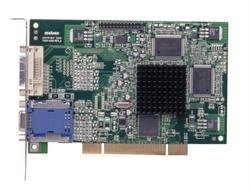
Figure 1: Matrox G450 DualHead PCI Graphics Card securely installed in a PCI slot.
2.3. Инсталација на драјвери
- Вклучување: Connect your monitor(s) to the DVI ports on the Matrox G450 card and power on your computer.
- Првично стартување: The operating system may detect new hardware and attempt to install generic drivers. Allow this process to complete.
- Install Matrox Drivers:
- Од ЦД: Insert the Matrox driver CD into your CD-ROM drive and follow the on-screen instructions.
- Од Web: Download the latest drivers from the official Matrox webсајт (www.matrox.com/graphics/en/support/drivers/). Run the downloaded installer and follow the prompts.
- Рестартирајте: Restart your computer when prompted to finalize the driver installation.
Figure 2: DVI output ports on the Matrox G450 graphics card for monitor connection.
3. Ракување со графичката картичка
3.1. Конфигурација на екранот
After successful driver installation, you can configure your display settings through your operating system's display properties or the Matrox PowerDesk software (if installed).
- Резолуција: Adjust the screen resolution to match your monitor's native resolution for optimal clarity.
- Стапка на освежување: Set the refresh rate to a comfortable level, typically 60Hz or 75Hz, to reduce flicker.
- Длабочина на боја: Configure the color depth (e.g., 16-bit, 24-bit, 32-bit) based on your requirements.
3.2. DualHead Functionality
The Matrox G450's DualHead feature allows you to use two monitors simultaneously. This can be configured in two primary modes:
- Проширена работна површина: This mode treats both monitors as a single, larger desktop area, allowing you to drag windows and applications between them. This is ideal for multitasking and increasing работен простор.
- Cloned Display: This mode duplicates the content of your primary monitor onto the secondary monitor. This is useful for presentations or sharing your screen with an audience.
Access these settings through your operating system's display settings (e.g., right-click on desktop > Screen Resolution in Windows) or the Matrox display utility.
Слика 3: Прample of a DualHead extended desktop configuration.
4. Одржување
Proper maintenance ensures the longevity and optimal performance of your Matrox G450 graphics card.
- Ажурирања на возачот: Regularly check the official Matrox website for updated drivers. Installing the latest drivers can improve performance, add features, and resolve compatibility issues.
- Отстранување прашина: Periodically open your computer case (after powering off and disconnecting power) and gently clean any dust accumulation on the graphics card's heatsink and fan (if present) using compressed air. Excessive dust can lead to overheating.
- Еколошки услови: Ensure your computer operates in a well-ventilated area with stable temperature and humidity to prevent damage to internal components, including the graphics card.
5 Смена на проблеми
This section addresses common issues you might encounter with your Matrox G450 graphics card.
5.1. Нема излез на екранот
- Проверете ги каблите: Ensure monitor cables are securely connected to both the graphics card and the monitor.
- Моќност на мониторот: Проверете дали вашиот монитор е вклучен и поставен на точниот влезен извор.
- Card Seating: Power off the computer, open the case, and re-seat the graphics card firmly in its PCI slot.
- Test with One Monitor: If using DualHead, try connecting only one monitor to isolate the issue.
- Поставки за BIOS/UEFI: Check your computer's BIOS/UEFI settings to ensure the PCI graphics card is selected as the primary display adapter, if applicable.
5.2. Driver Issues or Instability
- Повторно инсталирај драјвери: Uninstall existing Matrox drivers, restart the computer, and then perform a clean installation of the latest drivers from the Matrox webсајт.
- Компатибилност: Осигурете се дека инсталираните драјвери се компатибилни со верзијата на вашиот оперативен систем.
- Враќање на системот: If issues began after a recent change, consider using a system restore point.
5.3. Multi-Monitor Detection Problems
- Проверете ги врските: Verify both monitors are correctly connected to the DVI ports on the graphics card.
- Поставки на оперативниот систем: Access your operating system's display settings and ensure both monitors are detected and configured for "Extend these displays" or "Duplicate these displays" is configured as desired.
- Matrox PowerDesk: Utilize the Matrox PowerDesk utility for advanced multi-monitor configuration and troubleshooting.
6. Спецификации
| Карактеристика | Детал |
|---|---|
| Бренд | Матрокс |
| Модел | G450 DualHead PCI |
| Големина на графичка RAM меморија | 32 MB |
| Вид на графичка RAM меморија | DDR SDRAM |
| Интерфејс за видео излез | DVI |
| Тип на автобус | PCI |
| Поддршка за повеќе монитори | DualHead (2 displays) |
7. Информации за гаранцијата
This Matrox G450 DualHead PCI 32MB Graphics Card is covered by a limited manufacturer's warranty. Please refer to the warranty card included with your product or visit the official Matrox webстраница за детални услови и одредби, вклучувајќи го гарантниот период и процедурите за поднесување барање за надомест.
Keep your proof of purchase for warranty service.
8. Техничка поддршка
For technical assistance, driver downloads, or further information regarding your Matrox G450 graphics card, please visit the Matrox support webсајт:
www.matrox.com/graphics/en/support/
Исто така, можете да најдете корисни ресурси, често поставувани прашања и форуми на заедницата на нивните webсајт.


