1. Вовед
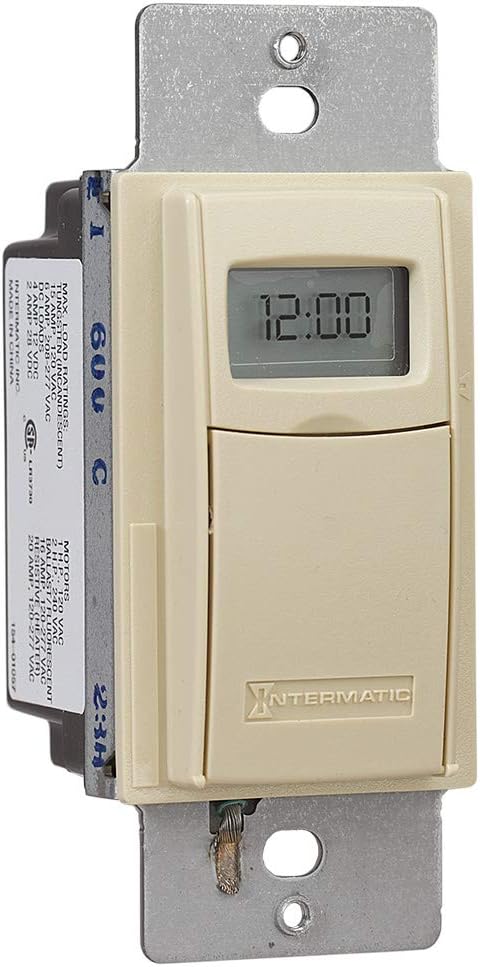
The Intermatic EI400C Electronic Countdown In-Wall Timer is designed to provide automatic shut-off functionality for various electrical loads, including indoor and outdoor lighting, bathroom fans, whole house fans, and other appliances. This timer offers precise control from 1 second to 24 hours, enhancing convenience and energy efficiency in your home or office. Its silent operation and simple push-button interface make it user-friendly, while its no-neutral wire requirement simplifies installation in most standard wall boxes.
2. Важни безбедносни информации
ПРЕДУПРЕДУВАЊЕ: Ризик од електричен удар. Неправилната инсталација може да доведе до сериозни повреди или смрт.
- Always turn off power at the circuit breaker or fuse box before installing or servicing the timer.
- Installation should be performed by a qualified electrician or in accordance with all local and national electrical codes.
- Do not use this timer with sunlamps, saunas, or any loads that could cause personal injury if timed incorrectly or if the timer malfunctions.
- Осигурајте се дека сите жичени врски се безбедни и правилно изолирани.
- Овој уред е наменет само за внатрешна употреба.
3. Производот завршиview
The Intermatic EI400C is an electronic countdown timer designed for in-wall installation. It features a digital display and intuitive controls for setting countdown durations.
3.1 Компоненти
- Дигитален екран: Shows current time and countdown status.
- Копче за вклучување/исклучување: Activates or deactivates the timer.
- Копчиња плус (+) / минус (-): Adjust countdown duration.
- Копче за пауза: Temporarily stops the countdown.
- Оддел за батерии: Houses the CR2 lithium battery.
3.2 Слики од производи



4. Поставување и инсталација
The Intermatic EI400C timer is designed for easy installation, compatible with single-pole or 3-way switch configurations and does not require a neutral wire connection.
4.1 Чекори пред инсталација
- Исклучете го напојувањето: Locate the circuit breaker or fuse that controls the switch you are replacing and turn off the power. Verify power is off using a voltagд тестер.
- Отстранете го постоечкиот прекинувач: Внимателно отстранете ја ѕидната плоча и одвртете го постоечкиот прекинувач од ѕидната кутија. Исклучете ги жиците од стариот прекинувач.
4.2 Инструкции за поврзување
The EI400C timer is compatible with both single-pole and 3-way switch setups. Refer to the diagram provided with your product for specific wiring configurations. Generally, the timer will have two load wires and a ground wire. For 3-way applications, one of the traveler wires from the existing 3-way switch will be connected to the timer.
- Connect the timer's wires to the corresponding house wires using wire nuts.
- Проверете дали сите врски се цврсти и сигурни.
- The EI400C does not require a neutral wire, simplifying installation in older homes.
4.3 Mounting and Finalizing Installation
- Carefully push the wired timer into the wall box.
- Secure the timer to the wall box with the provided screws.
- Attach the decorative wall plate.
- Вратете ја моќноста: Вклучете го напојувањето повторно кај прекинувачот.
4.4 Инсталација на батерија
The timer comes with a replaceable CR2 lithium battery, which powers the internal clock and settings memory. The battery is typically pre-installed or needs to be inserted upon initial setup.
- Open the small front cover of the timer to access the battery compartment.
- Insert the CR2 lithium battery, observing the correct polarity.
- Добро затворете го капакот на преградата за батерии.
5. Упатства за работа
The EI400C timer offers simple, push-button operation for setting countdown durations from 1 second to 24 hours.
5.1 Setting a Countdown Time
- Контроли за пристап: Gently open the front cover of the timer to reveal the control buttons.
- Прилагодете го времето: Користете го + и - buttons to set the desired countdown duration. The display will show the selected time.
- Стартувајте го тајмерот: Притиснете го Вклучено/Исклучено button to activate the timer. The connected load will turn on, and the timer will begin counting down.
5.2 Turning Off Before Countdown Ends
If you wish to turn off the connected load before the set countdown time expires, simply press the Вклучено/Исклучено button again. This will immediately turn off the load and reset the timer.
5.3 Функција за пауза
Притиснете го Пауза button to temporarily halt the countdown. The connected load will remain on. Press Пауза повторно да продолжи со одбројувањето.
5.4 Lockable Settings
The timer features lockable settings to prevent unintended changes to the program. Refer to the detailed instructions included in the product packaging for how to activate and deactivate this feature.
5.5 Visual/Audible Warnings
The EI400C can be configured to provide a visual or audible warning before the timer turns off. Consult the full product manual for steps on enabling and customizing these warning options.
5.6 Инструктивно видео
Видео 1: An official Intermatic video providing an overview of their in-wall timers, including the EI400 series. This video demonstrates general features and benefits of Intermatic in-wall timers, which are applicable to the EI400C model.
6. Одржување
The Intermatic EI400C timer requires minimal maintenance, primarily focusing on battery replacement.
6.1 Замена на батеријата
The internal CR2 lithium battery provides power for the timer's memory and display, typically lasting up to three years. When the battery is low, a 'LoBatt' indicator may appear on the display.
- Open the front cover of the timer.
- Carefully remove the old CR2 battery from its compartment.
- Insert a new CR2 lithium battery, ensuring correct polarity.
- Добро затворете го предниот капак.
Забелешка: Some users have reported that the battery compartment cover can be difficult to open or may not stay securely closed after multiple battery changes. Exercise care when opening and closing the compartment. If the cover does not stay closed, ensure the battery makes proper contact.
7 Смена на проблеми
This section addresses common issues you might encounter with your Intermatic EI400C timer.
| Проблем | Можна причина | Решение |
|---|---|---|
| Timer display is blank or shows 'LoBatt' | Low or dead CR2 battery, or poor battery contact. | Replace the CR2 lithium battery. Ensure the battery is inserted correctly and the compartment cover is securely closed to maintain contact. |
| Timer shows 'NoOP' error | Indicates a problem with battery contact or internal operation. | Check and re-seat the CR2 battery. If the issue persists, the unit may require replacement. |
| Connected load does not turn on/off | No power to the timer, incorrect wiring, or faulty load. | Verify power at the circuit breaker. Double-check wiring connections according to the installation instructions. Test the connected load (e.g., light bulb) with a different switch or power source. |
| Difficulty opening battery compartment cover | Tight fit or worn plastic tabs. | Use a small, flat-head screwdriver to gently pry open the cover. Be careful not to damage the plastic tabs. |
| Timer does not hold settings after power outage | Dead or missing CR2 battery. | The CR2 battery maintains settings during power outages. Ensure it is installed and functional. |
8. Спецификации
| Карактеристика | Детал |
|---|---|
| Број на модел | EI400C |
| Бренд | Интерматик |
| Боја | Слоновата Коска |
| Материјал | Пластика |
| Voltage | 120 277-VAC |
| Максимално оптоварување | 20 Amps |
| Опсег на тајмер | 1 Second to 24 Hours |
| Тип на прекинувач | Еднополен или тронасочен |
| Тип на монтирање | Standard Wall Box, Rectangular Decorator Wall Plate |
| Потребна е батерија | 1 CR2 Lithium (included) |
| Траење на батеријата | До 3 години |
| Димензии | 4.13 x 1.75 x 1.2 инчи |
| Тежина на ставката | 6 унци (0.38 фунти) |
| Сертификација | Сертифициран CSA |
| UPC | 078275101371 |
9. Гаранција и поддршка
9.1 Информации за гаранцијата
The Intermatic EI400C Electronic Countdown In-Wall Timer comes with a 5-годишна ограничена гаранцијаОваа гаранција ги покрива дефектите во материјалите и изработката при нормална употреба. Ве молиме задржете го доказот за купување за гаранциски барања.
9.2 Поддршка за корисници
For technical assistance, troubleshooting beyond this manual, or warranty inquiries, please contact Intermatic customer support. Refer to the official Intermatic webстраницата или пакувањето на производот за најактуелните информации за контакт.
Онлајн ресурси: Посетете го Продавница „Интерматик“ на Амазон за дополнителни информации и ресурси за производот.


