1. Вовед
The Antec TruePower TPQ-1200 is a high-performance 1200-watt power supply designed for demanding computer systems. It features an 80 PLUS Silver certification, indicating high energy efficiency, and provides stable power delivery through its six +12V rails. This manual provides essential information for the safe installation, operation, and maintenance of your TPQ-1200 power supply.
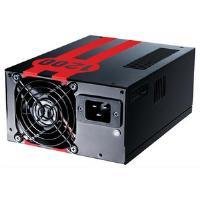
Image 1.1: The Antec TruePower TPQ-1200 Power Supply unit, showcasing its design and modular connectors.
2. Информации за безбедност
Ве молиме прочитајте ги и разберете ги сите безбедносни упатства пред да го инсталирате или ракувате со напојувањето. Непочитувањето на ова може да резултира со телесни повреди или оштетување на вашата опрема.
- Always disconnect the power cord from the wall outlet before installing, removing, or cleaning the power supply.
- This power supply is designed for use in personal computers only. Do not use it for any other purpose.
- Не го отворајте напојувањето casing. Висок волуменtages are present inside, and there are no user-serviceable parts. Opening the casing ќе ја поништи гаранцијата.
- Обезбедете правилно заземјување на вашиот компјутерски систем.
- Избегнувајте да го користите напојувањето во средини со висока влажност или екстремни температури.
- Keep the power supply away from liquids and sources of heat.
3. Содржина на пакетот
Потврдете дека вашиот пакет ги содржи следниве ставки:
- Antec TruePower TPQ-1200 Power Supply Unit
- Modular Cable Set (PCIe, SATA, Molex, Floppy)
- Кабел за напојување со наизменична струја
- Завртки за монтирање
- Упатство за употреба (овој документ)
If any items are missing or damaged, please contact your retailer or Antec customer support.
4. Карактеристики
The Antec TruePower TPQ-1200 power supply offers advanced features for reliable and efficient performance:
- 1200 Watts Continuous Power: Обезбедува ample power for high-end gaming and workstation systems.
- 80 PLUS Silver Certified: Achieves up to 88% efficiency, reducing heat generation and operating costs.
- Six +12V Rails: Delivers stable and clean power to critical components.
- Advanced Cable Management: Semi-modular design allows for cleaner builds and improved airflow.
- PowerCache High Performance Capacitors: Enhances stability and transient response.
- Ultra-Quiet Pulse Width Modulation (PWM) Fan: Provides efficient cooling with minimal noise.
- Industrial Grade Protection Circuitry: Вклучува заштита од пренапон (OCP), пренапонtage Заштита (OVP), Под томtage Protection (UVP), Short Circuit Protection (SCP), Over Power Protection (OPP), and Over Temperature Protection (OTP).
5. Поставување и инсталација
Follow these steps carefully to install your Antec TruePower TPQ-1200 power supply.
5.1 Список за проверка пред инсталација
- Ensure your computer case supports an ATX power supply.
- Соберете ги потребните алатки: шрафцигер со крстоглава глава.
- Unplug your computer from the wall outlet and discharge any residual power by pressing the power button.
5.2 Монтирање на напојувањето
- Carefully place the power supply into the designated PSU bay in your computer case. Ensure the fan is oriented correctly (typically facing down for bottom-mounted PSUs, or according to case design for top-mounted).
- Порамнете ги дупките за завртките на напојувањето со оние на куќиштето.
- Secure the power supply using the provided mounting screws. Do not overtighten.
5.3 Поврзување на напојувачки кабли
Connect the necessary cables to your motherboard and components. The TPQ-1200 features both fixed and modular cables.
- 24-Pin ATX Motherboard Power: Connect the main 24-pin connector to the corresponding port on your motherboard. Ensure it clicks into place.
- 8-Pin EPS12V (CPU) Power: Connect the 8-pin (or 4+4 pin) EPS12V connector to the CPU power port on your motherboard.
- PCIe (Graphics Card) Power: For graphics cards requiring additional power, connect the appropriate 6-pin or 6+2 pin PCIe modular cables from the power supply to your graphics card(s).
- SATA напојување: Connect SATA modular cables to your SATA hard drives, SSDs, and optical drives.
- Molex (Peripheral) Power: Use Molex modular cables for older peripherals or case fans that require this connector type.
- Управување со кабли: Уредно поставете ги каблите зад фиоката на матичната плоча или во други означени места на куќиштето за да го подобрите протокот на воздух и естетиката.
5.4 Почетно вклучување
- Проверете дали сите врски се безбедни.
- Connect the AC power cord to the power supply and then to a grounded wall outlet.
- Префрлете го прекинувачот за напојување на задната страна од напојувањето во положба „ВКЛУЧЕНО“ (I).
- Вклучете го вашиот компјутер.
6. Упатства за работа
The Antec TruePower TPQ-1200 is designed for continuous operation within its specified limits. Ensure adequate ventilation around your computer case to prevent overheating. The intelligent PWM fan will adjust its speed based on the power supply's temperature to maintain optimal cooling and noise levels.
Always shut down your computer properly through the operating system before turning off the power supply switch or unplugging the AC cord.
7. Одржување
Редовното одржување помага да се обезбеди долготрајност и оптимални перформанси на вашето напојување.
- Чистење прашина: Periodically (e.g., every 6-12 months), disconnect the power supply from the wall outlet and use compressed air to gently clean dust from the fan grille and ventilation openings. Do not open the power supply casing.
- Инспекција на кабел: Повремено проверувајте ги сите приклучоци на каблите за напојување за да се осигурате дека се безбедни и без оштетувања.
8 Смена на проблеми
Доколку имате проблеми со напојувањето, погледнете го следното упатство за решавање проблеми:
| Проблем | Можна причина | Решение |
|---|---|---|
| Компјутерот не се вклучува. | AC power cord not connected or loose. Power supply switch is OFF. Faulty power supply. | Ensure AC cord is firmly connected. Flip PSU switch to 'ON' (I). Test with another power supply if possible. |
| Системот се вклучува, но веднаш се исклучува. | Overload, short circuit, or overheating. | Check for short circuits (e.g., loose screws). Ensure adequate ventilation. Disconnect non-essential components to check for overload. |
| System instability or random reboots. | Insufficient power, faulty component, or power supply issue. | Verify all power connectors are secure. Ensure total system wattage does not exceed PSU capacity. Test components individually if possible. |
| Гласен шум на вентилаторот од напојувањето. | Dust accumulation, fan malfunction, or high load. | Clean dust from the fan grille. If noise persists and is excessive, contact support. |
If troubleshooting steps do not resolve the issue, contact Antec customer support for further assistance.
9. Спецификации
Detailed technical specifications for the Antec TruePower TPQ-1200 power supply:
- Име на модел: TruePower TPQ-1200
- Излезен Ватtage: 1200 вати
- Форма фактор: ATX12V
- Тип на конектор: ATX
- Ефикасност: 80 PLUS Silver Certified
- Метод на ладење: Air (PWM Fan)
- Број на обожаватели: 1
- Компатибилни уреди: Личен компјутер
- Тежина на ставката: 4.96 фунти (2.25 кг)
- Димензии на пакетот: 12.91 x 9.84 x 5.59 инчи (32.8 x 25 x 14.2 см)
- Прво достапен датум: 17 април 2012 година
10. Гаранција и поддршка
За информации за гаранцијата и техничка поддршка, ве молиме погледнете го официјалниот Antec webстраницата или директно контактирајте ја нивната служба за корисници. Условите за гаранција може да се разликуваат во зависност од регионот и датумот на купување.
Antec Official Webсајт: www.antec.com


