Вовед
Ви благодарам за купувањетоasing the Optimus F-1760 16-inch Wave Oscillating Stand Fan. This manual provides important information regarding the safe operation, assembly, maintenance, and troubleshooting of your fan. Please read these instructions thoroughly before use and retain them for future reference.

Image: The Optimus F-1760 stand fan positioned in a bedroom, showcasinнеговиот дизајн и големина во однос на мебелот.
Важни безбедносни инструкции
Кога користите електрични апарати, секогаш треба да се следат основните мерки на претпазливост за да се намали ризикот од пожар, електричен удар и повреди на лица, вклучувајќи го следново:
- Прочитајте ги сите упатства пред да го користите овој вентилатор.
- Користете го овој вентилатор само како што е опишано во ова упатство. Други употреби што не се препорачуваат може да предизвикаат пожар, електричен удар или повреда на лица.
- To protect against electrical shock, do not place fan in window, immerse unit, plug or cord in water or spray with liquids.
- Внимателен надзор е неопходен кога некој апарат се користи од или во близина на деца.
- Unplug fan from outlet when not in use, when moving fan from one location to another, and before cleaning.
- Do not operate fan in the presence of explosive and/or flammable fumes.
- Не ставајте вентилатор или други делови во близина на отворен пламен, готвење или друг апарат за греење.
- Do not operate fan with a damaged cord or plug, or after the fan malfunctions or has been dropped or damaged in any manner.
- Избегнувајте контакт со подвижни делови.
- За да го исклучите, фатете го приклучокот и извлечете го од ѕидниот штекер. Никогаш не свиткајте по кабелот.
- Секогаш користете на сува, рамна површина.
- Не закачувајте или монтирајте вентилатор на wallид или таван.
- Не работете без решетките на вентилаторот правилно поставени.
- This product employs overload protection (fuse). A blown fuse indicates an overload or short-circuit situation. If the fuse blows, unplug the product from the outlet. Replace the fuse as per the servicing instructions (follow product marking for proper fuse rating) and check the product. If the replacement fuse blows, a short-circuit may be present and the product should be discarded or returned to an authorized service facility for examination and/or repair.
Поставување и склопување
The Optimus F-1760 fan requires minimal assembly. Ensure all components are present and undamaged before proceeding.
- Основно собрание: Attach the weighted base legs to the main pole. Ensure they are securely fastened to provide stability. The base is designed to be sturdy, with weights at the ends of the feet.
- Прилагодување на висината: The fan's height can be adjusted. Loosen the height adjustment knob on the pole, extend or retract the pole to the desired height, and then securely tighten the knob.
- Додаток за глава на вентилаторот: Ensure the fan head is securely attached to the top of the pole. The motor housing and fan blade are plastic, while the grill is metal.
- Поставување: Place the fan on a dry, level surface. Ensure there is adequate space around the fan for proper air circulation and oscillation.
Упатства за работа
The Optimus F-1760 fan offers multiple control options and features for customized comfort.
Контролен панел
The fan features a 4-position push-button switch on the pole for basic operation.
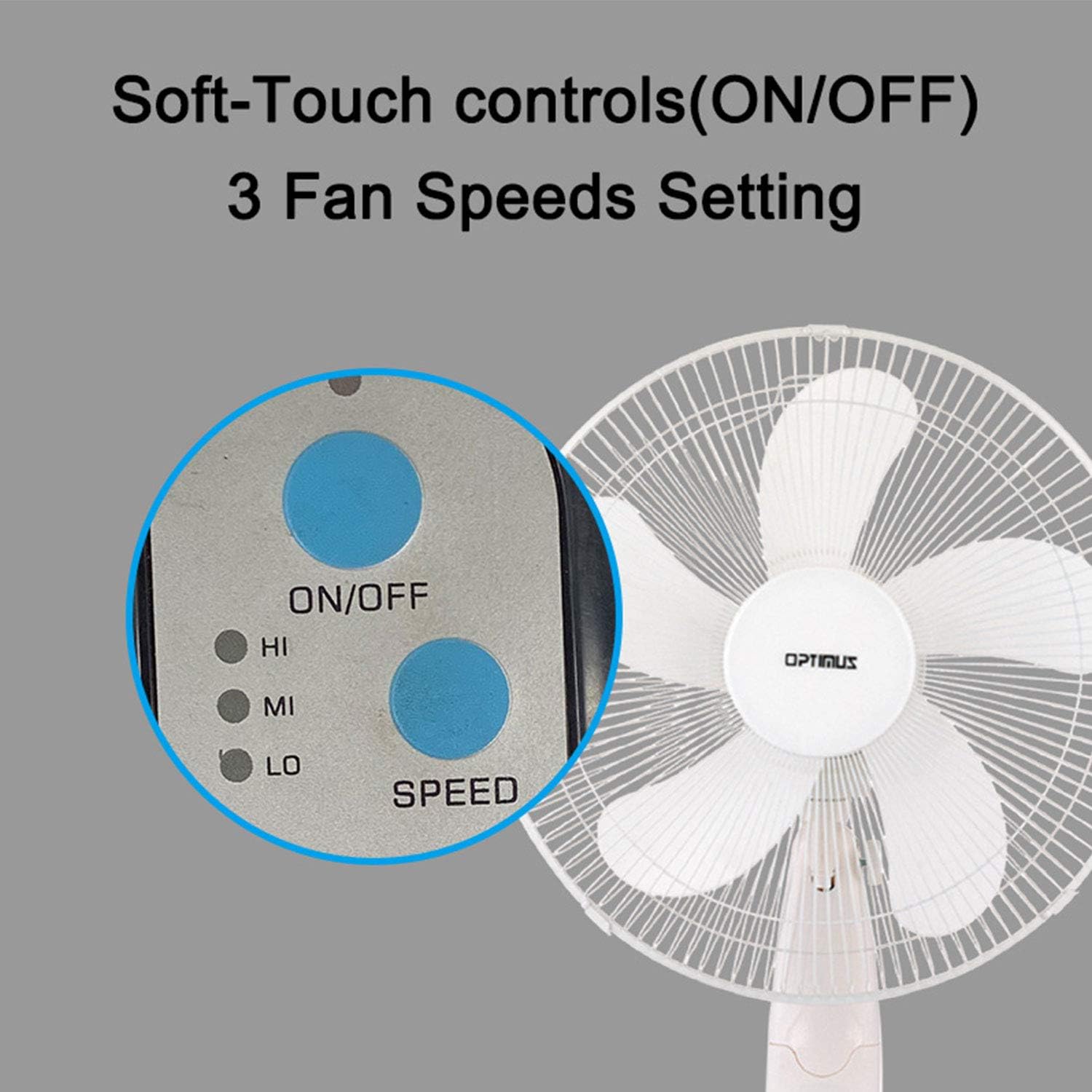
Image: The fan's soft-touch control panel, showing buttons for ON/OFF and SPEED, with indicators for High (HI), Medium (MI), and Low (LO) fan speeds.
- ВКЛУЧЕНО/ИСКЛУЧЕНО: Притиснете за да го вклучите или исклучите вентилаторот.
- Поставки за брзина: Select from Low, Medium, or High speeds. The 3-speed, energy-saving, whisper-quiet operation motor provides efficient airflow.
Далечински управувач
The fan comes with a remote control for convenient operation from a distance. (Batteries not included).

Image: The remote control for the fan, featuring buttons for Mode, Time, Speed, and ON/OFF functions.
- ВКЛУЧЕНО/ИСКЛУЧЕНО: Го вклучува или исклучува вентилаторот.
- БРЗИНА: Cycles through the three fan speeds (Low, Medium, High).
- МОД: Selects between different wind modes.
- ВРЕМЕ: Activates and sets the shut-off timer.
Режими на ветер
The fan offers three distinct wind modes to suit your preference:

Image: The fan's control panel highlighting the MODE button and indicators for Normal, Natural, and Sleep wind modes.
- Нормален режим: The fan blows at a constant speed based on your selected setting.
- Природен режим: The fan speed fluctuates to mimic a natural breeze.
- Режим на спиење: The fan operates at a lower, quieter speed, ideal for sleeping, with gentle speed variations.
Осцилација
The F-1760 features unique wave oscillation for comprehensive air distribution.

Image: A diagram illustrating the fan's capability for both vertical (up/down) and horizontal (left/right) wave oscillation, providing wider air coverage.
- Up/Down & Left/Right Wave Oscillating: Activates a unique oscillation pattern that moves the fan head both horizontally and vertically, distributing air throughout the room.
- To stop oscillation, press the oscillation button again.
Функција на тајмер
Поставете го вентилаторот автоматски да се исклучува по одреден период.

Image: The fan's control panel showing the TIME button and indicators for 1 hour (1H), 2 hours (2H), and 4 hours (4H) timer settings. The fan can be programmed for up to 7 hours.
- The timer can be set for 1, 2, 4, or up to 7 hours. Press the TIME button repeatedly to cycle through the desired duration.
Одржување и чистење
Редовното чистење помага во одржувањето на перформансите на вентилаторот и го продолжува неговиот век на траење.
- Пред чистење: Секогаш исклучувајте го вентилаторот од штекерот пред чистење.
- Надворешно чистење: Користете мека, гamp крпа за бришење на надворешните површини на вентилаторот. Не користете абразивни средства за чистење или растворувачи.
- Чистење на скара: The metal grill can be cleaned with a soft brush or vacuum cleaner to remove dust. For thorough cleaning, the grill may need to be carefully removed.
- Чистење на сечилото: If necessary, the fan blades can be cleaned. Ensure the fan is completely off and unplugged. The care instructions specify "Hand Wash" for components.
- Складирање: Кога не го користите подолг период, чувајте го вентилаторот на ладно и суво место, по можност во оригиналното пакување.
Решавање проблеми
| Проблем | Можна причина | Решение |
|---|---|---|
| Вентилаторот не се вклучува. | No power supply. Blown fuse. | Ensure the fan is plugged into a working outlet. Check the fuse in the plug and replace if necessary (refer to safety instructions for fuse replacement). |
| Fan operates but air movement is weak. | Low speed setting. Dust accumulation on blades/grill. | Increase the fan speed. Clean the fan blades and grills as per maintenance instructions. |
| Далечинскиот управувач не работи. | Dead batteries. Obstruction between remote and fan. | Replace batteries in the remote control. Ensure a clear line of sight between the remote and the fan's receiver. |
| Fan changes speed automatically or unexpectedly. | Пречки од други далечински управувачи (на пр., далечински управувач за телевизор). | This fan may respond to frequencies from other remote controls. Try operating the fan manually or repositioning the fan/other devices to minimize interference. |
| Fan makes clicking noises during oscillation. | Normal operation of oscillation gears. | A slight clicking noise from the oscillation gears can occur during normal operation. If the noise is excessive or new, ensure the fan head is securely attached. |
| Fan feels unstable. | Base not properly assembled or tightened. Uneven surface. | Ensure all base components are securely fastened and the fan is placed on a firm, level surface. |
Спецификации
- Име на модел: Ф-1760
- Бренд: Оптимус
- Дијаметар на вентилаторот: 16 инчи
- Дизајн на електричен вентилатор: Вентилатор на подот
- Извор на енергија: Електричен со кабел
- Ватtage: 60 вати
- Voltage: 6 волти
- Број на сечила: 3
- Поставки за брзина: 3 вртежи во минута (ниско, средно, високо)
- Контролен метод: Далечински, притисни копче
- Посебни карактеристики: Up/Down & Left/Right Wave Oscillating, Adjustable Height, Timer Function (up to 7 hours), Wind Modes (Normal, Natural, Sleep)
- Внатрешна/надворешна употреба: Затворен
- Тежина на ставката: 9.9 фунти
- Вклучени компоненти: Производ, Прирачник
Информации за гаранцијата
This Optimus F-1760 fan comes with a 1-годишна ограничена гаранција from the date of purchase. This warranty covers defects in materials and workmanship under normal use. It does not cover damage resulting from misuse, accident, alteration, or unauthorized repair. Please retain your proof of purchase for warranty claims.
Поддршка за корисници
For technical assistance, warranty claims, or questions regarding your Optimus F-1760 fan, please contact Optimus customer service. Refer to the product packaging or the official Optimus webстраница за најактуелните информации за контакт.


