1. Вовед
This manual provides essential information for the proper installation, operation, and maintenance of your Western Digital WD1600HLFS hard drive. The WD1600HLFS is a high-performance 3.5-inch internal hard disk drive designed for demanding applications, featuring a 160GB storage capacity, SATA 3Gb/s interface, and a 10,000 RPM spindle speed for rapid data access.
2. Информации за безбедност
Please read and understand all safety precautions before installing or operating this device. Failure to do so may result in personal injury or damage to the product or other components.
- Мерки на претпазливост за електростатско празнење (ESD): Always handle the hard drive by its edges and avoid touching the circuit board or connector pins. Use an anti-static wrist strap or ground yourself by touching a metal object before handling the drive to prevent ESD damage.
- Исклучување на струја: Ensure your computer system is completely powered off and unplugged from the electrical outlet before installing or removing the hard drive.
- Физичко ракување: Hard drives are delicate. Avoid dropping, striking, or exposing the drive to excessive vibration or shock.
- Вентилација: Ensure adequate airflow around the hard drive within your computer case to prevent overheating.
- Бекап на податоци: Seller is not responsible for data loss. Always back up your data before servicing or making changes to your hard disk.
3. Содржина на пакетот
Потврдете дека вашиот пакет ги содржи следниве ставки:
- Western Digital WD1600HLFS 160GB Hard Drive
- Note: Additional accessories such as mounting screws, SATA data cables, or power adapters are typically supplied with your computer system or sold separately. The inclusion of a mounting tray may vary.
4. Поставување и инсталација
4.1 Системски барања
- Available 3.5-inch drive bay in your computer case.
- Available SATA port on your motherboard.
- Available SATA power connector from your power supply.
- Компатибилен оперативен систем (на пр., Windows, macOS, Linux).
4.2 Физичка инсталација
- Подгответе го вашиот систем: Power off your computer and unplug the power cord. Open the computer case according to your system's instructions.
- Монтирајте го погонот: Slide the WD1600HLFS hard drive into an available 3.5-inch drive bay. Secure it with screws on both sides of the drive bay. If your system uses a tool-less mounting mechanism, follow its specific instructions.
- Поврзете го кабелот за податоци: Connect one end of a SATA data cable to the SATA data port on the hard drive and the other end to an available SATA port on your motherboard.
- Поврзете го кабелот за напојување: Connect a SATA power connector from your power supply to the SATA power port on the hard drive.

Слика 1: Предна страна view of the WD1600HLFS with its mounting tray, highlighting the SATA data and power interfaces.

Слика 2: Долна view of the WD1600HLFS, illustrating the printed circuit board (PCB) and screw points for secure installation.
4.3 Почетно поставување на системот
- Конфигурација на BIOS/UEFI: After reassembling your computer and powering it on, enter your system's BIOS or UEFI settings. Ensure the new hard drive is detected and configured correctly (e.g., SATA mode set to AHCI for optimal performance).
- Поставување на оперативен систем:
- Нова инсталација: If installing an operating system on this drive, follow your OS installation media's instructions for partitioning and formatting the drive.
- Adding as Secondary Drive: If adding as a secondary drive, boot into your existing operating system. Use Disk Management (Windows) or Disk Utility (macOS/Linux) to initialize, partition, and format the new drive before use.
5. Операција
The Western Digital WD1600HLFS functions as a standard internal hard disk drive. Once properly installed and formatted, it can be used for:
- Operating System Storage: Install your operating system for fast boot times and application loading due to its 10,000 RPM speed.
- Складирање податоци: Продавница files, апликации и медиуми.
- Играње: Benefit from quicker game loading times compared to slower drives.
- Workstation Applications: Ideal for applications requiring high I/O performance.
Access the drive through your operating system's file explorer or command line interface, just like any other storage device.
6. Одржување
To ensure the longevity and optimal performance of your WD1600HLFS hard drive, consider the following maintenance practices:
- Regular Data Backups: Periodically back up critical data to another storage device. Hard drives can fail, and backups are your only protection against data loss.
- Следење на состојбата на дискот: Utilize SMART (Self-Monitoring, Analysis and Reporting Technology) tools available in many operating systems or third-party utilities to monitor the drive's health status.
- Одржувајте соодветно ладење: Ensure your computer case has adequate ventilation to prevent the drive from overheating, which can reduce its lifespan.
- Дефрагментација (за HDD): While modern operating systems often handle this automatically, occasional defragmentation can help maintain performance on traditional hard drives.
- Избегнувајте физички шокови: Protect your computer from drops or impacts while the drive is operating.
7 Смена на проблеми
If you encounter issues with your WD1600HLFS hard drive, refer to the following common problems and solutions:
- Не е откриен диск:
- Проверете ги сите SATA конекции за податоци и кабли за напојување.
- Verify the drive is enabled in your system's BIOS/UEFI settings.
- Обидете се да го поврзете дискот со друг SATA порт или да користите различни кабли.
- Ensure your power supply is providing sufficient power.
- Бавни перформанси:
- Проверете за прекумерни процеси во позадина или малициозен софтвер.
- Ensure the drive is not nearly full.
- Verify SATA drivers are up to date.
- Run a disk defragmenter (if applicable).
- Monitor drive temperature; overheating can cause throttling.
- Unusual Noises (Clicking, Grinding):
- Immediately back up any accessible data.
- Unusual noises often indicate a mechanical failure. Discontinue use to prevent further damage.
- Contact Western Digital support if the drive is under warranty.
- Корупција на податоци:
- Run disk error checking utilities (e.g., CHKDSK on Windows).
- Ensure proper system shutdown to prevent data loss.
If these steps do not resolve your issue, consult the Western Digital support webна лице место или квалификуван техничар.
8. Спецификации
Below are the technical specifications for the Western Digital WD1600HLFS hard drive:

Figure 3: Product label of the WD1600HLFS, detailing model, serial, and part numbers.
- Сериски број (S/N): WXE0C79C3272
- Број на дел (P/N): 490581-001
- Controller (CT): 2AHER013HY10B9
- Model (MDL): WD1600HLFS-60G6U1
- Spare Part Number (S/C): 8509C309GRH
| Карактеристика | Опис |
|---|---|
| Број на модел | WD1600HLFS |
| Капацитет на складирање | 160 GB |
| Интерфејс | SATA 3Gb/s (SATA/300) |
| Брзина на вретеното | 10,000 вртежи во минута |
| Големина на тампон | 16 MB |
| Форма фактор | 3.5-инчен |
| Average Read Speed | 80.5 MB/s |
| Random Access (Read/Write) | 8.1 ms |
| Спецификации за напојување | 5VDC, 0.90A; 12 VDC, 0.30 А |
| Тежина на ставката | 1.25 фунти (0.57 кг) |
| Димензии на производот (ДxШxВ) | 0.09 x 0.07 x 0.04 инчи (приближно) |
| Регулаторни одобренија | BSMI, cULus, C-Tick, MIC, CE, WEEE |
| Датум прв на располагање | 4 април 2010 година |
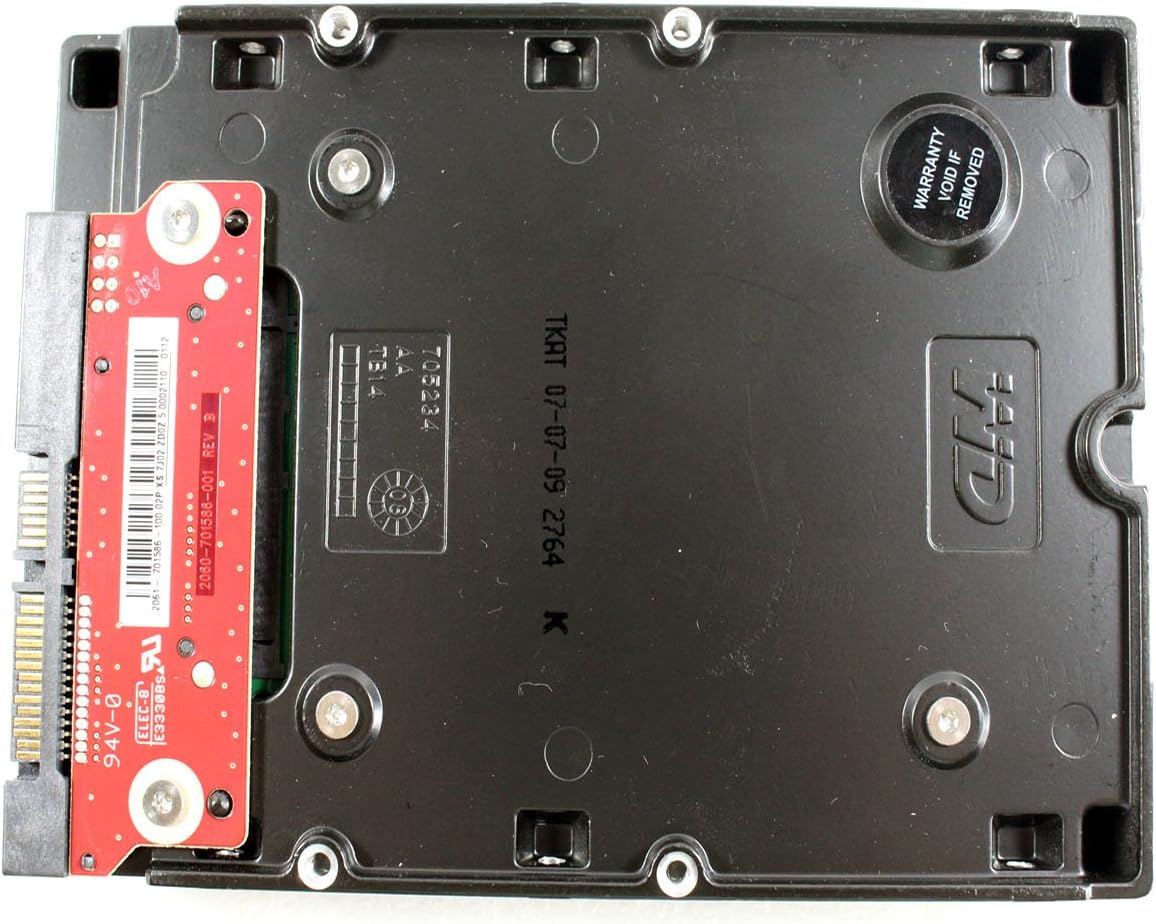
Слика 4: Долна view of the WD1600HLFS without the tray, showing the PCB and a warranty sticker.

Слика 5: Детално view of the WD1600HLFS PCB, including component markings.
9. Гаранција и поддршка
Правно одрекување: Seller is not responsible for data loss. Always back up your data before servicing your hard disk.
The WD1600HLFS hard drive is manufactured by Western Digital. For specific warranty terms, conditions, and duration, please refer to the documentation provided with your purchase or visit the official Western Digital website. Note that tampering with the drive, such as removing certain labels or components, may void the warranty, as indicated by the 'Warranty Void If Removed' sticker on the drive.
For technical assistance, driver downloads, or further support, please visit the official Western Digital support portal:
- Western Digital Support: https://support.wdc.com


