Вовед
The Vanco 281442 HDMI 4x2 Matrix Selector Switch is designed to connect up to four HDMI audio/video source devices to two independent HDMI displays. This device ensures high-quality, uncompressed digital video and surround sound audio transmission without signal loss. It supports 3D content when connected to compatible devices and high-definition resolutions up to 1080p. The switch is compliant with the DDWG standard for HDMI monitors and H.D.C.P. (High-Bandwidth Digital Content Protection).
Главните карактеристики вклучуваат:
- Видео ampпропусен опсег на зајакнувачот: 2.25 Gbps
- Input connector type: (4) HDMI (19 pin - type A) female
- Output connector type: (2) HDMI (19 pin - type A) female
- IR remote control port
- Напојување: 5V DC
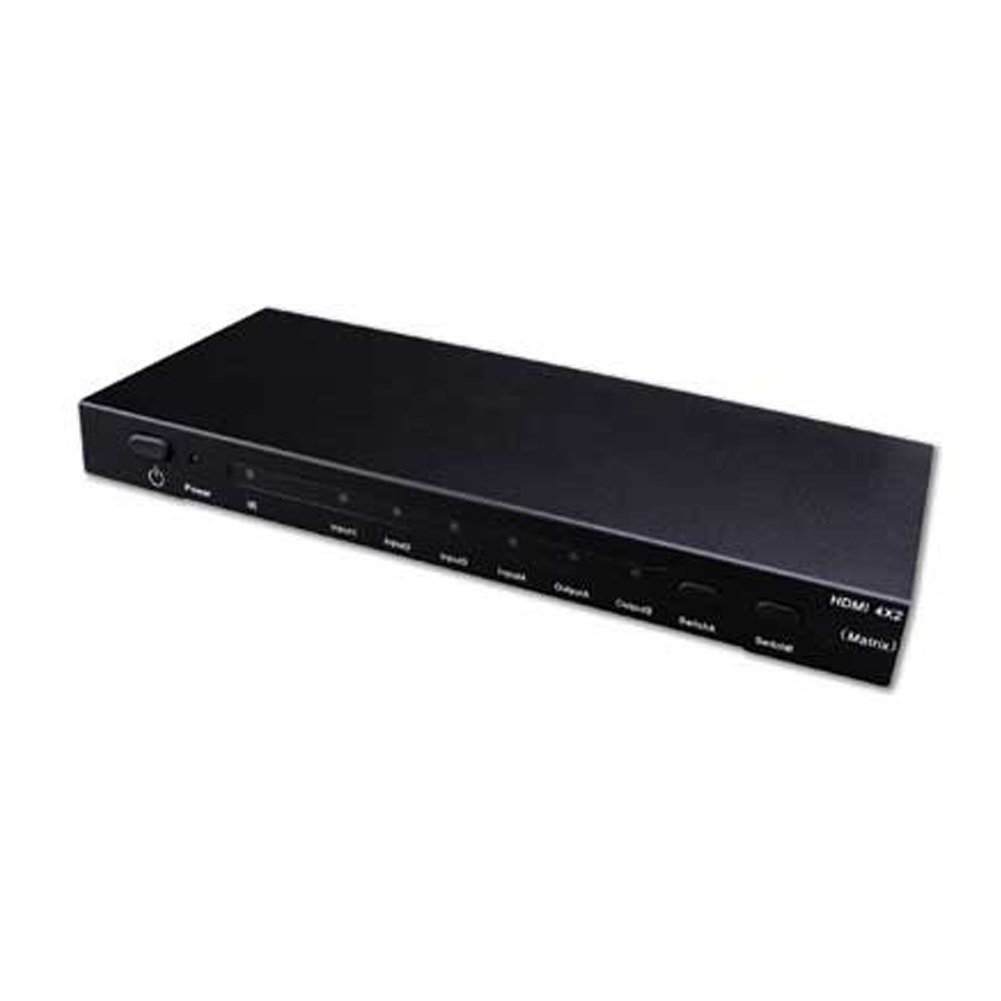
Image showing the Vanco 281442 HDMI 4x2 Matrix Selector Switch, a device designed to connect multiple HDMI sources to multiple HDMI displays.
Инструкции за поставување
- Уреди за исклучување: Ensure all HDMI source devices (e.g., Blu-ray player, game console, cable box) and HDMI display devices (e.g., TV, projector) are powered off before making connections.
- Поврзете извори на HDMI: Connect up to four HDMI source devices to the HDMI input ports (labeled INPUT 1-4) on the Vanco 281442 switch using high-quality HDMI cables.
- Поврзете HDMI екрани: Connect your two HDMI display devices to the HDMI output ports (labeled OUTPUT A and OUTPUT B) on the Vanco 281442 switch using high-quality HDMI cables.
- Поврзете адаптер за напојување: Plug the included 5V DC power adapter into the DC 5V port on the switch, then plug the adapter into a standard electrical outlet.
- Уреди за вклучување: Power on your HDMI display devices first, then power on your HDMI source devices.
- Потврдете ја врската: The switch should automatically detect the connected devices. You can now proceed to the operation section to select your desired input and output combinations.
Упатства за работа
The Vanco 281442 HDMI 4x2 Matrix Selector Switch can be operated using the front panel push-buttons or the included IR remote control.
Контрола на предниот панел:
- Избор на влез: Use the 'INPUT' buttons (1, 2, 3, 4) to select which of the four HDMI sources is routed to the active output.
- Избор на излез: Use the 'OUTPUT A' and 'OUTPUT B' buttons to independently select which input is displayed on each respective output. For example, you can select Input 1 for Output A and Input 2 for Output B simultaneously.
Ракување со далечински управувач:
The included IR remote control provides the same functionality as the front panel buttons, allowing for convenient operation from a distance. Point the remote control towards the IR receiver window on the front panel of the switch.
- Input Buttons (1-4): Selects the corresponding HDMI input source.
- Output A/B Buttons: Assigns the currently selected input to Output A or Output B.
Спецификации
| Број на модел | 281442 |
| Димензии на производот | 13 x 12 x 4 инчи |
| Тежина на ставката | 2.5 фунти |
| Производител | Ванчо |
| Тип на конектор | HDMI |
| Компатибилни уреди | Monitor, Projector |
| Тип на кабел | HDMI |
| Видео Ampпоживотен пропусен опсег | 2.25 Gbps |
| Влезни конектори | (4) HDMI (19 pin - type A) female |
| Излезни приклучоци | (2) HDMI (19 pin - type A) female |
| Напојување | 5V DC |
Одржување
To ensure the longevity and optimal performance of your Vanco 281442 HDMI 4x2 Matrix Selector Switch, follow these maintenance guidelines:
- Чистење: Use a soft, dry cloth to clean the exterior of the unit. Avoid using abrasive cleaners, solvents, or strong detergents, as these can damage the finish or internal components.
- Вентилација: Уверете се дека уредот е поставен во добро проветрено место за да спречите прегревање. Не ги блокирајте отворите за вентилација.
- Управување со кабли: Avoid excessive bending or pulling of HDMI cables, which can damage the connectors or internal wiring.
- Напојување: Use only the provided 5V DC power adapter. Using an incorrect power supply can damage the device.
- Складирање: Доколку го складирате уредот подолг временски период, исклучете го од струја и складирајте го на ладно и суво место, подалеку од директна сончева светлина и екстремни температури.
Решавање проблеми
If you encounter issues with your Vanco 281442 HDMI 4x2 Matrix Selector Switch, refer to the following common troubleshooting steps:
- Нема сигнал на екранот:
- Ensure all HDMI cables are securely connected to both the source devices, the switch, and the display devices.
- Verify that the correct input source is selected on the matrix switch for the desired output.
- Check that the display device is set to the correct HDMI input.
- Try bypassing the switch by connecting an HDMI source directly to a display to confirm the source and display are working correctly.
- Power cycle all devices (source, switch, display) by unplugging them from power for a few seconds and then plugging them back in.
- Треперење или повремен сигнал:
- Replace HDMI cables with higher quality or shorter cables, especially for longer runs or high-resolution signals.
- Ensure the power adapter is firmly connected and providing stable power to the switch.
- Проверете за потенцијални пречки од други електронски уреди.
- Неточна резолуција или сооднос на ширина и висина:
- Ensure your source device's output resolution is compatible with your display device.
- Some display devices may require manual adjustment of aspect ratio or scaling settings.
- If using HDMI extenders, ensure they are compatible and functioning correctly, as they can sometimes interfere with EDID communication.
- Далечинскиот управувач не работи:
- Проверете ги батериите на далечинскиот управувач и заменете ги доколку е потребно.
- Ensure there are no obstructions between the remote control and the IR receiver on the switch.
- Make sure you are within the effective range and angle of the IR receiver.
Гаранција и поддршка
Specific warranty information for the Vanco 281442 HDMI 4x2 Matrix Selector Switch is not provided within this manual. For detailed warranty terms, technical support, or service inquiries, please refer to the documentation included with your purchase or visit the official Vanco webсајт.


