1. Вовед
The Linksys SE1500 is a 5-Port Fast Ethernet Switch designed to expand your wired network. It allows you to connect up to five devices, such as computers, printers, storage devices, and gaming consoles, at speeds up to 100 Mbps. This device provides a simple and efficient way to add more wired connections to your existing network without complex configuration.

Слика 1: Предна страна view of the Linksys SE1500 5-Port Fast Ethernet Switch.
2. Содржина на пакетот
Потврдете дека вашиот пакет ги содржи следниве ставки:
- Linksys SE1500 5-Port 10/100 Switch
- Адаптер за напојување
- Водич за брз почеток (не е вклучен во ова упатство)
3. Карактеристики на производот
The Linksys SE1500 switch offers the following key features:
- 5 Fast Ethernet Ports: Provides five 10/100 Mbps ports for connecting wired devices.
- Auto-Sensing Ports: Automatically detects and optimizes the speed for each connected device.
- Квалитет на услуга (QoS): Prioritizes traffic for smooth performance of bandwidth-intensive applications.
- Карактеристики за заштеда на енергија: Includes auto power-down for unused ports and a port status switch to disable LED indicators, reducing energy consumption.
- Plug-and-play: Requires no software configuration for basic operation.
4. Упатства за поставување
Follow these steps to set up your Linksys SE1500 switch:
- Позиционирајте го прекинувачот: Поставете го прекинувачот на рамна, стабилна површина или монтирајте го на соодветно место. Обезбедете соодветна вентилација околу уредот.
- Поврзете го адаптерот за напојување: Plug the included power adapter into the 12V DC port on the back of the switch. Then, plug the other end of the power adapter into a standard electrical outlet. The power LED on the front of the switch should illuminate.
- Поврзете се со вашата мрежа: Connect an Ethernet cable from your router or modem to any of the five numbered Ethernet ports on the back of the SE1500 switch.
- Поврзете ги уредите: Connect your wired devices (e.g., computer, printer, gaming console) to the remaining Ethernet ports on the switch using Ethernet cables. The switch's auto-sensing ports will automatically detect the connection speed.
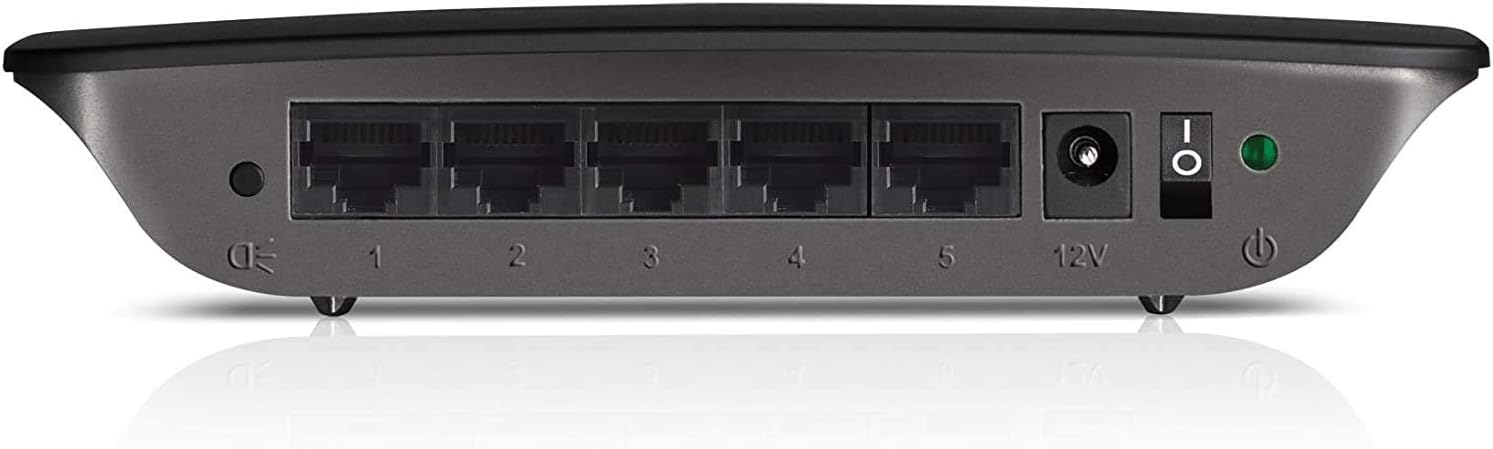
Figure 2: Rear panel of the Linksys SE1500, showing Ethernet ports, power input, and power switch.
5. Упатства за работа
The Linksys SE1500 is a plug-and-play device, meaning it typically requires no software configuration. Once connected, it operates automatically.
LED индикатори
The front panel of the switch features LED indicators to provide status information:
- Напојување LED: Свети кога прекинувачот е вклучен.
- Port LEDs (1-5): Each numbered port has an associated LED.
- Цврсто зелено: Indicates a successful link connection at 100 Mbps.
- Цврст килибар: Indicates a successful link connection at 10 Mbps.
- Трепка: Indicates network activity (data transmission).
- Исклучено: No link detected or port is inactive.
Режим на заштеда на енергија
The SE1500 automatically enters a power-saving mode when a connected device is turned off or when a port is unused. This feature helps reduce energy consumption. You can also use the port status switch on the rear panel to turn off the port LEDs if desired.
6. Одржување
To ensure optimal performance and longevity of your Linksys SE1500 switch, consider the following maintenance tips:
- Одржувајте чисто: Regularly wipe the exterior of the switch with a soft, dry cloth. Avoid using liquid cleaners or aerosols.
- Обезбедете вентилација: Do not block the ventilation openings on the switch. Ensure it is placed in an area with good airflow to prevent overheating.
- Управување со кабли: Keep Ethernet cables neatly organized to prevent accidental disconnections or damage.
- Power Cycle (if needed): If the switch becomes unresponsive, disconnect the power adapter, wait 10 seconds, and then reconnect it.
7 Смена на проблеми
If you encounter issues with your Linksys SE1500 switch, try the following troubleshooting steps:
- Без моќност:
- Осигурајте се дека адаптерот за напојување е безбедно поврзан со прекинувачот и со функционален електричен штекер.
- Verify the power switch on the rear panel is in the "On" position.
- Без светло за поврзување:
- Check that the Ethernet cable is securely connected to both the switch port and the connected device.
- Пробајте друг Ethernet кабел.
- Осигурајте се дека поврзаниот уред е вклучен и работи правилно.
- If the port status switch is off, toggle it to enable the LEDs.
- Бавна брзина на мрежата:
- Ensure all connected devices and cables support Fast Ethernet (100 Mbps) for optimal performance.
- Check for excessive network traffic or issues with your internet service provider (ISP) or router.
- Наизменична врска:
- Проверете ги Ethernet каблите за оштетување.
- Try connecting devices to different ports on the switch.
- Power cycle the switch, router, and connected devices.
8. Спецификации
| Модел | SE1500 |
| Бренд | Линксис |
| Број на пристаништа | 5 |
| Тип на интерфејс | RJ45 |
| Стапка на пренос на податоци | 10/100 Mbps (брз етернет) |
| Димензии на производот | 4.29 x 6.06 x 1.14 инчи |
| Тежина на ставката | 5.4 унци (0.34 фунти) |
| Боја | Црното |
| Компатибилни уреди | Desktop, Gaming Console, Laptop, Printer |
| Вклучени компоненти | 5-port 10/100 Switch, Power Adapter |
9. Гаранција и поддршка
For detailed warranty information and technical support, please refer to the documentation included with your purchase or visit the official Linksys support webлокација. Условите за гаранција може да се разликуваат во зависност од регионот.
Поддршка на Linksys Webсајт: www.linksys.com/support


