1. Вовед
This manual provides essential information for the safe and efficient operation of your Datalogic PowerScan M8300-AR910RB Handheld Laser Bar Code Reader. Please read this manual thoroughly before using the device to ensure proper setup, operation, and maintenance. Keep this manual for future reference.
2. Информации за безбедност
Секогаш почитувајте ги следниве безбедносни мерки за да спречите повреда или оштетување на уредот:
- Ласерска безбедност: This device emits a laser beam. Do not stare directly into the laser beam or point it at others. Avoid direct eye exposure.
- Безбедност на батеријата: Use only Datalogic-approved batteries and charging accessories. Do not expose batteries to extreme temperatures, puncture, or disassemble them. Dispose of batteries according to local regulations.
- Еколошки услови: Do not operate the device in explosive atmospheres or near flammable materials. Keep the device dry and away from extreme temperatures.
- Одржување: Refer all servicing to qualified service personnel. Do not attempt to open or modify the device.
3. Содржина на пакетот
Проверете дали сите артикли се присутни во пакувањето:
- Datalogic PowerScan M8300-AR910RB Handheld Laser Bar Code Reader
- Отстранлива батерија
- Charging/Communication Cradle (may be sold separately depending on configuration)
- USB or Serial Cable (for cradle connection, may be sold separately)
- Power Supply (for cradle, may be sold separately)
- Водич за брз почеток
4. Производот завршиview
The Datalogic PowerScan M8300 is a robust, cordless handheld laser bar code reader designed for industrial applications. It features a durable casing and a 910MHz radio for reliable wireless communication.
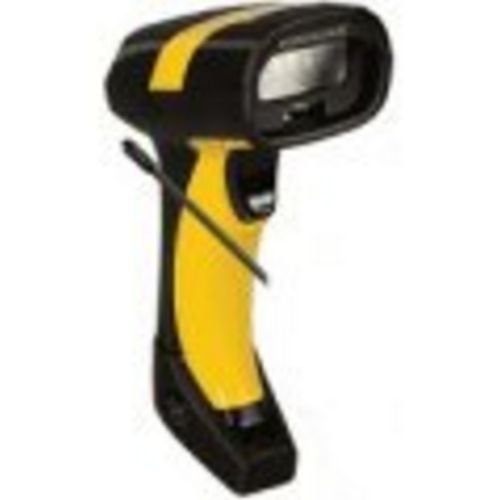
Слика 1: Datalogic PowerScan M8300 Handheld Laser Bar Code Reader. This image displays the front view of the scanner, highlighting its ergonomic design, scan window, and trigger button.
Клучни компоненти:
- Скенирајте го прозорецот: Located at the front, where the laser beam exits to read barcodes.
- Активира: Го активира ласерот за скенирање.
- Индикаторски светла: Provide feedback on scan status, battery level, and communication.
- Оддел за батерии: Located at the base of the handle, housing the removable battery.
- Комуникациски интерфејс: For wireless data transmission via the 910MHz radio.
5. Поставување
5.1. Инсталација на батерија
- Проверете дали скенерот е исклучен.
- Locate the battery compartment cover at the bottom of the handle.
- Open the cover and insert the removable battery, ensuring correct polarity.
- Добро затворете го капакот на преградата за батерии.
5.2. Полнење на батеријата
- Place the scanner into its charging cradle. Ensure the contacts on the scanner align with those on the cradle.
- Connect the power supply to the charging cradle and plug it into an electrical outlet.
- The scanner's indicator light will show charging status (typically amber for charging, green for fully charged).
- Оставете батеријата целосно да се наполни пред првата употреба (приближно 4 часа).
5.3. Connecting to a Host System
The PowerScan M8300 uses a 910MHz radio for wireless communication. It typically connects to a host system (e.g., PC, laptop) via a base station or cradle connected by a USB or serial cable.
- Connect the communication cable (USB or serial) from the charging/communication cradle to your host system.
- Connect the power supply to the cradle and plug it in.
- Place the scanner in the cradle. The scanner and cradle will automatically establish a wireless link.
- Install any necessary drivers or software on your host system as prompted or as instructed by Datalogic documentation for your specific cradle model.
6. Упатства за работа
6.1. Вклучување/исклучување
- За вклучување: The scanner typically powers on automatically when removed from the cradle or when the trigger is pressed.
- За исклучување: The scanner will enter a low-power sleep mode after a period of inactivity. To fully power off, remove the battery.
6.2. Скенирање баркодови
- Aim the scan window at the barcode you wish to read.
- Press and hold the trigger button. A laser line will appear.
- Position the laser line across the entire barcode.
- Once the barcode is successfully read, the scanner will emit an audible beep and/or an indicator light will illuminate.
- Release the trigger. The scanned data will be transmitted to the connected host system.
6.3. Пренос на податоци
The PowerScan M8300 transmits scanned data wirelessly to its paired base station/cradle. Ensure the scanner is within range of its base station for successful data transfer. Out-of-range scanning capabilities may vary by configuration; refer to advanced programming guides for details.
7. Одржување
7.1. Чистење на уредот
- Користете мека, чиста крпа dampнаполнето со вода или благ раствор за чистење.
- Не користете абразивни средства за чистење, растворувачи или груби хемикалии.
- Gently wipe the scan window and the exterior of the scanner.
- Осигурајте се дека течноста не влегува во отворите на уредот.
7.2. Нега на батерии
- Полнете ја батеријата редовно.
- Избегнувајте често целосно празнење на батеријата.
- Store the scanner and spare batteries in a cool, dry place when not in use.
7.3. Складирање
When storing the scanner for extended periods, ensure the battery is partially charged (around 50%) and remove it from the device if possible. Store in a temperature-controlled environment.
8 Смена на проблеми
If you encounter issues with your PowerScan M8300, refer to the following common problems and solutions:
| Проблем | Можна причина | Решение |
|---|---|---|
| Скенерот не се вклучува. | Изумрена или неправилно инсталирана батерија. | Check battery installation. Charge the battery. Replace battery if necessary. |
| Скенерот не чита баркодови. | Barcode damaged or poorly printed; scan window dirty; incorrect symbology enabled. | Try scanning a different barcode. Clean the scan window. Refer to the programming guide to enable/disable symbologies. |
| Нема пренесени податоци до домаќинот. | Scanner out of range; base station not connected; communication issue. | Move scanner closer to the base station. Verify base station connection to host. Check base station power. |
| Траењето на батеријата е кратко. | Battery nearing end of life; frequent use; improper charging. | Replace battery. Ensure full charges. Reduce backlight/power settings if configurable. |
If the problem persists, contact Datalogic technical support.
9. Спецификации
The following specifications apply to the Datalogic PowerScan M8300-AR910RB model:
- Број на модел: PM8300-AR910RB
- Димензии на производот: 2.72 x 4.49 x 8.15 инчи
- Тежина на ставката: 13.9 унци
- Производител: Datalogic ADC
- Извор на енергија: Напојува со батерија
- Технологија за поврзување: Безжичен (910MHz)
- Компатибилни уреди: Десктоп, лаптоп
- UPC: 053926383351
10. Информации за гаранцијата
Datalogic products are covered by a limited warranty against defects in materials and workmanship. The specific terms and duration of the warranty may vary by region and product. Please refer to the warranty card included with your product or visit the official Datalogic webстраница за детални информации за гаранцијата и процедури за регистрација.
11. Поддршка
For technical assistance, product inquiries, or to report issues, please contact Datalogic customer support:
- Webсајт: Visit the official Datalogic website for support resources, FAQs, and driver downloads.
- Контакт: Refer to the 'Contact Us' section on the Datalogic webстраница за телефонски броеви и е-адреси специфични за вашиот регион.
When contacting support, please have your product model number (PM8300-AR910RB) and serial number ready.


