1. Производот завршиview
The Mitel MiVoice 5304 IP Phone is a compact and cost-effective entry-level display phone designed for various environments such as hotel rooms, university dorms, classrooms, and retail spaces. It provides essential communication features and integrates seamlessly with Mitel IP-based communication platforms.
This phone supports both MiNet and SIP protocols, offering flexibility in deployment. It features a backlit display, two lines with LED indication, and programmable keys for enhanced functionality.
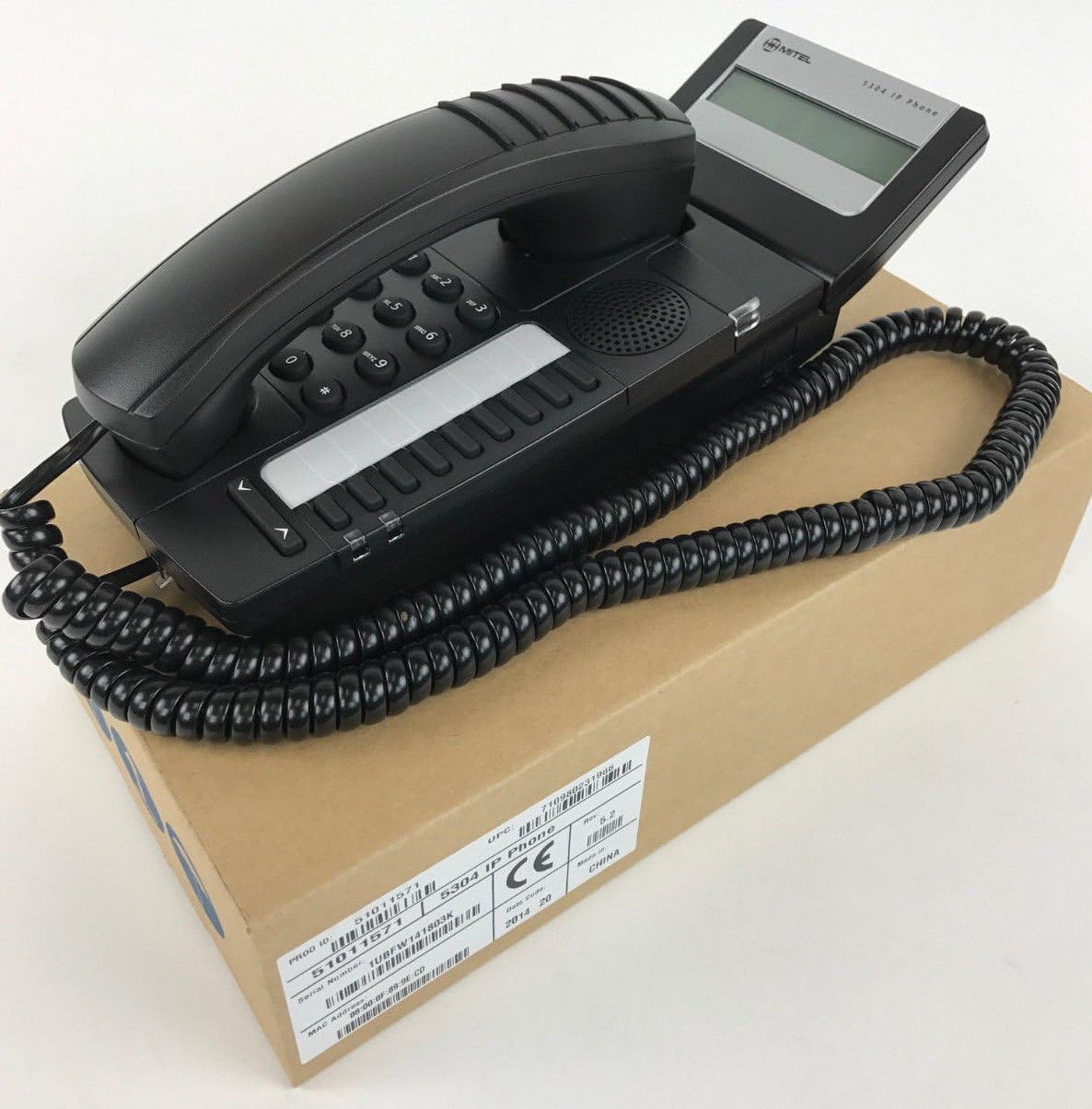
Figure 1: Mitel MiVoice 5304 IP Phone. This image shows the black IP phone with its coiled handset cord, resting on a brown cardboard box. The phone features a numeric keypad, several function buttons, and a small display screen.
2. Клучни карактеристики
- Прикажи: Two x 20 character backlit display with auto-dimming.
- Линии: Two lines with LED indication (one prime line, one programmable key).
- Програмабилни клучеви: Eight programmable keys for speed dials, feature access codes, paging, conferencing, voicemail access, etc.
- Страници: Paging and page receive capability, including direct page and group page support.
- Поддршка со двоен режим: Compatible with both MiNet and SIP protocols.
- Визуелни индикатори: Incoming call visual indication and message waiting indication.
- Аудио контроли: Adjustable volume and ringing controls.
- Монтирање: Wall-mountable (optional accessory may be required).
- Напојување: Multiple powering options, including 802.3af compliant Power over Ethernet (PoE).
- Пристапност: ADA-compliant (HAC handset).
- Компактен дизајн: Small footprint (approximately 26.5 cm x 10 cm or 10.5 x 4 inches).
- Енергетски ефикасен: Designed for power conservation to reduce overall energy consumption.
3. Поставување и инсталација
3.1 Содржина на пакетот
Пред да започнете, проверете дали сите компоненти се присутни:
- Mitel MiVoice 5304 IP Phone unit
- Слушалка
- Свиткан кабел на слушалката
- Етернет кабел
- (Optional) Power adapter if PoE is not used
3.2 Поврзување на телефонот
- Поврзете го слушалката: Приклучете го едниот крај од намотаниот кабел на слушалката во слушалката, а другиот крај во приклучокот за слушалка на основата на телефонот.
- Поврзете се на мрежа: Connect one end of the Ethernet cable to the LAN port on the back of the phone and the other end to an active network port (e.g., a wall jack or network switch). If using Power over Ethernet (PoE), the phone will power on automatically.
- Поврзете го напојувањето (ако не користите PoE): If your network does not provide PoE, connect an optional Mitel-approved power adapter to the power port on the phone and then to a standard electrical outlet.
- Првично стартување: The phone will power on and begin its boot-up sequence. This may take a few moments as it obtains an IP address and registers with your communication system.
3.3 Монтирање на ѕид (опционално)
The Mitel 5304 IP Phone can be wall-mounted. An optional wall-mount kit (sold separately) may be required. Follow the instructions provided with the wall-mount kit for proper installation.
4. Упатства за работа
4.1 Воспоставување и одговарање на повици
- За да остварите повик:
- Подигнете ја слушалката или притиснете го Говорник копче.
- Бирајте го саканиот број користејќи ја тастатурата.
- Притиснете го Бирајте or Испрати button (if available) or wait for the call to connect automatically.
- За да одговорите на повик:
- Lift the handset or press the flashing line button or the Говорник копче.
- За да завршите повик:
- Заменете ја слушалката или притиснете го копчето Заврши повик or Говорник копче.
4.2 Користење на програмабилни копчиња
The Mitel 5304 features eight programmable keys. Their functions are typically configured by your system administrator and can include:
- Speed Dial numbers
- Access to specific features (e.g., Call Forward, Do Not Disturb)
- Paging functions
- Voicemail access
- Конференции
To use a programmable key, simply press the button corresponding to the desired function.
4.3 Прилагодување на јачината на звукот
Use the volume control buttons (usually located below the keypad or on the side of the phone) to adjust the handset, speakerphone, or ringer volume. Press the + копче за зголемување на јачината на звукот и - копче за намалување на јачината на звукот.
4.4 Message Waiting Indication
A flashing LED indicator on the phone signifies that you have new voicemail messages. To retrieve messages, press the dedicated Порака button (if configured) or dial your voicemail access code.
5. Одржување и грижа
- Чистење: Користете мека, малку гamp cloth to clean the phone's surface. Do not use abrasive cleaners, solvents, or strong chemicals, as these can damage the finish.
- Прашина: Regularly dust the phone, especially around the keypad and display, to prevent accumulation that could affect performance.
- Животна средина: Keep the phone away from excessive heat, direct sunlight, and moisture. Ensure proper ventilation if placed in an enclosed space.
- Кабли: Осигурајте се дека сите кабли се безбедно поврзани и дека не се приклештени или оштетени.
6 Смена на проблеми
| Проблем | Можна причина | Решение |
|---|---|---|
| Телефонот не се вклучува. | Нема струја од Ethernet (PoE) или адаптерот за напојување не е поврзан/е неисправен. |
|
| Нема тон за бирање или не може да се воспостават повици. | Network connectivity issue, phone not registered, or system configuration problem. |
|
| Екранот е празен или нечитлив. | Power issue or display fault. |
|
| Не можам да го слушнам повикувачот или повикувачот не може да ме чуе мене. | Volume settings, handset/speaker issue, or network audio problem. |
|
7. Спецификации
| Атрибут | Детал |
|---|---|
| Број на модел | 51011571 |
| Димензии на производот (Д x Ш x В) | 10 x 10 x 6 инчи (25.4 x 25.4 x 15.24 см) |
| Тежина на ставката | 1.9 фунти (0.86 кг) |
| Боја | Црното |
| Тип на телефон | Кабелски IP телефон |
| Извор на енергија | Corded Electric (PoE 802.3af compliant or optional power adapter) |
| Тип на бирач | Единечна тастатура |
| Приказ | Two x 20 character backlit display |
| Линиска поддршка | 2 Lines with LED indication |
| Поддржани протоколи | MiNet, SIP |
| Компатибилни уреди | VoIP services, IP-based communication systems, Mitel 3300, Mitel SX-200 IP Communications Platforms |
| Можност за конференциски повик | 2-насочен |
8. Гаранција и поддршка
For information regarding product warranty, please refer to the warranty card included with your purchase or visit the official Mitel website. For technical support, service, or further inquiries, please contact your Mitel authorized dealer or system administrator.
You can also find additional resources and contact information on the official Mitel webсајт: www.mitel.com


