Вовед
The Waring Pro TCO650 Digital Convection Oven is a versatile kitchen appliance designed for baking, convection-baking, broiling, toasting, and pizza preparation. This manual provides essential information for the safe and efficient operation, maintenance, and troubleshooting of your oven. Please read all instructions thoroughly before first use.

Image: The Waring Pro TCO650 Digital Convection Oven, showcasing its compact design and a pizza being cooked inside. The control panel with digital display is visible on the right side.
Важни заштитни мерки
Кога користите електрични апарати, секогаш треба да се следат основните безбедносни мерки за да се намали ризикот од пожар, електричен удар и/или повреда на лица, вклучувајќи го следново:
- Прочитајте ги сите упатства пред да ја користите рерната.
- Не допирајте жешки површини. Користете рачки или копчиња.
- To protect against electrical shock, do not immerse cord, plug, or oven body in water or other liquids.
- Внимателен надзор е неопходен кога некој апарат се користи од или во близина на деца.
- Исклучете го од штекер кога не се користи и пред чистење. Оставете да се излади пред да ги ставите или извадите деловите.
- Не ракувајте со ниеден апарат со оштетен кабел или приклучок, или откако апаратот не функционира или е оштетен на кој било начин.
- The unit must be placed at least 6 inches away from the wall or any combustible material. When using, pull the unit out a minimum of 6 inches away from the wall or other cords.
- The exterior surfaces, especially the top and glass door, become hot during operation. Exercise caution. The handle remains cool to the touch.
Делови и карактеристики
Familiarize yourself with the components of your Waring Pro TCO650 Digital Convection Oven:
- Решетка за рерна: For supporting food items during cooking.
- Тава за печење: Used for baking and roasting.
- Послужавник за трошки: Собира трошки и капки за лесно чистење.
- Дигитален екран: Shows time, temperature, and function settings.
- Контроли на подлогата за допир: Buttons for selecting functions (Bake, Convection-Bake, Broil, Toast, Pizza) and adjusting settings.
- Копче за старт/запирање: Initiates or cancels cooking cycles.
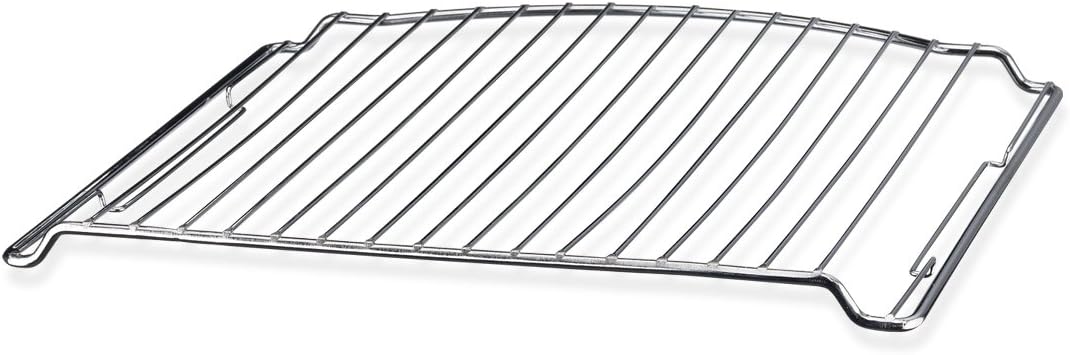
Image: A metal oven rack, designed to fit inside the Waring Pro TCO650 Digital Convection Oven, used for supporting food items.

Image: A rectangular metal baking pan, included with the Waring Pro TCO650 Digital Convection Oven, suitable for various cooking tasks.

Image: A removable metal crumb tray, designed to slide into the bottom of the Waring Pro TCO650 Digital Convection Oven to catch food debris.
Поставување
- Отпакување: Отстранете ги сите материјали за пакување и сите промотивни етикети или налепници од вашата рерна.
- Поставување: Place the oven on a stable, heat-resistant surface. Ensure there is at least 6 inches of clearance from walls, cabinets, and other combustible materials on all sides and above the oven for proper ventilation.
- Почетно чистење: Избришете ја внатрешноста со рекламаamp cloth. Wash the oven rack, baking pan, and crumb tray in warm, soapy water. Rinse and dry thoroughly.
- Инсталација на послужавник за трошки: Slide the crumb tray into the bottom of the oven.
- Поврзување за напојување: Приклучете го кабелот за напојување во стандарден штекер.
- Прва употреба Burn-Off: Before cooking food, operate the oven empty on the "Bake" function at 400°F (200°C) for approximately 15 minutes to burn off any manufacturing residues. A slight odor or smoke is normal during this process. Ensure the area is well-ventilated.
Упатства за работа
Општа операција
- Place food on the baking pan or directly on the oven rack, depending on the recipe.
- Добро затворете ја вратата на рерната.
- Select the desired cooking function using the touchpad controls.
- Adjust the temperature and time as needed using the control knob.
- Притиснете го копчето СТАРТ/СТОП за да започнете со готвење.
- The oven will preheat if necessary, then begin the cooking cycle. The digital display will count down the remaining time.
- When the cooking cycle is complete, the oven will beep, and the heating elements will turn off.
- Внимателно извадете ја храната користејќи ракавици за рерна.
Функции
- Печете: Ideal for general baking tasks like cookies, cakes, and casseroles.
- Convection-Bake: Uses a fan to circulate hot air, resulting in faster and more even cooking. Reduce cooking time by approximately 20% compared to conventional baking.
- Брил: For browning the top of food, melting cheese, or cooking thin cuts of meat. Position food closer to the top heating element.
- Тост: Specifically designed for toasting bread, bagels, and frozen waffles. Adjust the darkness setting as desired. The oven can hold up to 6 slices of bread.
- Пица: Optimized for cooking pizzas up to 12 inches in diameter.
Одржување и чистење
Regular cleaning will ensure optimal performance and extend the life of your oven.
- Секогаш исклучувајте го од струја: Before cleaning, ensure the oven is unplugged from the power outlet and has completely cooled down.
- Послужавник за трошки: Remove the crumb tray and discard accumulated crumbs. Wash the tray in warm, soapy water, rinse, and dry thoroughly. Reinsert the tray.
- Решетка за рерна и тава за печење: Wash these accessories in warm, soapy water. For stubborn food residue, soak them before scrubbing. Rinse and dry completely.
- Внатрешност: Wipe the interior walls and bottom of the oven with a damp крпа и благ детергент. Избегнувајте абразивни средства за чистење или жлебови за триење, бидејќи тие можат да го оштетат нелепливиот слој.
- Надворешност: Избришете ги надворешните површини со рекламаamp крпа. Не користете абразивни средства за чистење или политури.
- Стаклена врата: Исчистете ја стаклената врата со средство за чистење стакло или со рекламаamp крпа.
- Никогаш не потопувајте: Never immerse the oven body, cord, or plug in water or any other liquid.
Решавање проблеми
| Проблем | Можна причина | Решение |
|---|---|---|
| Рерната не се вклучува. | Не е вклучено во штекер; исклученоtage; неисправен штекер. | Ensure the oven is securely plugged into a working outlet. Check your circuit breaker. |
| Храната не се готви рамномерно. | Неправилна положба на решетката; пренатрупаност; проблем со конвекцискиот вентилатор. | Adjust rack position. Do not overcrowd the oven. Ensure the convection fan is operating (if using convection mode). |
| Прекумерно чад за време на готвењето. | Food spills; greasy residue; first use burn-off. | Clean the interior and crumb tray thoroughly. Ensure the oven is clean before use. If it's the first use, this is normal. |
| Дигиталниот дисплеј не работи. | Проблем со напојувањето; внатрешен дефект. | Исклучете ја рерната од струја неколку минути, а потоа повторно вклучете ја. Ако проблемот продолжи, контактирајте ја службата за корисници. |
Спецификации
- Модел: TCO650
- Бренд: Предупредување
- Капацитет: 0.6 кубни стапки
- Моќност: 1500 вати
- Exterior Dimensions (D x W x H): 14.5" x 17" x 10.75"
- Interior Dimensions (D x W x H): 10.5" x 12" x 8.5"
- Тип на контрола: Контрола на подлогата за допир
- Функции: Bake, Convection-Bake, Broil, Toast, Pizza
- Тајмер: Digital 60-minute timer with LCD display
- Вклучени компоненти: Oven Rack, Baking Pan, Crumb Tray
- Материјал: Stainless Steel (door)
- Боја: Црното
- Тежина на ставката: 22.8 фунти
Информации за гаранцијата
Waring products are manufactured to the highest standards and are warranted to be free from defects in material and workmanship for a period of one year from the date of purchase. This warranty covers defects in materials and workmanship under normal use and service. It does not cover damage resulting from accident, misuse, abuse, or unauthorized modification. For warranty service, please retain your original purchase receipt.
Поддршка за корисници
For technical assistance, service, or to order replacement parts, please contact Waring Customer Service. You can find contact information on the official Waring webлокација или преку оригиналното пакување на вашиот производ.
Webсајт: www.waringcommercialproducts.com
Please have your model number (TCO650) and date of purchase available when contacting support.


