1. Вовед
This manual provides comprehensive instructions for the setup, operation, and maintenance of your Geemarc CL100 Amplified Big Button Corded Phone. Please read this manual carefully to ensure proper use and to maximize the benefits of your new telephone.
The Geemarc CL100 is designed for ease of use, featuring large buttons, adjustable amplification, and visual indicators, making it suitable for individuals with hearing or visual impairments. This telephone is line-powered and does not require an external power source.
Важна забелешка: This telephone does not include a built-in answering machine, speakerphone, caller display, talking caller ID, talking keypad, or voice assist functionality.
2. Производот завршиview
2.1 Содржина на пакетот
- Geemarc CL100 Corded Telephone Base
- Слушалка
- Кабел за намотан слушалки
- Кабел за телефонска линија
- Упатство за употреба (овој документ)
2.2 Telephone Layout
Familiarize yourself with the key components and controls of your Geemarc CL100 phone.

Слика 1: Горе-надолу view of the Geemarc CL100 phone, illustrating the large numeric keypad, function buttons, and memory slots.
- Слушалка: For speaking and listening during calls.
- Нумеричка тастатура: Large, easy-to-read buttons for dialing numbers.
- P1, P2, P3 Buttons: Priority memory buttons for frequently called numbers.
- M1-M9 Buttons: One-touch memory buttons for storing additional numbers.
- Копче за повторно бирање: Го бира последниот повикан број.
- Копче за блиц: Се користи за мрежни услуги (на пр., чекање на повик).
- Копче за складирање: Used for programming memory numbers.
- Нечујно копче: Temporarily mutes your microphone during a call.
- Прекинувач за контрола на тонот: Adjusts the audio tone for clearer conversations.
- Прекинувач за контрола на јачината на звукот: Adjusts the receiving volume during a call.
- Visual Ringer Indicator: Flashes when an incoming call is received.
- Memory Index Card: Pull-out card for noting stored memory numbers.

Слика 2: Страна view of the phone, illustrating the ringer ON/OFF switch and the telephone line connection port.
3. Поставување
3.1 Поврзување на телефонот
- Поврзете го слушалката: Plug one end of the coiled handset cord into the handset and the other end into the handset jack on the side of the telephone base.
- Поврзете ја телефонската линија: Plug one end of the telephone line cord into the jack labeled with a telephone icon on the back or side of the phone base. Plug the other end into your wall telephone jack.
- Извор на енергија: The Geemarc CL100 is powered by the telephone line and does not require an external power adapter.
- Ringer Switch: Ensure the ringer switch (located on the side) is set to "Low" or "High" for audible ringing.
3.2 Првични проверки
- Lift the handset and listen for a dial tone. If no dial tone is present, check all connections.
- Make a test call to ensure proper functionality.
4. Упатства за работа
4.1 Упатување повик
- Подигнете ја слушалката.
- Почекајте го тонот за бирање.
- Dial the required number using the numeric keypad.
- Upon completion of the call, carefully replace the handset in the cradle to disconnect.
4.2 Одговарање на повик
When an incoming call is received, the phone will ring and the visual indicator will flash.
- Подигнете ја слушалката за да одговорите на повикот.
- Upon completion of the call, carefully replace the handset in the cradle.
4.3 Повторно бирање на последен број
- Подигнете ја слушалката.
- Почекајте го тонот за бирање.
- Притиснете го Редилирање button. The previously dialed number will be automatically redialed.
- Note: This function does not apply to numbers dialed from memory buttons.
4.4 Функција за исклучување
The Mute button allows you to speak privately without your caller overhearing.
- За време на повик, притиснете на Исклучи звук button. You will still hear the caller, but they will not hear you.
- Притиснете го Исклучи звук button again to resume normal conversation.
4.5 Storing Telephone Numbers (Memory Dialing)
Your telephone can store 12 direct memory numbers: 3 priority numbers (P1, P2, P3) and 9 standard memory numbers (M1-M9). Priority memories can store up to 24 digits, and M1-M9 can store up to 32 digits.
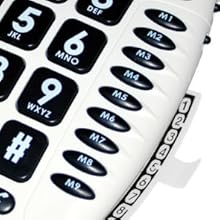
Слика 3: Detail of the memory buttons (M1-M9) and the integrated memory index card.
- Подигнете ја слушалката.
- Притиснете го Продавница копче.
- Бирајте го телефонскиот број што сакате да го зачувате.
- Притиснете го Продавница копчето повторно.
- Press the desired memory button (P1, P2, P3, or M1-M9) where you want to save the number.
- Заменете ја слушалката.
- Note: Use the index card located under the base to record your stored numbers for easy reference. Stored memories are protected even if the phone line is unplugged.
4.6 Dialing Stored Numbers
- Подигнете ја слушалката.
- Почекајте го тонот за бирање.
- Press the appropriate memory button (P1, P2, P3, or M1-M9). The stored number will be dialed automatically.
4.7 Recall (R), * & # Buttons
These buttons are used in conjunction with new services provided on digital exchanges. For specific details on their use, please contact your network operator.
4.8 Hearing Aid Compatibility
If you are using this telephone with a hearing aid, set your hearing aid to the "T" (Telecoil) setting for optimal audio quality.
5. Одржување
- Чистење: Clean the telephone with a soft, damp крпа. Не користете абразивни средства за чистење или растворувачи.
- Складирање: Чувајте го телефонот на ладно и суво место, подалеку од директна сончева светлина и екстремни температури.
- Избегнувајте течности: Do not expose the telephone to water or other liquids.
- Грижа за кабел: Ensure the handset and line cords are not tangled or pinched to prevent damage.
6 Смена на проблеми
| Проблем | Можна причина | Решение |
|---|---|---|
| Нема тон за бирање | Телефонскиот кабел не е правилно поврзан. | Check that both ends of the telephone line cord are securely plugged in. |
| Не можам да го слушнам повикувачот / Повикувачот не може да ме чуе мене | Volume settings are too low or Mute is active. | Adjust the Volume control. Ensure the Mute button is not pressed. |
| Телефонот не ѕвони | Ringer switch is set to "Off". | Set the ringer switch (on the side) to "Low" or "High". |
| Stored memory numbers are lost | This phone protects stored memories even if the phone line is unplugged. If numbers are lost, they may not have been stored correctly. | Re-store the numbers following the instructions in Section 4.5. |
| Difficulty dialing quickly | Some older phone systems may require a slower dialing pace. | Try dialing at a slightly slower pace. Consider using the memory dial function for frequently called numbers. |
7. Спецификации
- Модел: Гимарк CL100
- Тип: Ordичен телефон
- Ampоживување: Up to 30 dB receiving volume
- Јачина на ѕвонење: Adjustable up to 85 dB
- Меморија: 3 Priority (P1-P3), 9 One-touch (M1-M9)
- Извор на енергија: Напојување преку линија (не е потребен надворешен адаптер)
- Компатибилен слушен апарат: Yes (T-coil setting)
- Димензии: Приближно 7.5 x 8 x 3 инчи (19 x 20.3 x 7.6 см)
- Тежина: Приближно 2.25 фунти (1.02 кг)
- Боја: Бело
8. Гаранција и поддршка
8.1 Информации за гаранцијата
For information regarding the warranty period and terms for your Geemarc CL100 telephone, please refer to the warranty card included with your purchase or visit the official Geemarc webстраница. Зачувајте го доказот за купување за гаранциски побарувања.
8.2 Поддршка за корисници
If you encounter any issues not covered in the troubleshooting section or require further assistance, please contact Geemarc customer support. Contact details can typically be found on the Geemarc webна локацијата или на пакувањето на производот.
За онлајн ресурси, посетете: www.geemarc.com


