1. Вовед
Thank you for choosing the Ground Zero GZIA 4115HPX 4-Channel Car Audio Ampлафикатор. Ова amplifier is designed to deliver high-quality audio performance for your vehicle's sound system. This manual provides essential information for the proper installation, operation, and maintenance of your ampладилник. Ве молиме внимателно прочитајте го ова упатство пред да се обидете со инсталација или работа за да обезбедите оптимални перформанси и безбедност.
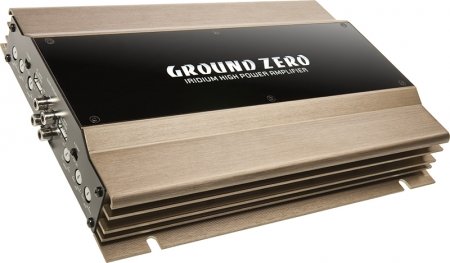
Figure 1: Ground Zero GZIA 4115HPX 4-Channel Car Audio Amplifier. This image displays the external casinг од ampладилник, истакнувајќи го неговиот компактен дизајн и ребра на ладилникот.
2. Инструкции за безбедност
Важни безбедносни информации: Improper installation or use can lead to serious injury, damage to the amplifier, or damage to your vehicle.
- Секогаш исклучувајте го негативниот терминал на батеријата на возилото пред да започнете со какви било електрични работи.
- Осигурајте се дека сите кабли се правилно поставени и обезбедени за да спречите приклештување, триење или краток спој.
- Use appropriate gauge wiring for power, ground, and speaker connections as recommended by the manufacturer.
- Install a fuse or circuit breaker on the main power wire as close to the battery as possible.
- Избегнувајте монтирање на ampладилникот на места изложени на директна сончева светлина, прекумерна топлина, влага или прашина.
- Не ракувајте со ampразладувачот ако е оштетен или неисправен. Побарајте стручна помош.
- Чувајте го amplifier's ventilation areas clear to prevent overheating.
3. Поставување и инсталација
Правилната инсталација е клучна за перформансите и долготрајноста на вашиот ampлифиер. Доколку не сте сигурни за кој било дел од процесот на инсталација, консултирајте се со професионален инсталатер на аудио системи за автомобили.
3.1 Отпакување
Внимателно отстранете го amplifier from its packaging. Inspect the unit for any signs of damage that may have occurred during shipping. Retain the packaging for future transport or service needs.
3.2 Монтирање
The GZIA 4115HPX amplifier is designed for surface mount installation. Choose a mounting location that is:
- Secure and stable, preventing vibration.
- Well-ventilated to allow for proper heat dissipation.
- Заштитено од влага и директна сончева светлина.
- Достапно за ожичување и прилагодувања.
Use the provided mounting screws to secure the amplifier to a solid surface in your vehicle. Ensure no existing wiring, fuel lines, or brake lines are damaged during drilling.
3.3 Приклучоци за жици
Refer to the connection diagrams below for proper wiring. All connections should be tight and secure to prevent signal loss or electrical issues.
3.3.1 Power and Ground Wiring
- Моќност (B+): Connect a suitable gauge power cable directly from the positive terminal of the vehicle's battery to the amplifier's B+ terminal. Install an inline fuse (not included) within 18 inches (45 cm) of the battery.
- Земја (GND): Connect a suitable gauge ground cable from the amplifier's GND terminal to a clean, unpainted metal surface of the vehicle's chassis. Ensure a good electrical connection. The ground cable should be as short as possible.
- Далечински управувач (REM): Поврзете кабел за далечинско вклучување од далечинскиот излез на вашата главна единица со ampREM терминалот на ладилникот. Оваа жица го врти ampВклучување и исклучување на ладилникот со вашата главна единица.
3.3.2 Поврзување на звучниците
The GZIA 4115HPX is a 4-channel amplifier. Connect your speakers to the corresponding speaker output terminals (CH1, CH2, CH3, CH4). Ensure correct polarity (+ to + and - to -) for each speaker.
- For stereo operation, connect one speaker per channel.
- For bridged operation (e.g., for a subwoofer), refer to the specific bridging instructions on the amplifier or in a detailed wiring diagram.
3.3.3 RCA Input Connections
Поврзете ги RCA каблите од пред-приклучокот на вашата главна единицаamp излези на amplifier's RCA input jacks (INPUT CH1/2, INPUT CH3/4).

Слика 2: Внатрешно view of the Ground Zero GZIA 4115HPX amplifier's circuit board. This image shows the internal components, including capacitors, resistors, and the transformer, which are responsible for audio processing and power delivery.

Figure 3: Detailed internal view of the Ground Zero GZIA 4115HPX amplifier. This image provides a closer look at the power supply section and output stage components, indicating the amplifier's robust construction.
3.4 Првични прилагодувања
Before powering on, ensure all connections are correct and secure.
- Здобијат со контрола: Set the gain controls (LEVEL) on the amplifier to their minimum position.
- Поставки за кросовер: Доколку вашиот amplifier has built-in crossovers (HPF/LPF), set them according to your speaker type. For full-range speakers, you might use the HPF (High Pass Filter) to protect them from low frequencies. For subwoofers, use the LPF (Low Pass Filter).
4. Ракување со Ampживописен
Откако ќе се инсталира, на amplifier will turn on automatically with your head unit via the remote wire.
4.1 Setting Gain Levels
The gain control is not a volume knob; it matches the output voltagна вашата главна единица до влезната чувствителност на ampживописен.
- Turn your head unit volume to about 75-80% of its maximum.
- Полека зголемувајте го ampконтролата на засилувањето на олеснувачот додека не слушнете мало дисторзија, а потоа малку намалете ја додека звукот не стане јасен.
- Repeat for all channels if independent gain controls are present.
4.2 Adjusting Crossovers and Bass Boost
- Високопропустлив филтер (HPF): Used for full-range speakers to block low frequencies that they cannot reproduce effectively. Adjust to protect speakers and improve clarity.
- Нископропусен филтер (LPF): Used for subwoofers to allow only low frequencies to pass through. Adjust to blend with your main speakers.
- Засилување на басот: Use sparingly. Excessive bass boost can lead to distortion and potential damage to speakers or the amplifier. Adjust to enhance low-frequency response as desired, but avoid overdriving the system.
5. Одржување
The Ground Zero GZIA 4115HPX ampЛифирачот бара минимално одржување.
- Чистење: Периодично бришете ја надворешноста на amplifier with a soft, dry cloth to remove dust. Do not use harsh chemicals or abrasive cleaners.
- Вентилација: Обезбедете дека на amplifier's heat sink fins and surrounding area remain free of obstructions to allow for proper airflow and cooling.
- Проверка на врската: Occasionally check all power, ground, remote, and speaker connections to ensure they remain tight and free of corrosion.
6 Смена на проблеми
Ако имате проблеми со вашите ampлифирач, консултирајте се со следното упатство за решавање проблеми пред да контактирате со поддршката.
| Проблем | Можна причина | Решение |
|---|---|---|
| Amplifier does not turn on (no power indicator). |
|
|
| Нема звук од звучниците. |
|
|
| Искривен или лош квалитет на звукот. |
|
|
| Amplifier overheats (protection light on). |
|
|
7. Спецификации
The following are the technical specifications for the Ground Zero GZIA 4115HPX 4-Channel Car Audio Ampпоживо:
| Карактеристика | Детал |
|---|---|
| Број на модел | GZIA 4115HPX |
| Број на канали | 4 |
| Output Channel Quantity | 4 |
| Voltage | 14.4 волти |
| Ватtagд (максимум) | 500 вати |
| Тип на монтирање | Површинска монтажа |
| Тежина на ставката | 2 кг 900 г |
| Димензии на пакетот | 43.4 x 25 x 7.9 cm |
| ASIN | B006VTSQ8C |
8. Информации за гаранцијата
Ground Zero products are designed and manufactured to the highest quality standards. For detailed warranty terms and conditions, please refer to the warranty card included with your product or visit the official Ground Zero webстраница. Зачувајте го доказот за купување за какви било гаранциски побарувања.
9. Поддршка за корисници
If you require further assistance or have questions not covered in this manual, please contact Ground Zero customer support or your authorized dealer. Contact information can typically be found on the official Ground Zero webсајт.


