1. Вовед
Thank you for choosing the Cameo Light CLMPAR2 Compact LED Light System. This manual provides essential information for the safe and efficient operation of your device. Please read it thoroughly before initial use and keep it for future reference.
The CLMPAR2 is a versatile lighting solution featuring four flat PAR cans, each equipped with 7 super bright 3-watt TRI LEDs. It offers various control modes including DMX, master/slave, and standalone operation, making it suitable for a wide range of applications.
2. Инструкции за безбедност
Секогаш почитувајте ги следниве безбедносни мерки за да спречите електричен удар, пожар или повреда:
- Внимателно прочитајте ги сите упатства пред да ракувате со уредот.
- Обезбедете ја јачината на напојувањетоtage одговара на барањата наведени на единицата.
- Не го отворајте куќиштето. Внатре нема делови што може да ги сервисира корисникот. За секое сервисирање обратете се кај квалификуван персонал.
- Избегнувајте директно изложување на очите на изворот на светлина.
- Keep the device away from moisture, rain, and liquids.
- Обезбедете соодветна вентилација околу уредот за да спречите прегревање.
- Монтирајте го уредот безбедно користејќи соодветен хардвер.
- Disconnect from the mains power before cleaning or maintenance.
3. Содржина на пакетот
По распакувањето, проверете дали сите предмети се присутни и во добра состојба:
- 4 x Flat PAR Cans with TRI LEDs
- 1 x Light Bar
- 1 x Transport Bag/Case
- 1 x Упатство за употреба (овој документ)
- Кабел за напојување
- Mounting Hardware (e.g., tripod mount adapter)

Image: The Cameo Light CLMPAR2 system neatly packed within its dedicated transport case, showcasing the four PAR cans, the light bar, and accessories.
4. Производот завршиview
The Cameo Light CLMPAR2 system consists of a central light bar with four adjustable PAR cans. Each PAR can features 7 x 3W TRI LEDs, capable of producing a wide spectrum of colors.
4.1 фронт View

Слика: напред view of the Cameo Light CLMPAR2 LED system. Four individual PAR cans are attached to a horizontal bar, each emitting a different color (yellow, blue, green, purple), demonstrating the TRI-LED capabilities.
4.2 Заден дел View и Врски

Слика: Заден дел view of the Cameo Light CLMPAR2 LED system. The central light bar features the control panel with an LCD display, DMX input/output ports, and power connections. The back of the four PAR cans are also visible.
The rear panel provides access to the control interface and various input/output connections:
- Влез на енергија: Connects to mains power.
- DMX ВЛЕЗ/ИЗЛЕЗ: 3-pin XLR connectors for DMX control.
- Контролен дисплеј: LCD screen for menu navigation and settings.
- Контролни копчиња: MODE, ENTER, UP, DOWN for navigating the menu and adjusting settings.
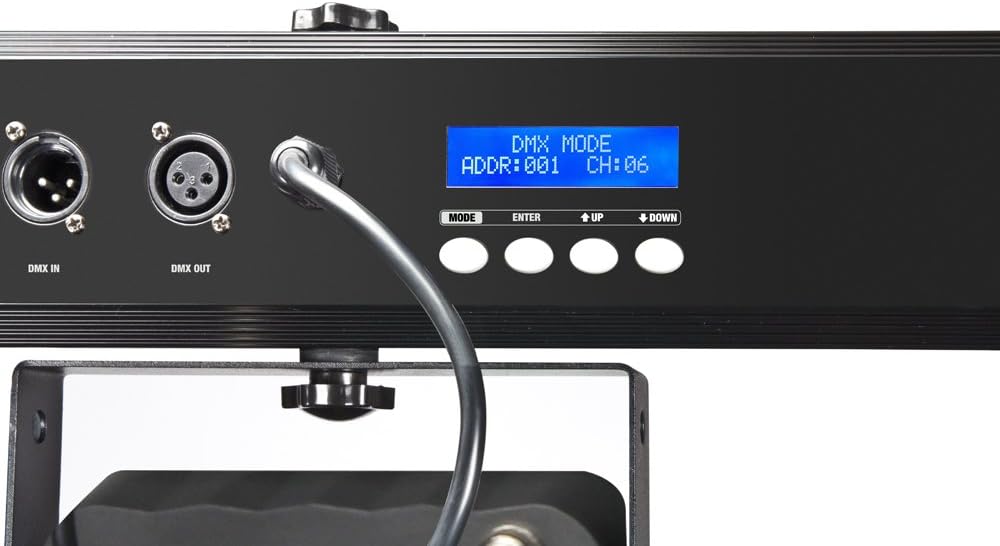
Слика: Крупен план view of the control panel on the Cameo Light CLMPAR2. The LCD display shows "DMX MODE ADDR:001 CH:06", indicating DMX address and channel settings. Buttons for MODE, ENTER, UP, and DOWN are clearly visible.
5. Поставување
5.1 Монтирање
The CLMPAR2 system is designed for easy mounting on a standard lighting tripod or truss system. It includes a tripod mount adapter compatible with 28mm TV outlets.
- Attach the light bar securely to a stable tripod or truss using the provided mounting hardware.
- Ensure all connections are tight and the system is balanced.
- Adjust the angle of each PAR can as desired.

Image: The Cameo Light CLMPAR2 system is shown mounted on a tall, silver tripod. The four PAR cans are illuminated with different colors. A foot controller is visible on the ground, connected to the system.
5.2 Поврзување за напојување
Connect the supplied power cable to the power input on the rear of the light bar, then plug it into a suitable mains power outlet.
6. Операција
The CLMPAR2 offers multiple operating modes:
6.1 Самостоен режим
In standalone mode, the system operates using its internal programs without external control. Use the MODE, ENTER, UP, and DOWN buttons on the rear panel to select desired programs, colors, or sound-activated modes.
- Притиснете го РЕЖИМ button to cycle through available standalone programs.
- Користете го UP и ДОЛУ buttons to adjust parameters (e.g., speed, sensitivity).
- Притиснете ENTER за да се потврдат изборите.
6.2 Режим Master/Slave
Connect multiple CLMPAR2 units using DMX cables. Set one unit as the "Master" and others as "Slave" units. The slave units will mirror the master's operation.
- Connect the DMX OUT of the Master unit to the DMX IN of the first Slave unit.
- Daisy-chain subsequent Slave units by connecting DMX OUT to DMX IN.
- Configure the Master unit to its desired standalone program.
- Set all Slave units to "Slave" mode via their control panels.
6.3 Контролен режим DMX
For advanced control, connect the CLMPAR2 to a DMX controller. The system supports various DMX channel modes.
- Connect the DMX OUT of your DMX controller to the DMX IN of the CLMPAR2.
- If using multiple DMX devices, daisy-chain them: DMX OUT of the first device to DMX IN of the next.
- Set a unique DMX start address for each CLMPAR2 unit using the control panel (refer to the display image in Section 4.2).
- Select the desired DMX channel mode (e.g., 3-channel, 6-channel) on the CLMPAR2 control panel to match your DMX controller's settings.
- Consult your DMX controller's manual for specific programming instructions.
7. Одржување
Regular maintenance ensures optimal performance and longevity of your CLMPAR2 system.
- Чистење: Disconnect the unit from power. Use a soft, lint-free cloth to wipe the exterior. For lenses, use a specialized lens cleaner and cloth. Do not use abrasive cleaners or solvents.
- Инспекција: Periodically check cables, connectors, and mounting hardware for any signs of wear or damage. Replace damaged components immediately.
- Складирање: When not in use, store the system in its transport case in a dry, dust-free environment.
8 Смена на проблеми
| Проблем | Можна причина | Решение |
|---|---|---|
| Нема моќ | Power cable disconnected; faulty outlet | Проверете го поврзувањето на кабелот за напојување; тестирајте го штекерот со друг уред. |
| Светлата не реагираат на DMX | Incorrect DMX address; wrong DMX mode; faulty DMX cable; DMX controller issue | Verify DMX address and mode settings; check DMX cable connections; test with a different DMX controller or cable. |
| Lights flickering or inconsistent | Loose connections; power fluctuations; DMX signal interference | Check all power and DMX connections; ensure stable power supply; use DMX terminator if necessary. |
| Прегревање | Blocked ventilation; prolonged use in high ambient temperature | Ensure clear airflow around the unit; operate in a cooler environment if possible. |
9. Спецификации
| Бренд | Камео |
| Број на модел | CLMPAR2 |
| Производител | Камео светлина |
| Извор на светлина | 28 x 3W TRI Colour LEDs (7 LEDs per PAR can) |
| Вкупно Ватtage | 3 Watts (per LED, total system wattage not specified but implied by 28x3W) |
| Контролни режими | DMX control, Standalone, Master/Slave |
| Материјал | Алуминиум |
| Извор на енергија | Напојувано од мрежа |
| Тип на монтирање | Rack mounting, Tripod mount (28mm TV outlets) |
| Тежина на ставката | 10 килограми |
| Димензии на пакетот | 110.4 x 37.2 x 17 cm |
| ASIN | B007IFHXV4 |
| Датум прв на располагање | 8 август 2012 година |
10. Гаранција и поддршка
For warranty information and technical support, please refer to the documentation provided with your purchase or visit the official Cameo Light webстраница. Зачувајте го доказот за купување за гаранциски побарувања.
Производител: Камео светлина
Webсајт: www.cameolight.com (Прampлинкот, вистинската врска може да варира)