1. Вовед
Thank you for choosing the TFA 30.5027.02 Digital Thermometer/Hygrometer. This device is designed to accurately measure and display indoor temperature and humidity, providing a clear indication of the comfort level in your environment. Its ultra-flat design and high-gloss surface make it a discreet and functional addition to any room. Please read this manual carefully to ensure proper setup and operation.
2. Информации за безбедност
- Чувајте го ова упатство за идно упатување.
- Овој уред е наменет само за внатрешна употреба.
- Do not expose the device to extreme temperatures, direct sunlight, moisture, or strong vibrations.
- Не го потопувајте уредот во вода или други течности.
- Do not attempt to open or modify the device. This will void the warranty.
- Чувајте ги батериите подалеку од дофат на деца. Доколку се проголта, веднаш побарајте лекарска помош.
- Фрлете ги искористените батерии според локалните прописи.
- Исчистете го уредот со мека, гamp крпа. Не користете абразивни средства за чистење или растворувачи.
3. Содржина на пакетот
Проверете дали сите компоненти се присутни и неоштетени:
- 1x TFA 30.5027.02 Digital Thermometer/Hygrometer
- 1x CR2 Lithium Battery (pre-installed or separate)
- 1x Упатство за употреба (овој документ)
4. Производот завршиview
The TFA 30.5027.02 features a clear digital display showing current temperature and humidity. It also includes a comfort level indicator and a maximum/minimum value memory function.

Слика 1: Предна страна view of the TFA 30.5027.02 Digital Thermometer/Hygrometer. The display shows temperature in Celsius and relative humidity percentage, along with a comfort level icon.
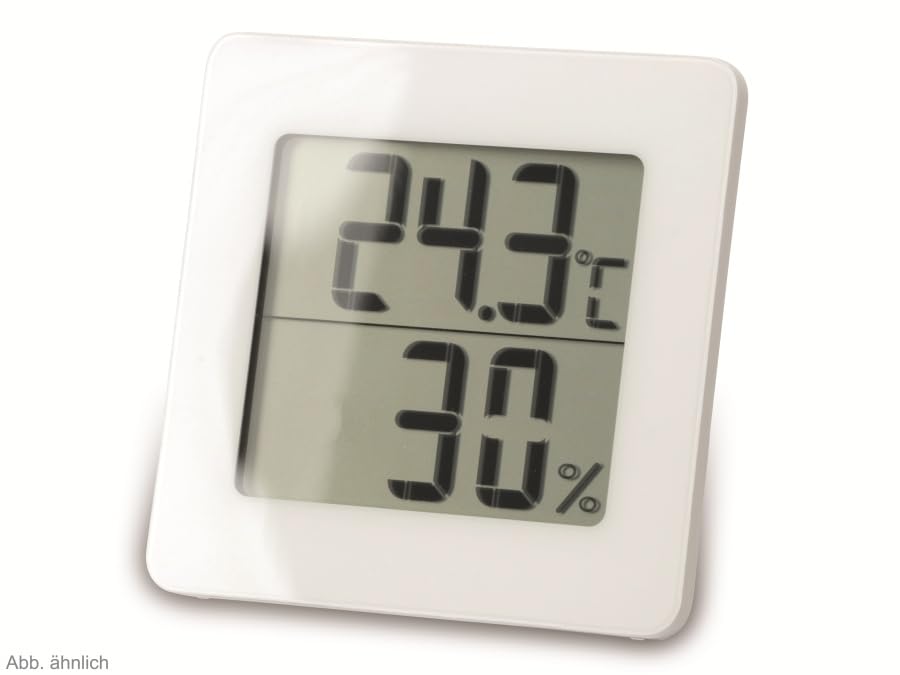
Слика 2: Алтернативен view of the TFA 30.5027.02 showing different temperature and humidity readings, demonstrating the device's clear digital display.
Клучни карактеристики:
- Digital display for temperature (°C) and humidity (% RH)
- Ultra-flat design with high-gloss finish
- Comfort level indicator (smiley icon)
- Maximum and minimum value memory function
- Монтирање на ѕид
5. Поставување
5.1 Инсталација на батерија
- Пронајдете го капакот на преградата за батерии на задната страна од уредот.
- Remove the cover by sliding or gently prying it open.
- Вметнете една CR2 литиумска батерија, внимавајќи на точниот поларитет (+/-) како што е наведено во преградата.
- Добро заменете го капакот на преградата за батерии.
- The device display should activate, showing current temperature and humidity readings.
5.2 Првично сместување
For accurate readings, place the thermometer/hygrometer in a location free from direct sunlight, drafts, or heat sources. The device can be placed on a flat surface or mounted on a wall using the integrated mounting hole on the back.
- Монтирање на ѕид: Use a small screw (not included) suitable for your wall type. Hang the device securely.
- Поставување на маса: Ensure the device is stable on a flat, level surface.
6. Упатства за работа
6.1 Прикажи надview
The large digital display shows two main values:
- Горен екран: Current temperature in degrees Celsius (°C).
- Долниот приказ: Моментална релативна влажност во процентиtage (% RH).
- Индикатор за ниво на удобност: A small icon (e.g., a smiley face) indicates the current indoor climate comfort level based on temperature and humidity.
6.2 Функција Max/Min
The device records the maximum and minimum temperature and humidity values measured since the last reset. To access these values:
- Притиснете го MAX/MIN button (if present, typically on the back or side). The display will show the maximum recorded temperature and humidity.
- Притиснете го MAX/MIN копчето повторно за да view минималната измерена температура и влажност.
- Притиснете го MAX/MIN button a third time to return to current readings.
За да ги ресетирате вредностите MAX/MIN, притиснете и држете го MAX/MIN button for a few seconds while viewing the MAX or MIN values. The memory will clear, and new maximum and minimum values will begin recording from that point.
6.3 Индикатор за ниво на удобност
The comfort level indicator provides a quick visual reference for indoor climate conditions:
- Среќно лице: Indicates optimal comfort (e.g., 20-25°C and 40-70% RH).
- Неутрално лице: Indicates acceptable but not optimal conditions.
- Тажно лице: Indicates uncomfortable conditions (e.g., too dry, too humid, too hot, or too cold).
Note: Specific ranges for comfort levels may vary slightly by model. Refer to the device's display for the exact icon representation.
7. Одржување
7.1 Чистење
Исчистете го уредот со мека, малку damp cloth. Do not use abrasive cleaning agents, solvents, or alcohol, as these can damage the surface and display.
7.2 Замена на батеријата
When the battery power is low, a low battery indicator (if available) will appear on the display. Replace the battery as follows:
- Отворете го капакот на преградата за батерии на задната страна на уредот.
- Remove the old CR2 Lithium battery.
- Insert a new CR2 Lithium battery, observing the correct polarity (+/-).
- Затворете го капакот на преградата за батерии.
Note: After battery replacement, the device may reset, and MAX/MIN values will be cleared.
8 Смена на проблеми
| Проблем | Можна причина | Решение |
|---|---|---|
| Нема екран или екранот е слаб | Батеријата е празна или неправилно вметната. | Replace the battery with a new CR2 Lithium battery, ensuring correct polarity. |
| Неточни читања | Device is placed in an unsuitable location (e.g., near a window, heat source, or vent). | Relocate the device to a stable indoor environment away from direct influences. Allow 15-30 minutes for readings to stabilize. |
| Comfort indicator always shows the same face | Environmental conditions are consistently outside or within a specific comfort range. | This indicates the device is functioning correctly. Adjust your indoor environment if desired. |
9. Спецификации
- Број на модел: 30.5027.02
- Бренд: ТФА
- Боја: Бело
- Димензии на производот (Д x Ш x В): 10 x 1.2 x 8.2 cm (3.94 x 0.47 x 3.23 инчи)
- Тежина на ставката: 70 грама (2.47 унци)
- Батерија: 1 x CR2 литиум (вклучен)
- Тип на монтирање: Монтирање на ѕид
- Operational Humidity Range: 20% до 95% RH
- Upper Rated Temperature: 50°C (122°F)
- Точност на температурата: ±1°C
- Точност на отчитување на температурата: ±1°C
10. Гаранција и поддршка
For warranty information and customer support, please refer to the terms and conditions provided by your retailer or contact the manufacturer directly. Keep your proof of purchase for any warranty claims.
Производител: TFA Dostmann GmbH & Co. KG
For further assistance, please visit the official TFA webсајт или контактирајте со нивниот оддел за услуги на клиентите.


