Вовед
This user manual provides comprehensive instructions for the installation, operation, and maintenance of your RCA RTS736W 30-Inch Streaming Soundbar. Please read this manual thoroughly before using the product to ensure proper functionality and to prevent damage.
The RCA RTS736W is designed to enhance your home audio experience with its 3.0 channel sound and integrated Wi-Fi for streaming online content.
Клучни карактеристики
- Wi-Fi Built-In for streaming video content to a TV.
- 3.0 Channel Left/Center/Right audio configuration.
- HDMI 1080p Output for high-definition connectivity.
- Includes 1 Rear Analog Audio-in Jack and 1 Side Line-in Jack for various audio sources.
- Flexible placement options: includes table or wall mounting brackets.
Содржина на пакетот
Проверете дали сите артикли се присутни во пакувањето:
- RCA RTS736W 30-Inch Streaming Soundbar
- Далечински управувач
- Адаптер за напојување
- Table or Wall Mounting Brackets
- Упатство за употреба (овој документ)
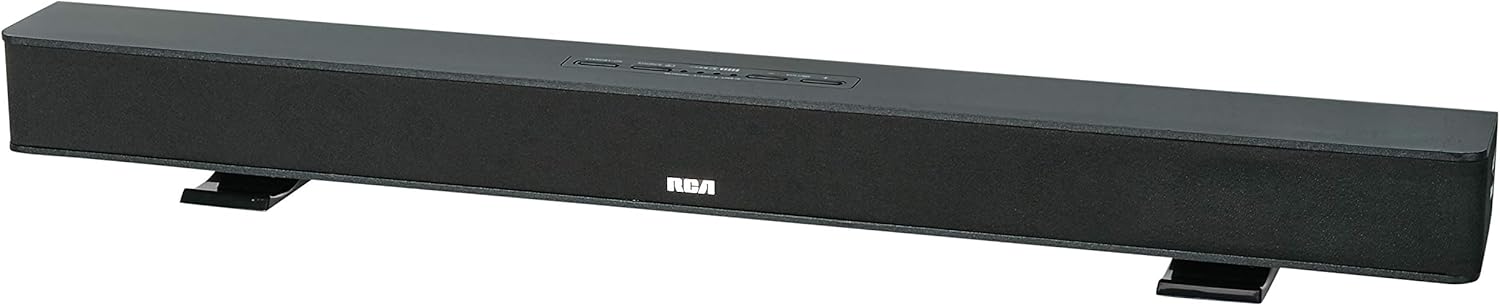
Image: The RCA RTS736W 30-Inch Streaming Soundbar, shown with its sleek black design and integrated controls.
Поставување
1. Опции за поставување
The soundbar offers flexible placement:
- Поставување на маса: Place the soundbar on a flat, stable surface in front of your television. Ensure there is adequate ventilation around the unit.
- Монтирање на ѕид: Use the included wall mounting brackets to secure the soundbar to a wall. Refer to the separate wall mounting template (if provided) for detailed instructions. Ensure the wall can support the weight of the soundbar.

Image: The RCA RTS736W soundbar positioned on a TV stand, demonstrating a typical home theater setup with various streaming service icons displayed on the television screen.
2. Поврзување на напојување
- Connect the power adapter to the DC IN 13.5V port on the back of the soundbar.
- Приклучете го другиот крај на адаптерот за напојување во ѕиден штекер.
3. Аудио врски
Choose one of the following methods to connect the soundbar to your audio source:
- HDMI излез: Connect an HDMI cable from the HDMI OUT port on the soundbar to an HDMI input on your television. This connection supports 1080p video output from the soundbar's streaming functions.
- Analog Audio-in (AUX 1 / AUX 2): Use RCA audio cables to connect your TV or other audio devices to the AUX 1 or AUX 2 input jacks on the back of the soundbar. Match the red and white connectors.
- Side Line-in Jack: For portable devices like smartphones or tablets, connect a 3.5mm audio cable from your device's headphone jack to the Line-in jack located on the side of the soundbar.

Слика: Крупен план view of the rear panel of the RCA RTS736W soundbar, highlighting the AUX 1, AUX 2, DC IN 13.5V, HDMI OUT, and VIDEO OUT ports for various connections.
4. Мрежна конекција (Wi-Fi)
To utilize the streaming features, connect the soundbar to your home Wi-Fi network. This process is typically guided by on-screen prompts when the soundbar is first powered on and connected to a TV via HDMI.
- Ensure your TV is connected to the soundbar via HDMI and powered on.
- Следете ги упатствата на екранот за да ја изберете вашата Wi-Fi мрежа и да ја внесете лозинката.
Упатства за работа
1. Вклучување/исклучување
Притиснете го Моќ копчето на саундбарот или на далечинскиот управувач за да го вклучите или исклучите уредот.
2. Избор на влез
Притиснете го Влез button on the remote control or the soundbar to cycle through available audio sources: HDMI, AUX 1, AUX 2, Line-in, and Wi-Fi streaming.
3. Контрола на јачината на звукот
Користете го Волумен + и Волумен - buttons on the remote control or the soundbar to adjust the audio level.
Притиснете го Исклучи звук копче за привремено замолчување на звукот.
4. Стриминг содржина
Once connected to Wi-Fi and your TV via HDMI, you can access various streaming applications. Navigate using the directional buttons and OK копче на далечинскиот управувач.
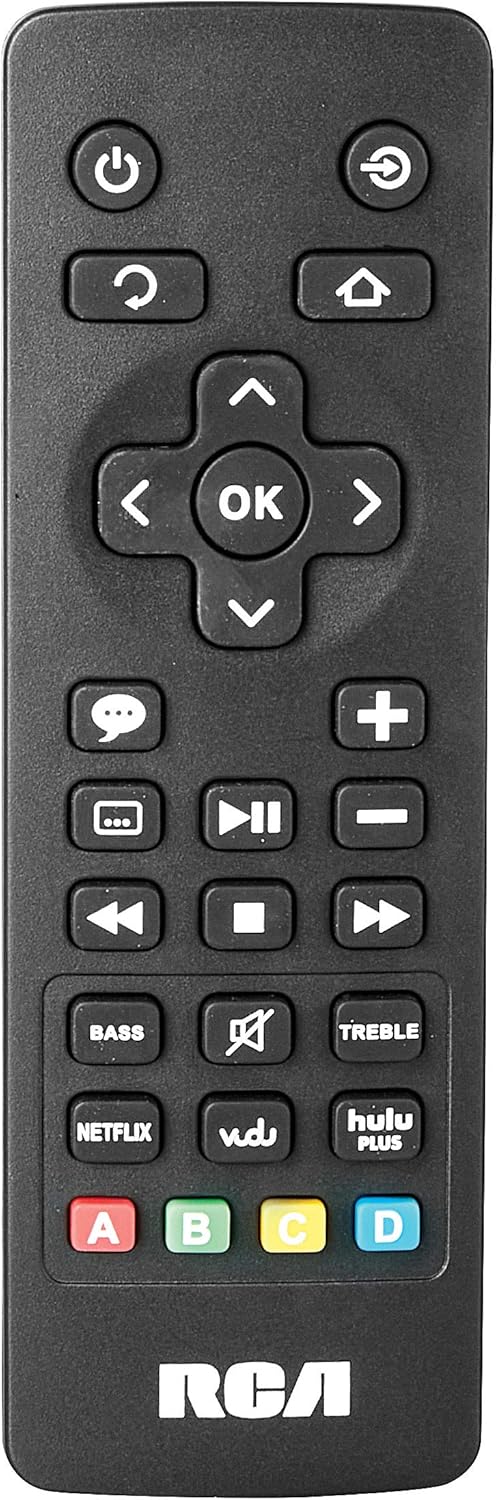
Image: The remote control for the RCA RTS736W soundbar, featuring dedicated buttons for power, volume, input selection, navigation, and direct access to streaming services like Netflix, Vudu, and Hulu Plus.
Dedicated buttons for services like Netflix, Vudu, and Hulu Plus may be available on the remote for direct access.
5. Аудио прилагодувања
Користете го BASS и ТРЕБРЕН buttons on the remote control to fine-tune the audio output to your preference.
Одржување
- Чистење: Disconnect the soundbar from the power outlet before cleaning. Use a soft, dry cloth to wipe the exterior surfaces. Do not use liquid cleaners or abrasive materials.
- Вентилација: Уверете се дека отворите за вентилација на саундбарот не се блокирани. Соодветниот проток на воздух спречува прегревање.
- Складирање: Доколку го складирате саундбарот подолг период, исклучете го од струја и складирајте го на ладно и суво место, подалеку од директна сончева светлина и екстремни температури.
Решавање проблеми
Нема моќ
- Check if the power adapter is securely connected to the soundbar and a working wall outlet.
- Ensure the power outlet is active by testing it with another device.
Нема звук
- Проверете дали е избран точниот влезен извор на саундбарот.
- Check all audio cable connections between the soundbar and your audio source (TV, etc.).
- Ensure the volume on both the soundbar and the connected audio source is turned up and not muted.
- If using HDMI, confirm that your TV's audio output settings are configured to send audio to the soundbar.
Streaming Issues (Buffering, Freezing)
- Check your Wi-Fi network connection. Ensure the signal strength is adequate.
- Рестартирајте го домашниот рутер и модем.
- Restart the soundbar by unplugging it from the power outlet for a few minutes, then plugging it back in.
- Ensure your internet service is active and performing correctly.
Далечинскиот управувач не работи
- Заменете ги батериите во далечинскиот управувач.
- Уверете се дека нема пречки помеѓу далечинскиот управувач и сензорот на саундбарот.
- Насочете го далечинското директно на лентата за звук.
Спецификации
| Број на модел | RTS736W |
| Тип на звучник | Звучна лента |
| Канали | 3.0 (Left/Center/Right) |
| Поврзување | HDMI, RCA, Wi-Fi |
| Безжична технологија | Wi-Fi |
| HDMI излез | 1080 стр |
| Аудио влезови | 2x Analog Audio-in (RCA), 1x Side Line-in (3.5mm) |
| Големина на звучникот | 30 инчи |
| Максимална излезна моќност | 150 вати |
| Импеданса | 8 оми |
| Извор на енергија | Електричен со кабел |
| Димензии на производот (Д x Ш x В) | 33.5 x 6.5 x 5.5 инчи |
| Тежина на ставката | 5.55 фунти |
| Производител | Alco Electronics Ltd. |
Информации за гаранцијата
Specific warranty details for the RCA RTS736W Soundbar are typically provided with the product packaging or can be found on the official RCA webстраница. Ве молиме задржете го доказот за купување за гаранциски барања.
For warranty service, contact RCA customer support with your model number and purchase date.
Поддршка за корисници
For further assistance, technical support, or service inquiries, please refer to the contact information provided in your product's original documentation or visit the official RCA support webсајт.
Онлајн ресурси: Посетете ја продавницата RCA на Amazon