1. Вовед
Thank you for choosing the Hama 95236 8-inch LCD Digital Photo Frame. This manual provides important information regarding the safe operation, setup, and maintenance of your device. Please read it thoroughly before using the product and keep it for future reference.
2. Инструкции за безбедност
- Do not open the device. Incorrect assembly or repair can lead to electric shock.
- Не ракувајте со производот ако е видливо оштетен.
- Заштитете го производот од нечистотија, влага и прегревање. Користете го само во суви средини.
- Не го испуштајте производот и не го изложувајте на силни вибрации.
- Користете го производот само за неговата намена.
- Чувајте го овој производ, како и сите електрични производи, подалеку од дофат на деца.
- Веднаш фрлете го материјалот од пакувањето според локално применливите прописи.
3. Содржина на пакетот
Ве молиме проверете дали пакетот ги содржи следниве артикли:
- Hama 95236 8-inch LCD Digital Photo Frame
- Адаптер за напојување
- Упатство за употреба (овој документ)
4. Производот завршиview
Familiarize yourself with the components and controls of your digital photo frame.
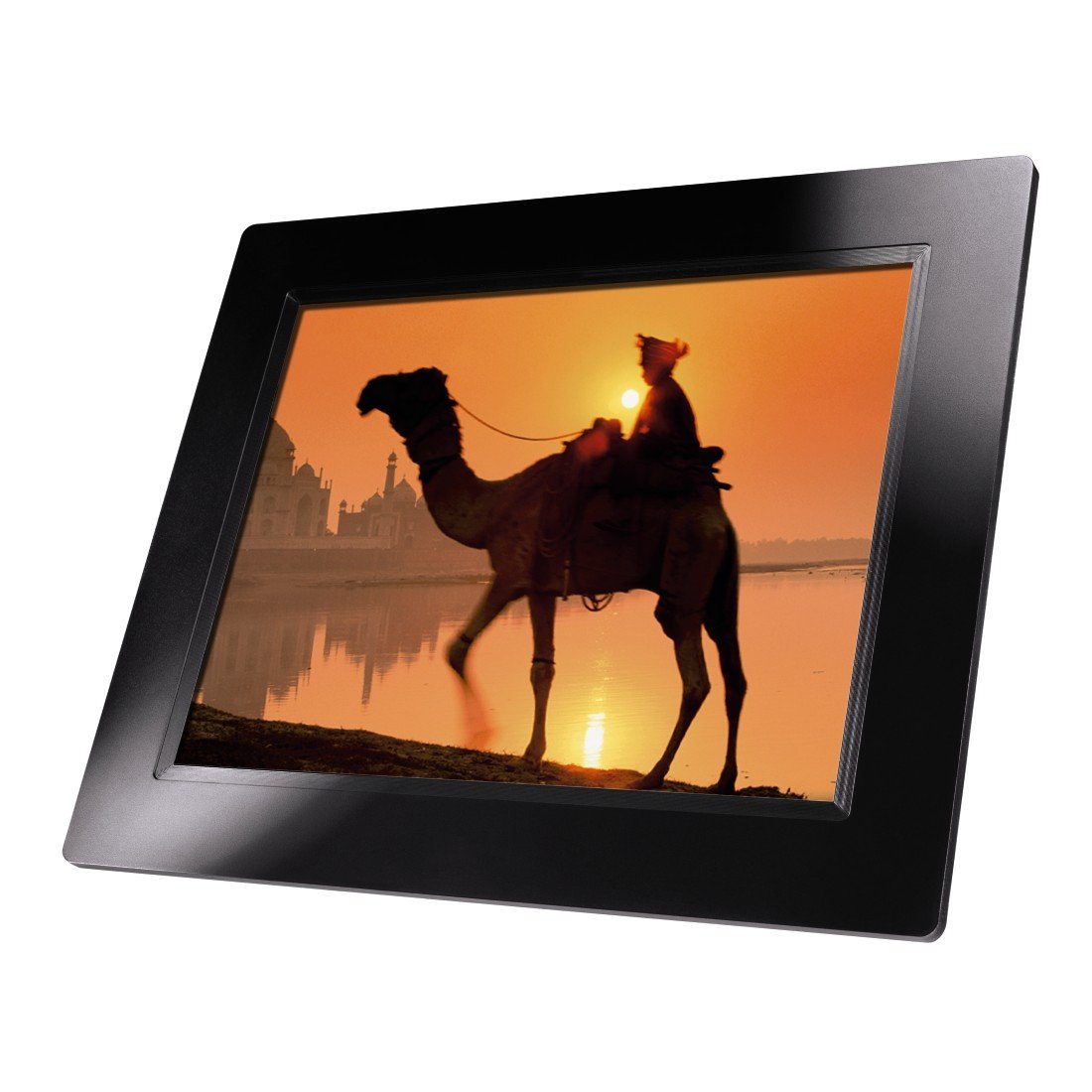
Слика 4.1: Предна страна view of the Hama 95236 Digital Photo Frame, showing the 8-inch LCD screen.

Слика 4.2: Страна view of the digital photo frame, highlighting the various input ports including the SD/MMC/MS card slot, USB port, and DC IN power port.

Слика 4.3: Заден дел view of the digital photo frame, showing the stand attachment point, ventilation grilles, and the control panel with power, navigation, and menu buttons.
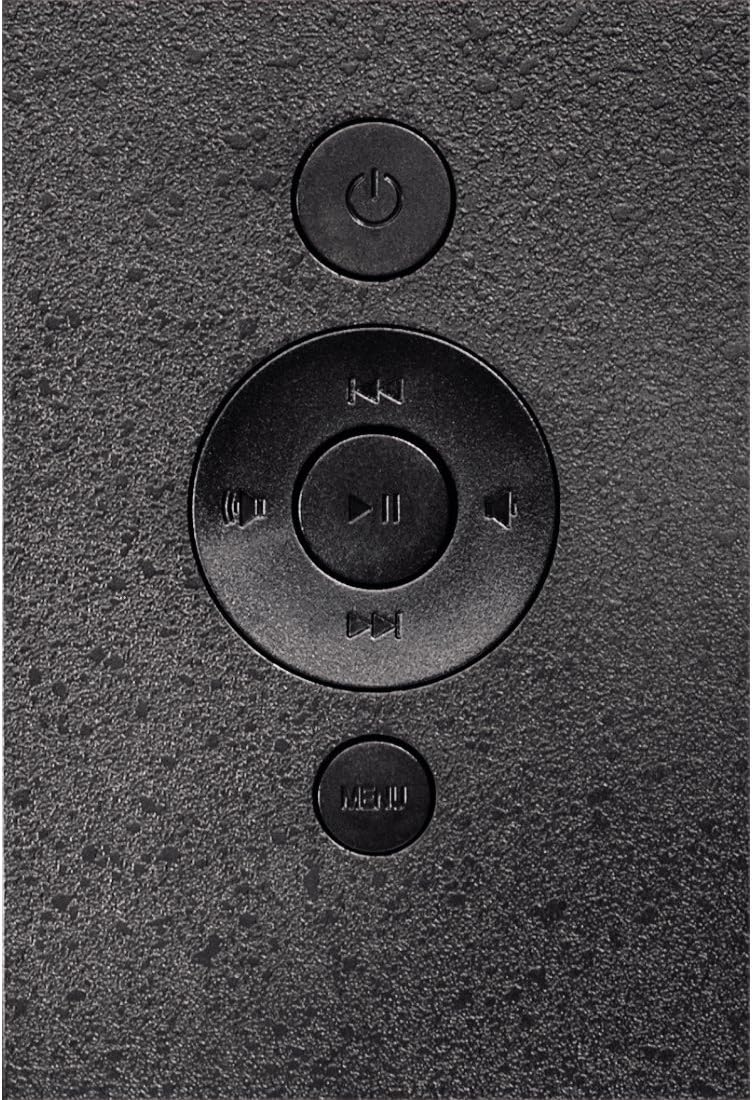
Слика 4.4: Close-up of the control buttons located on the back of the frame. These include the power button, directional navigation buttons (up, down, left, right), play/pause/enter button, and the menu button.
4.1. Порти и контроли
- SD/MMC/MS Card Slot: For inserting memory cards to display photos and videos.
- USB порта: For connecting USB flash drives or other compatible USB storage devices.
- DC ВО: Power input for connecting the provided power adapter.
- Копче за вклучување: Го вклучува или исклучува уредот.
- Копчиња за навигација (горе/долу/лево/десно): Се користи за навигација низ менијата и избирање опции.
- Play/Pause/Enter Button: Confirms selections or controls media playback.
- Копче за мени: Пристапува до главното мени за поставки и опции.
5. Поставување
5.1. Прикачување на држачот
Insert the metal stand into the designated slot on the back of the digital photo frame. Ensure it is securely fastened to provide stable support for the frame.
5.2. Поврзување за напојување
- Connect the power adapter to the DC IN port on the back of the photo frame.
- Приклучете го адаптерот за напојување во соодветен штекер.
- The frame will typically power on automatically or can be turned on using the power button.
5.3. Inserting a Memory Card or USB Drive
The Hama 95236 supports SD/MMC/MS memory cards and USB flash drives.
- Locate the SD/MMC/MS card slot or the USB port on the side of the frame (refer to Figure 4.2).
- Carefully insert your memory card or USB drive into the corresponding slot/port. Ensure it is inserted correctly to avoid damage.
- The frame should automatically detect the storage device and prompt you to view its contents or start a slideshow.
6. Упатства за работа
6.1. Основна навигација
Use the navigation buttons on the back of the frame to move through menus and options. The Play/Pause/Enter button confirms your selection.
6.2. Главно мени
Притиснете го МЕНИ button to access the main menu. From here, you can select different modes and settings:
- Фото: View photos in a slideshow or individually.
- Музика: Пушти аудио files.
- Видео: Пушти видео files.
- Calendar/Clock: Display the calendar and time.
- Поставки: Adjust various device parameters.
6.3. Photo Playback
- Од главното мени, изберете Фотографија.
- Navigate to your desired folder or select all photos.
- Притиснете го Пушти/Пауза/Внеси button to start the slideshow.
- During a slideshow, you can use the navigation buttons to skip photos or pause playback.
6.4. Поставки на системот
Пристапете до Поставки menu to customize your photo frame:
- Поставувањата на екранот: Adjust brightness, contrast, and display mode.
- Поставки за слајдшоу: Configure transition effects, display time per photo, and repeat mode.
- Датум и време: Поставете го тековниот датум и време. Note: Some users have reported that date and time settings may reset after power loss.
- Јазик: Изберете го претпочитаниот јазик за интерфејсот на менито.
- Информации за складирање: View details about connected storage devices.
7. Одржување
7.1. Чистење на уредот
- Секогаш исклучувајте го уредот од напојувањето пред да го чистите.
- Clean the screen and exterior surfaces with a soft, dry, lint-free cloth.
- Do not use aggressive cleaning agents, solvents, or abrasive materials.
7.2. Складирање
Доколку го складирате уредот подолг временски период, исклучете го од струја и складирајте го на ладно и суво место, подалеку од директна сончева светлина и екстремни температури.
8 Смена на проблеми
| Проблем | Можна причина | Решение |
|---|---|---|
| Уредот не се вклучува. | Адаптерот за напојување не е поврзан или е неисправен. | Ensure the power adapter is securely connected to both the frame and the power outlet. Test the outlet with another device. |
| Не се прикажани слики. | No memory card/USB drive inserted or files not supported. | Insert a compatible memory card or USB drive with supported image formats (e.g., JPEG). Check if the storage device is properly inserted. |
| Date and time reset after power off. | No internal battery backup for clock. | This model may not retain date/time settings without continuous power. Re-enter settings if necessary after power interruption. |
| Video playback is choppy or distorted. | Unsupported video format or high bitrate. | Обезбедете видео files are in a supported format and resolution. Convert videos to a lower resolution or bitrate if issues persist. |
| Копчињата не реагираат. | Привремен софтверски дефект. | Disconnect the power adapter, wait a few seconds, then reconnect it to restart the device. |
9. Спецификации
| Карактеристика | Детал |
|---|---|
| Број на модел | 00095236 |
| Големина на екранот | 8 инчи |
| Резолуција на екранот | 800 x 600 пиксели |
| Сооднос на аспект | 4:3 |
| Внатрешно складирање | 2 GB (2048 MB) |
| Поврзување | USB, SD/MMC/MS Card Slot |
| Димензии (Д x Ш x В) | 2.6 x 22.2 x 17.8 cm |
| Тежина | 550 гр |
| Производител | Хама |
10. Информации за гаранцијата
Hama GmbH & Co KG provides a manufacturer's warranty for this product. The specific terms and conditions of the warranty period and coverage are subject to the purchase date and the region of purchase. Please retain your proof of purchase (receipt) for any warranty claims.
For detailed warranty information, please refer to the official Hama webвеб-страница или директно контактирајте ја нивната корисничка поддршка.
11. Поддршка за корисници
Should you have any questions regarding this product, please contact Hama Customer Support:
- Webсајт: Посетете ја официјалната Хама website for FAQs, drivers, and further product information. www.hama.com
- Контакт: Refer to the contact section on the Hama webстраница за телефонски броеви или поддршка преку е-пошта во вашиот регион.
Ве молиме имајте го вашиот број на модел (00095236) и доказ за купување кога ќе контактирате со поддршката.


