1. Вовед
Thank you for choosing the Power Acoustik PD-740NB 7-inch Single-DIN Motorized Flip-Up Multimedia Receiver. This unit is designed to provide a comprehensive in-car entertainment experience, featuring a 7-inch TFT/LCD display, DVD playback, Bluetooth connectivity, iPod control, and USB/SD card support. This manual provides essential information for the proper installation, operation, and maintenance of your new multimedia receiver.
2. Информации за безбедност
- Инсталација: Ensure professional installation to prevent damage to the unit or vehicle. Incorrect wiring can cause fire or electric shock.
- Безбедност при возење: Do not operate the unit's complex functions or view videos while driving. Always prioritize road safety.
- Напојување: Поврзете го уредот само на напојување со негативна заземјување од 12V DC.
- Вентилација: Не ги блокирајте отворите за вентилација. Обезбедете соодветен проток на воздух околу уредот.
- Влага: Keep the unit away from moisture and water to prevent electric shock.
3. Производот завршиview
The Power Acoustik PD-740NB features a motorized 7-inch TFT/LCD touchscreen that retracts into the single-DIN chassis. The front panel includes essential control buttons and ports for media access.
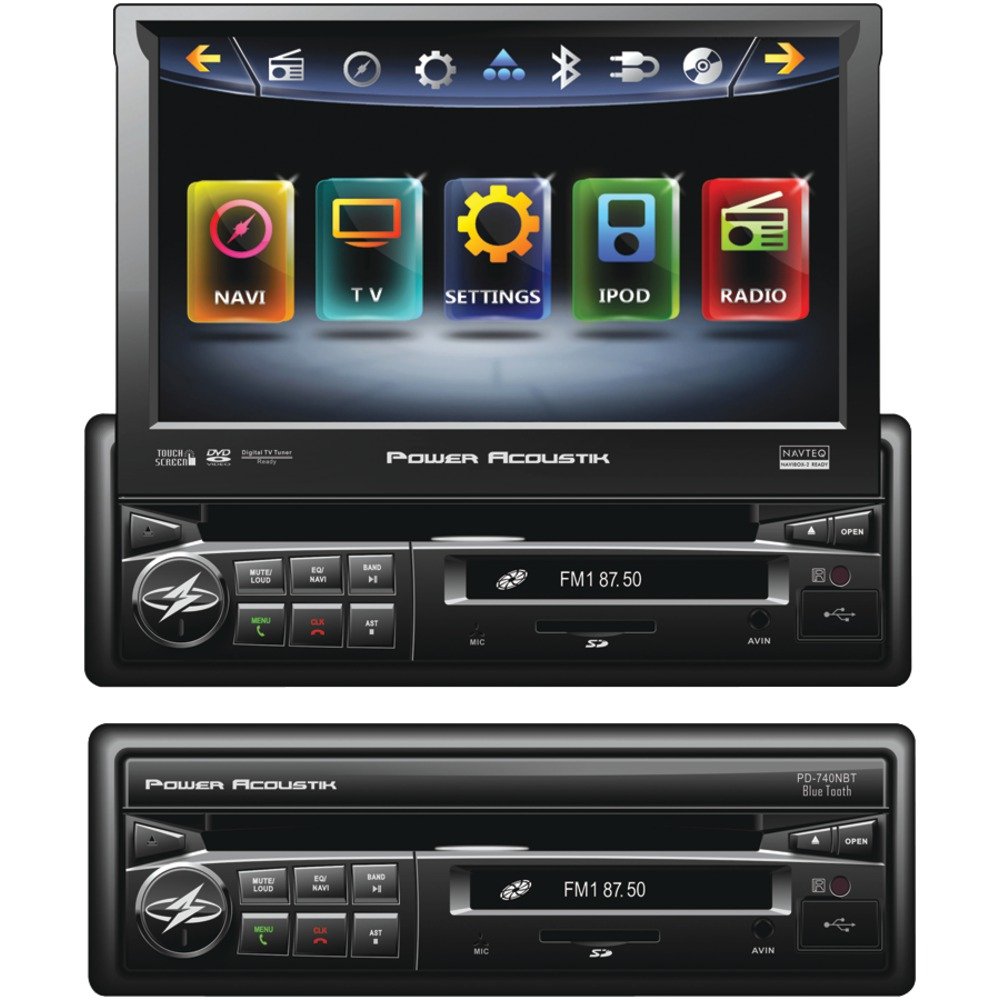
Слика 3.1: Предна страна view of the Power Acoustik PD-740NB with the 7-inch screen extended. This image shows the main display and primary control buttons.
Клучни компоненти:
- 7-inch Motorized TFT/LCD Touchscreen: Provides visual interface for all functions.
- Контролен панел: Buttons for power, volume, mode selection, and menu access.
- Слот за диск: For DVD/CD playback.
- USB порта: За поврзување на USB уреди за складирање.
- Слот за SD-картичка: За вметнување SD мемориски картички.
- Помошен влез: За поврзување на надворешни аудио извори.
4. Поставување и инсталација
Правилната инсталација е клучна за оптимални перформанси. Препорачливо е инсталирањето на овој уред да го изврши квалификуван професионалец.
4.1 Шема за поврзување (општо)
Below is a general description of typical wiring connections. Refer to the detailed wiring diagram included with your product packaging for precise connections.
- Жолта (константно 12V+): Connect to the vehicle's constant 12V power supply.
- Црвена (додаток 12V+): Connect to the vehicle's ignition switch (switched 12V).
- Црно (земја): Поврзете се со чиста точка за заземјување на шасијата во возилото.
- Blue (Remote Turn-On): Connect to the remote turn-on lead of an external amplifier or power antenna.
- Портокалова (осветлување): Connect to the vehicle's illumination circuit.
- Green/Purple/White/Gray (Speaker Outputs): Connect to the corresponding vehicle speakers (e.g., Green to Left Rear Speaker +, Green/Black to Left Rear Speaker -).
- Light Green (Parking Brake): Connect to the vehicle's parking brake switch. This connection is essential for video playback safety.
- Brown (Reverse Gear): Connect to the vehicle's reverse light circuit for automatic rear camera display (if applicable).
- RCA излези: За поврзување со надворешен ampлифтери (предни, задни, сабвуфер).
4.2 Монтирање
The PD-740NB is a single-DIN unit. Install it into the vehicle's dashboard opening using the supplied mounting sleeve and hardware. Ensure the unit is securely fastened to prevent movement.
4.3 Почетно вклучување
After installation, turn on the vehicle's ignition. The unit should power on. Follow any on-screen prompts for initial setup, such as language selection or clock setting.
5. Упатства за работа
5.1 Основни контроли
- Копче за вклучување: Притиснете за да го вклучите/исклучите уредот.
- Volume Knob/Buttons: Прилагодете го нивото на аудио излез.
- Копче за режим: Cycle through available sources (Radio, DVD, USB, SD, Bluetooth, AUX).
- Копче за мени: Access the main menu or system settings.
5.2 Работа со екран
The 7-inch screen is motorized. Use the designated buttons (usually on the front panel or remote) to extend or retract the screen. The screen is touch-sensitive for navigating menus and controlling functions.
5.3 Radio Tuner
- Избор на бенд: Select AM or FM band.
- Seek/Scan: Automatically search for strong stations.
- Рачно подесување: Fine-tune frequencies.
- Претходно поставени мемории: Store and recall up to 12 AM and 18 FM stations.
5.4 Репродукција на DVD/CD
- Вметнете диск: Gently insert a DVD or CD into the disc slot with the label side up. The unit will automatically load and begin playback.
- Контроли за репродукција: Use on-screen controls or physical buttons for Play, Pause, Stop, Skip Track, Fast Forward, and Rewind.
5.5 Репродукција од USB/SD картичка
- Вметни медиум: Вметнете USB-уред во USB-портата или SD-картичка во слотот за SD-картичка.
- File Навигација: Use the touchscreen to browse folders and select audio or video files.
- Репродукција: The unit supports various audio and video formats.
5.6 Работа со Bluetooth
- Спарување: Овозможете Bluetooth на вашиот мобилен уред. Пребарај за "PD-740NB" (or similar name) and pair. Enter PIN "0000" if prompted.
- Повикување без раце: Воспоставувајте и примајте повици директно преку уредот.
- Аудио стриминг (A2DP): Play music from your paired device wirelessly.
5.7 iPod Control
Connect your iPod using a compatible IC-3 cable (sold separately). The unit will allow direct control and playback of your iPod's music library.
5.8 Помошен влез
Connect external audio devices (e.g., MP3 players) to the unit's auxiliary input using a 3.5mm stereo cable.
5.9 Системски поставки
Access the system settings menu to adjust audio parameters (equalizer, balance, fader, subwoofer output), display settings (brightness, contrast), and other general system configurations.
6. Одржување
- Чистење на екранот: Use a soft, dry, lint-free cloth to gently wipe the screen. Do not use abrasive cleaners or solvents.
- Чистење на единицата: Избришете ја надворешноста на уредот со мека, сува крпа.
- Грижа за дискови: Држете ги дисковите за нивните рабови. Чувајте ги чисти и без гребнатини. Чувајте ги дисковите во нивните кутии кога не се во употреба.
- Ажурирања на софтверот: Периодично проверувајте ги упатствата на производителот website for any available firmware updates for improved performance or new features.
7 Смена на проблеми
| Проблем | Можна причина | Решение |
|---|---|---|
| Нема моќ | Прегорен осигурувач; неправилно поврзување; лабава врска. | Check fuses; verify wiring connections (constant 12V, accessory 12V, ground). |
| Нема звук | Volume too low; incorrect source selected; speaker wiring issue. | Increase volume; select correct source; check speaker connections. |
| Грешка во дискот | Валкан или изгребан диск; некомпатибилен формат на диск. | Clean disc; try a different disc; ensure disc format is supported. |
| Bluetooth не се поврзува | Bluetooth не е овозможен на уредот; уредот не е во режим на спарување; пречки. | Ensure Bluetooth is on; put unit in pairing mode; try re-pairing. |
| Екранот не се протега/повлекува | Опструкција; дефект на моторот. | Check for obstructions; if problem persists, contact support. |
8. Спецификации
- Прикажи: 7-inch TFT/LCD Motorized Flip-Up Touchscreen
- Излезна моќност: 52 вати x 4 канали
- Тјунер: AM/FM with 12 AM / 18 FM Presets
- Репродукција на медиуми: DVD, CD, USB, SD Card
- Поврзување: Bluetooth (Hands-Free & Audio Streaming), iPod Control (with IC-3), Auxiliary Input
- пред-amp Излези: 2V Variable Subwoofer Output
- Компатибилност: Navibox-2 Ready
- Димензии (приближни):
- Должина: 12.60 инчи
- Ширина: 9.50 инчи
- Висина: 4.70 инчи
9. Информации за гаранцијата
This Power Acoustik product is covered by a limited manufacturer's warranty. Please refer to the warranty card included in your product packaging for specific terms, conditions, and duration of coverage. Retain your proof of purchase for warranty claims.
10. Поддршка
For technical assistance, troubleshooting beyond this manual, or warranty inquiries, please contact your authorized Power Acoustik dealer or visit the official Power Acoustik webстраница за контакт информации за корисничка поддршка.


