Вовед
This manual provides essential information for the safe and efficient operation of your Sony KDL-55W900A 55-Inch 3D Internet LED HDTV. Please read these instructions thoroughly before using the television and retain them for future reference.
The Sony KDL-55W900A features a 55-inch display with 1080p resolution, 240Hz refresh rate, 3D capabilities, and integrated internet connectivity. It incorporates X-Reality PRO for enhanced detail and a TRILUMINOS display for brilliant colors.

Слика: Предна страна view of the Sony KDL-55W900A 55-Inch 3D Internet LED HDTV, showcasinнеговиот елегантен дизајн и дисплеј.
Што има во кутијата
Проверете дали сите од следниве елементи се вклучени со вашиот телевизор:
- Television Unit (Sony KDL-55W900A)
- Далечински управувач
- ТВ-штанд
- Кабел за напојување
- Active 3D Glasses (quantity may vary, typically 4 pairs)
- AA Batteries (2 for remote control)
- Документација (Водич за брзо поставување, Безбедносни информации)
Поставување
1. Прикачување на држачот за телевизор
Place the TV screen face down on a soft, clean surface to prevent damage. Align the stand with the mounting holes on the bottom of the TV and secure it using the provided screws. Ensure the stand is firmly attached before proceeding.

Слика: Diagram showing the dimensions of the Sony KDL-55W900A TV, including width, height, and depth.

Слика: Страна view of the Sony KDL-55W900A TV, highlighting its slim profile.
2. Поврзување периферни уреди
Connect your external devices such as Blu-ray players, gaming consoles, or cable/satellite boxes to the appropriate input ports (HDMI, USB, etc.) on the rear of the TV.
- HDMI: За аудио и видео со висока дефиниција.
- USB: За поврзување на USB уреди за складирање.
- Етернет: За жична интернет конекција.
- РФ: За поврзување преку антена или кабел.
3. Поврзување за напојување
Вклучете го кабелот за напојување во приклучокот за напојување на телевизорот, а потоа во ѕидниот штекер.
4. Волшебник за почетно поставување
Upon first power-on, the TV will guide you through an initial setup process. This includes language selection, time zone, channel scanning, and network configuration.

Слика: A person interacting with a tablet displaying a program guide, with the Sony TV visible in the background, demonstrating smart TV control.
Упатства за работа
1. Основни функции на телевизорот
- Моќност: Притиснете го копчето за вклучување на далечинскиот управувач или телевизорот за да го вклучите/исклучите.
- Избор на влез: Use the "Input" or "Source" button on the remote to switch between connected devices (HDMI 1, HDMI 2, TV, etc.).
- Волумен: Adjust using the Volume Up/Down buttons.
- Канал: Change channels using the Channel Up/Down buttons or number pad.
2. Smart TV Features and Internet Connectivity
Your TV can connect to the internet via Wi-Fi or Ethernet. Access various online services and applications through the Smart TV interface.
- Navigate the Smart TV menu using the remote's directional pad.
- Select apps like Netflix, Hulu, or Amazon Prime Video for streaming content.
- Користете го вградениот web browser for internet surfing.

Слика: A family enjoying content on the Sony TV, with a smartphone mirroring its display to the TV, illustrating connectivity features.
3. Поставки за слика и звук
Access the "Picture" and "Sound" menus to customize your viewискуство и слушање.
- Режими на слика: Choose from Standard, Vivid, Cinema, Game, etc.
- Осветленост, Контраст, Боја: Прилагодете ги овие поставки според вашите желби.
- X-Reality PRO: This feature enhances detail and texture.
- Екран TRILUMINOS: Provides a wider spectrum of colors.
- Motionflow XR 960: Improves motion clarity for fast-moving scenes.

Слика: A split-screen comparison demonstrating the enhanced detail and clarity provided by X-Reality PRO technology on the Sony TV.
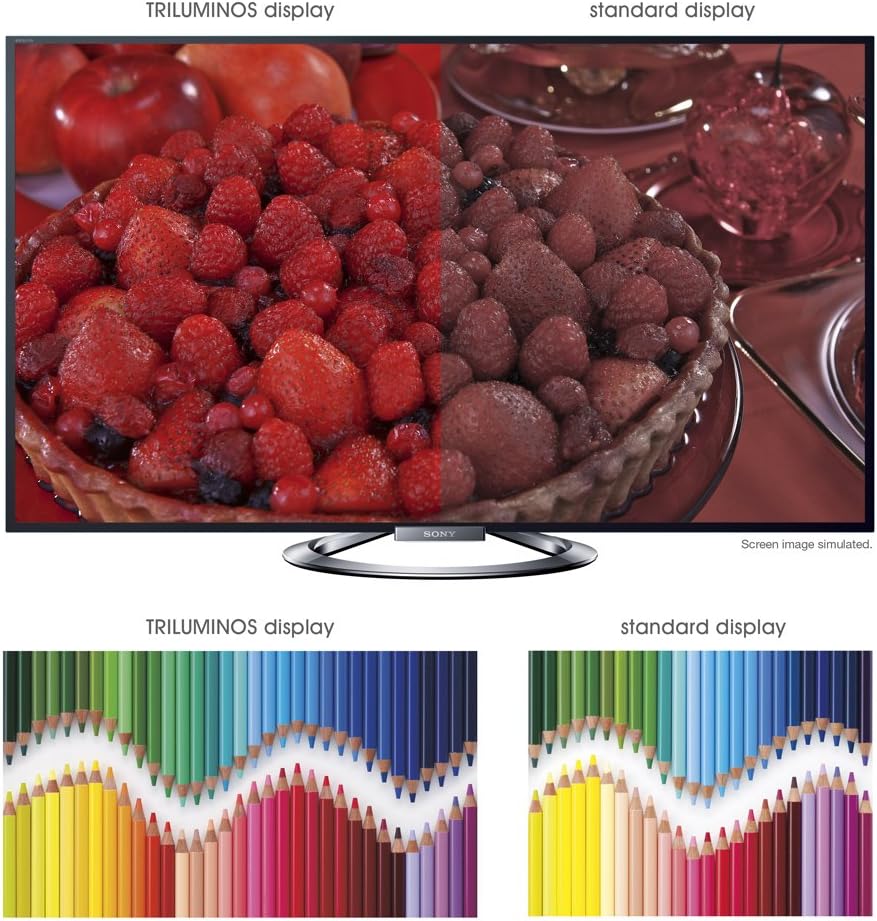
Слика: A split-screen comparison illustrating the vibrant and expanded color palette of the TRILUMINOS display versus a standard display.
4. 3Д Viewинг
To enjoy 3D content, ensure you have active 3D glasses and a 3D-compatible source (e.g., 3D Blu-ray player).
- Put on the active 3D glasses.
- Play 3D content from a connected source. The TV should automatically detect and switch to 3D mode.
- If 3D mode does not activate automatically, check the TV's picture settings for 3D options.
- Ensure 3D glasses are charged or have fresh batteries.
Одржување
1. Чистење на телевизорот
- Екран: Нежно избришете го екранот со мека, сува крпа од микрофибер. За тврдокорни дамки, малку избришете гоampИзмијте ја крпата со вода или со специјализирано средство за чистење екрани (не прскајте директно врз екранот).
- Кабинет: Избришете го куќиштето на телевизорот со мека, сува крпа. Избегнувајте употреба на абразивни средства за чистење, восоци или растворувачи.
- Секогаш исклучувајте го телевизорот од струја пред чистење.
2. Софтверски ажурирања
Периодично проверувајте за ажурирања на софтверот за да обезбедите оптимални перформанси и пристап до најновите функции.
- Navigate to the "Settings" menu on your TV.
- Look for "System Software Update" or similar options.
- Follow the on-screen instructions to download and install updates. Ensure the TV remains powered on during the update process.
3. 3D Glasses Care
- Clean lenses with a soft, dry cloth.
- Store glasses in a protective case when not in use.
- Replace batteries as needed (typically AA batteries).
Решавање проблеми
| Проблем | Можна причина / решение |
|---|---|
| Нема моќ |
|
| Нема слика / Црн екран |
|
| Нема звук |
|
| Проблеми со мрежно поврзување |
|
| 3D Image is Blurry or Not Working |
|
If the problem persists after attempting these solutions, please refer to the support section for further assistance.
Спецификации
| Карактеристика | Детал |
|---|---|
| Бренд | Sony |
| Број на модел | KDL-55W900A |
| Големина на екранот | 55 инчи |
| Технологија на прикажување | LED |
| Резолуција | 1080 стр |
| Стапка на освежување | 240 Hz (Motionflow XR 960) |
| Сооднос на аспект | 16:9 |
| Посебни карактеристики | Flat, 3D Capable, Internet TV, X-Reality PRO, TRILUMINOS Display, Dynamic Edge LED Backlight |
| Технологија за поврзување | Етернет, HDMI, RF, USB, Wi-Fi |
| Димензии на производот (со држач) | 48.9" Ш x 29.9" В x 11.8" Д |
| Димензии на производот (без држач) | 48.9" Ш x 28.5" В x 2.5" Д |
| Тежина на ставката | 48.5 фунти |
| Потребни се батерии | 2 AA батерии (за далечинско) |
| Датум прв на располагање | 7 јануари 2013 година |
Информации за гаранцијата
Your Sony KDL-55W900A television is covered by a limited warranty. The specific terms and duration of the warranty may vary by region and purchase date. Please refer to the warranty card included with your product or visit the official Sony support webстраница за детални информации во врска со гарантното покритие, условите и одредбите.
Зачувајте го доказот за купување (сметка) бидејќи ќе биде потребен за какви било гаранциски побарувања.
Поддршка за корисници
For further assistance, technical support, or service inquiries regarding your Sony KDL-55W900A, please contact Sony customer support.
- Поддршка преку Интернет: Посетете ја официјалната поддршка на Sony webстраница за најчесто поставувани прашања, упатства за решавање проблеми, преземања на софтвер и опции за контакт.
- Телефонска поддршка: Погледнете ги информациите за контакт дадени во документацијата за вашиот производ или на страницата за поддршка на Sony. website for regional telephone numbers.
When contacting support, please have your TV model number (KDL-55W900A) and serial number ready.