1. Производот завршиview
The Power Acoustik PDR-780 is a single DIN digital media receiver featuring a motorized flip-up 7-inch LCD touchscreen. This unit is designed to provide comprehensive multimedia entertainment and control in your vehicle. It supports various audio, video, and picture file formats from SD cards and USB flash drives, and includes an integrated AM/FM tuner.
Клучни карактеристики:
- Motorized telescoping and angle adjustment for the 7-inch LCD touchscreen.
- Detachable theft deterrent front panel for security.
- Playback from up to 32GB SD/MMC card or USB drive.
- Supports 720p HD video playback of MP4, DIVX, AVI, and more.
- Audio playback of MP3, AAC, AC3, and WMA formats.
- Digital signal processing with a 2-band equalizer, 7 factory presets, and custom preset options.
- Programmable FM/AM receiver with 18 FM and 12 AM station memory.
- Low-level RCA audio outputs for connecting external ampказните за слободни животи.
- 800x480 HD Resolution display.
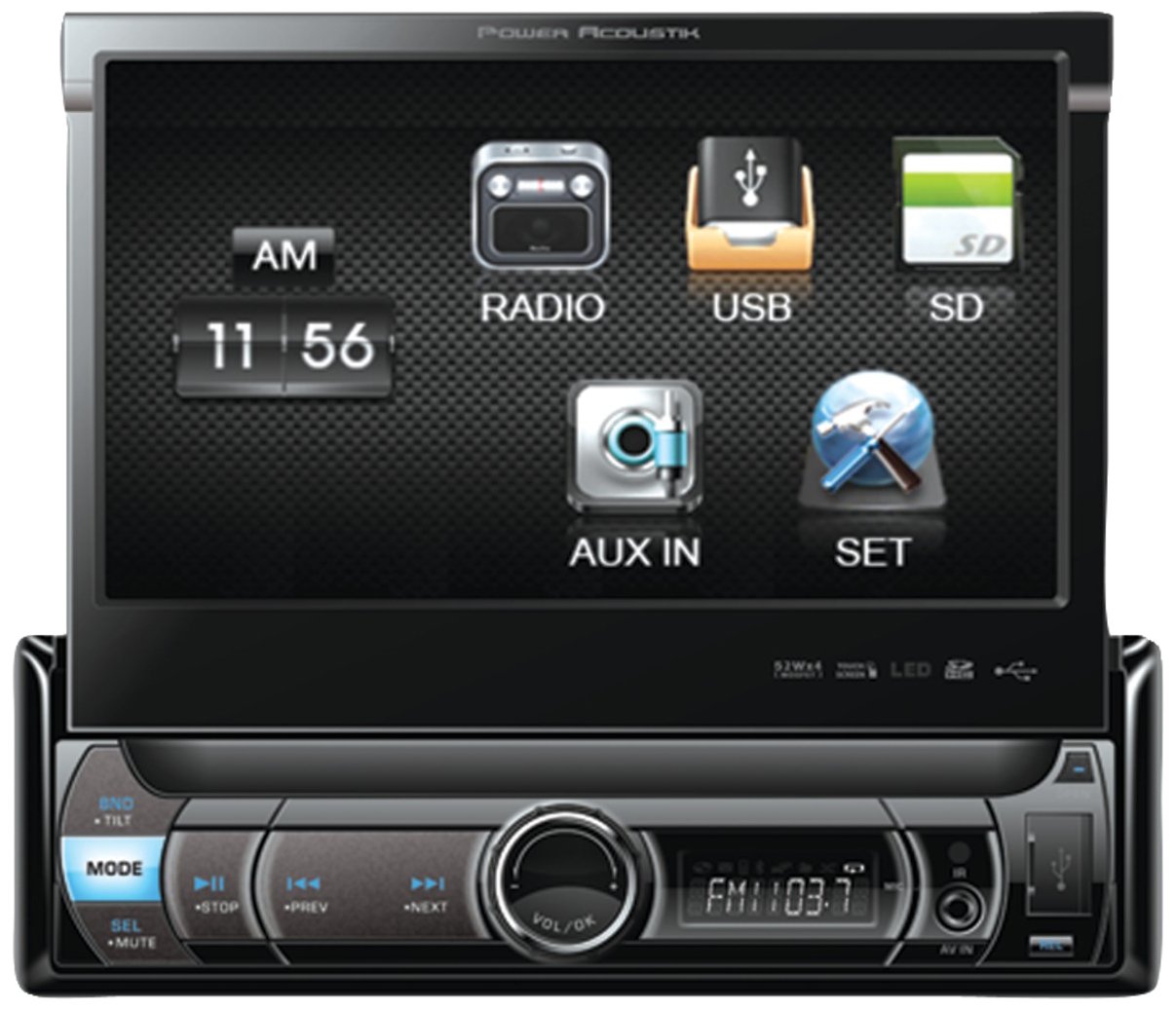
Слика 1: Предна страна view of the Power Acoustik PDR-780 multimedia receiver with its 7-inch motorized flip-up LCD touchscreen extended.
2. Поставување и инсталација
Правилната инсталација е клучна за оптимални перформанси и безбедност. Препорачливо е инсталацијата да ја изврши квалификуван професионалец. Секогаш исклучувајте ја батеријата на возилото пред да започнете со какви било електрични работи.
2.1 Монтирање на единицата
- Внимателно отстранете го постоечкото автомобилско стерео од контролната табла.
- Insert the PDR-780 into the single DIN opening. Ensure it fits securely.
- Secure the unit using the provided mounting hardware (screws, brackets) to prevent movement.
2.2 Приклучоци за жици
Refer to your vehicle's wiring diagram and the PDR-780's wiring harness for specific connections. Common connections include:
- Моќност (жолта): Постојано напојување од 12V.
- Додаток (црвена): Switched 12V supply (ignition).
- Земјата (црна): Поврзете се со чиста точка за заземјување на шасијата.
- Speaker Outputs (Colored pairs): Connect to vehicle speakers (e.g., White/White-Black for front left, Gray/Gray-Black for front right, etc.).
- Антена (сина): Power antenna or ampдалечинско вклучување на лифирачот.
- RCA излези: За поврзување на надворешни ampлифтери (предни, задни, сабвуфер).
- Рачна сопирачка (светло зелена): Connect to the parking brake switch for video playback safety.
Важно: Incorrect wiring can damage the unit or your vehicle's electrical system. Double-check all connections before restoring power.
3. Упатства за работа
3.1 Вклучување/исклучување и работа на екранот
- Вклучување: Притиснете го МОЌ button or turn the vehicle's ignition to ACC or ON. The screen will automatically extend.
- Исклучено: Притиснете и задржете го МОЌ button. The screen will retract before the unit powers down.
- Прилагодување на аголот на екранот: Користете го ANGLE UP/DOWN buttons on the front panel or touchscreen controls to adjust the viewing angle of the LCD.
- Екран на допир: Navigate menus and control functions by touching the icons and options displayed on the 7-inch LCD.
3.2 Репродукција на медиуми (USB/SD)
- Вметнете USB флеш-меморија во USB-портата или SD-картичка во слотот за SD-картичка.
- The unit will automatically detect the media and display the media browser. If not, select the "USB" or "SD" source from the main menu.
- Browse folders and select audio, video, or picture files за репродукција.
- Use the on-screen controls for Play/Pause, Skip, Fast Forward/Rewind.
3.3 Работење со радио (AM/FM)
- Select the "Radio" source from the main menu.
- Избор на бенд: Tap the "BAND" button to switch between FM1, FM2, FM3, and AM bands.
- Автоматско пребарување: Press and hold the "SEEK" buttons to automatically scan for the next strong station.
- Рачно мелодија: Briefly press the "SEEK" buttons to fine-tune the frequency.
- Претходно поставени станици: To save a station, tune to the desired frequency, then press and hold one of the preset number buttons (1-6) on the touchscreen until you hear a beep. To recall a preset, simply tap the corresponding number button.
3.4 Аудио поставки (Еквилајзер)
- Access the "Audio" or "Sound" settings from the main menu.
- Select "Equalizer" to adjust audio frequencies.
- Choose from 7 factory presets (e.g., Pop, Rock, Classic) or select "Custom" to manually adjust the 2-band equalizer.
- Прилагодете ги нивоата на бас и високи тонови по ваш вкус.
4. Одржување
4.1 Чистење на единицата
- Екран: Use a soft, lint-free cloth (e.g., microfiber) to gently wipe the LCD touchscreen. For stubborn smudges, slightly dampen the cloth with water or a screen-safe cleaning solution. Do not spray liquid directly onto the screen.
- Преден панел: Wipe the detachable front panel with a dry, soft cloth. Avoid abrasive cleaners or solvents.
- Пристаништа: Keep USB and SD card slots free of dust and debris. Use compressed air if necessary.
4.2 Општа нега
- Избегнувајте изложување на уредот на екстремни температури, директна сончева светлина подолг период или висока влажност.
- Обезбедете соодветна вентилација околу уредот за да спречите прегревање.
- Always retract the screen and detach the front panel when leaving the vehicle unattended for security.
5 Смена на проблеми
If you encounter issues with your PDR-780, refer to the following common problems and solutions before contacting support.
| Проблем | Можна причина | Решение |
|---|---|---|
| Нема струја на единицата. | Неправилно поврзување на жици; прегорен осигурувач; акумулаторот на возилото е исклучен. | Check power and ground connections. Inspect the fuse on the unit's wiring harness and in the vehicle's fuse box. Ensure the vehicle battery is connected. |
| Нема звук од звучниците. | Каблите на звучникот се исклучени; Јачината на звукот е прениска; Функцијата за исклучување на звукот е активна; Неточен аудио извор. | Verify speaker connections. Increase volume. Check if the unit is muted. Select the correct audio source. |
| Screen does not extend or retract. | Motor obstruction; Power issue; Unit malfunction. | Ensure no objects are blocking the screen's path. Check power supply. If the issue persists, contact support. |
| USB/SD media not playing. | Неподдржано file format; Corrupted media; Incorrectly inserted media. | Обезбедете files are in supported formats (MP3, WAV, MP4, DivX, AVI). Try a different USB/SD card. Reinsert the media correctly. |
| Лош радио прием. | Антената не е поврзана; Оштетена антена; Слаб сигнал во областа. | Check antenna connection. Inspect antenna for damage. Try tuning to a different station or moving to an area with better signal. |
6. Спецификации
| Карактеристика | Детал |
|---|---|
| Бренд | Power Acoustik |
| Модел | PDR-780 |
| Димензии на производот | 29.21 x 12.07 x 22.86 cm |
| Тежина на ставката | 794 гр |
| Технологија на тјунер | AM, FM |
| Компатибилни уреди | Говорник |
| Посебни карактеристики | Еквилајзер |
| Големина на приказ на стоечки екран | 7 инчи |
| Тип на аудио излез | Звучници |
| Аудио Ватtage | 52 Watts x 4 (MOSFET Powered Speaker Level Outputs) |
| Тип на конектор | USB, RCA |
| Поддршка за медиумски формати | AVI, MP3 Audio, WAV, WMA, MP4, DivX, JPG |
| Резолуција на екранот | 800x480 HD |
| Максимален капацитет за складирање | 32GB (SD card or USB drive) |
7. Гаранција и поддршка
7.1 Гаранција за производот
This Power Acoustik PDR-780 unit comes with a 1 години гаранција from the date of purchase. This warranty covers manufacturing defects and faulty workmanship under normal use. It does not cover damage caused by improper installation, accident, misuse, abuse, neglect, unauthorized modification, or normal wear and tear. Please retain your proof of purchase for warranty claims.
7.2 Поддршка за корисници
For technical assistance, troubleshooting beyond this manual, or warranty service, please contact Power Acoustik customer support. Refer to the official Power Acoustik website or your purchase documentation for the most current contact information (phone numbers, email, or support portal).
Забелешка: Do not attempt to repair the unit yourself, as this may void your warranty.


