1. Вовед и повеќеview
This manual provides comprehensive instructions for the setup, operation, maintenance, and troubleshooting of your InFocus IN3124 Projector. Designed for clarity and ease of use, this guide will help you maximize your projector's performance and longevity.
The InFocus IN3124 is a high-performance projector featuring XGA (1024 x 868) native resolution, 4800 lumens of brightness, and a 3000:1 contrast ratio, making it suitable for various presentation environments. Its portable design allows for flexible placement and usage.
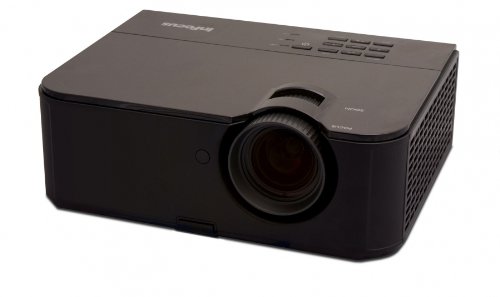
Слика 1: Предната страна view of the InFocus IN3124 Projector, highlighting the main lens and the top-mounted control panel.
2. Поставување
2.1 Отпакување
Внимателно извадете го проекторот и сите додатоци од пакувањето. Проверете дали се присутни сите компоненти наведени во списокот за пакување. Зачувајте го оригиналното пакување за иден транспорт или складирање.
2.2 Поставување
Position the projector on a stable, level surface. Ensure adequate ventilation around the unit to prevent overheating. Maintain a clear path between the projector lens and the projection screen or surface. The optimal projection distance will vary based on the desired screen size.
2.3 Поврзување напојување
- Поврзете го кабелот за напојување со влезот за напојување на проекторот.
- Приклучете го другиот крај на кабелот за напојување во заземјен електричен штекер.
2.4 Поврзување на влезни извори
The IN3124 projector supports various input sources. Connect your video source (e.g., computer, DVD player) to the appropriate input port on the projector. Common ports include VGA and HDMI (if available on your specific model).
- VGA: Use a VGA cable to connect to a computer's video output.
- HDMI: Use an HDMI cable for digital video and audio (check projector for HDMI port availability).
3. Упатства за работа
3.1 Вклучување/исклучување
- За вклучување: Притиснете го копчето за вклучување на контролната табла на проекторот или на далечинскиот управувач. Индикаторското светло за напојување ќе светне.
- За исклучување: Press the power button twice. The projector will enter a cooling cycle before shutting down completely. Do not unplug the projector during the cooling cycle.
3.2 Прилагодување на фокусот и зумот
Rotate the focus ring on the projector lens until the image appears sharp and clear. Use the zoom ring (if present) to adjust the image size to fit your screen.
3.3 Selecting Input Sources
Press the "Source" or "Input" button on the projector's control panel or remote control to cycle through available input sources (e.g., VGA, HDMI). Select the input corresponding to your connected device.
3.4 Menu Navigation and Keystone Correction
Use the menu buttons on the projector or remote to access the On-Screen Display (OSD). Navigate through the menu options to adjust settings such as brightness, contrast, color, and keystone correction. Keystone correction helps to square the image if the projector is not perfectly perpendicular to the screen.
4. Одржување
4.1 Чистење на објективот
Нежно избришете го објективот на проекторот со мека крпа без влакненца, специјално дизајнирана за оптички површини. Не користете абразивни средства за чистење или прекумерна сила, бидејќи тоа може да го изгребе објективот.
4.2 Чистење на филтрите за воздух
Regularly check and clean the projector's air filters to ensure proper airflow and prevent overheating. Refer to the projector's specific filter access instructions. Use a soft brush or vacuum cleaner to remove dust accumulation.
4.3 лamp Замена
Проекторот лamp има ограничен животен век. Кога лamp life indicator appears or the image becomes dim, the lamp may need replacement. Consult the full service manual or manufacturer's website for detailed lamp процедури за замена и компатибилен лamp models. Always allow the projector to cool down completely before attempting lamp замена.
4.4 Складирање
Кога не го користите подолг период, чувајте го проекторот на ладно и суво место, подалеку од директна сончева светлина и екстремни температури. Користете го оригиналното пакување или заштитна футрола за да спречите прашина и оштетување.
5 Смена на проблеми
This section addresses common issues you might encounter with your InFocus IN3124 Projector. For more complex problems, contact customer support.
- Нема прикажана слика:
- Ensure the projector is powered on and the power indicator is solid.
- Verify that the input source cable (VGA, HDMI) is securely connected to both the projector and the source device.
- Изберете го точниот влезен извор користејќи го копчето „Извор“.
- Check if the source device is outputting a signal.
- Затемнета или избледена слика:
- Adjust brightness and contrast settings in the OSD menu.
- Обезбедете лamp is not nearing the end of its lifespan.
- Clean the projector lens and air filters.
- Check the projection mode (e.g., Eco mode might reduce brightness).
- Сликата е заматена:
- Прилагодете го прстенот за фокусирање на објективот на проекторот.
- Уверете се дека површината за проекција е рамна и дека проекторот е стабилен.
- Check the resolution settings of your source device to match the projector's native resolution.
- Далечинскиот управувач не работи:
- Заменете ги батериите во далечинскиот управувач.
- Уверете се дека нема пречки помеѓу далечинскиот управувач и IR приемникот на проекторот.
- Насочете го далечинскиот управувач директно кон проекторот.
6. Спецификации
The following table outlines the key technical specifications for the InFocus IN3124 Projector:
| Карактеристика | Спецификација |
|---|---|
| Број на модел | IN3124 |
| Резолуција на екранот (матична) | XGA (1024 x 868) |
| Осветленост | 4800 лумени |
| Сооднос на контраст | 3000:1 |
| Тип на дисплеј | LCD, LCoS |
| Тежина на ставката | 8.16 фунти (3.7 кг) |
| Димензии на производот (Д x Ш x В) | 12.83 x 10.43 x 4.8 инчи (32.59 x 26.49 x 12.19 см) |
| Специјална карактеристика | Пренослив |
7. Гаранција и поддршка
For detailed warranty information, please refer to the warranty card included with your product packaging or visit the official InFocus webлокација. Гаранцијата обично ги покрива производствените дефекти за одреден период од датумот на купување.
If you encounter issues that cannot be resolved using the troubleshooting guide, or require technical assistance, please contact InFocus customer support. Contact details can usually be found on the manufacturer's webстраницата или во документацијата за вашиот производ.


