Вовед
This manual provides essential information for the proper installation, operation, and maintenance of your BlackVue Power Cord, Model BV-CJ. This 15-foot (approximately 4.57 meters) DC 12V car cigar jack power cable is designed to provide power to compatible BlackVue dash cam models from your vehicle's cigarette lighter socket. Please read this manual thoroughly before use to ensure correct functionality and to prevent damage.
Информации за безбедност
- Ensure the vehicle's power outlet (cigarette lighter socket) is clean and free of debris before inserting the power cord.
- Do not attempt to modify the power cord or its connectors. Unauthorized modifications can lead to electrical hazards or damage to the dash cam and vehicle.
- Avoid exposing the power cord to extreme temperatures, direct sunlight for prolonged periods, or moisture.
- Route the cable carefully to avoid interference with vehicle controls, airbags, or driver visibility. Secure the cable to prevent it from becoming entangled or damaged.
- If the power cord appears damaged, discontinue use immediately and replace it with an authorized BlackVue replacement cable.
Поставување и инсталација
- Идентификувајте ги компонентите: Locate the BlackVue Power Cord (Model BV-CJ). One end has a standard car cigar jack (cigarette lighter plug), and the other end has a proprietary connector designed for BlackVue dash cams.
- Поврзете се со Dash Cam: Carefully insert the BlackVue connector end of the power cord into the power input port on your BlackVue dash cam. Ensure a firm and secure connection.
- Поврзете се со напојувањето на возилото: Insert the car cigar jack end of the power cord into your vehicle's 12V cigarette lighter socket.
- Насочете го кабелот: Route the 15-foot cable along the vehicle's interior, ensuring it does not obstruct the driver's view, interfere with vehicle operation, or become a tripping hazard. Use cable clips or ties (not included) to secure the cable neatly.
- Потврдете ја моќноста: Once connected, your BlackVue dash cam should power on automatically (if the vehicle's ignition is on and the socket provides constant power, or when the ignition is turned on). Refer to your dash cam's manual for specific power-on indicators.
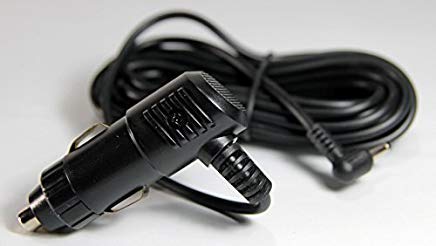
Image: The BlackVue Power Cord, featuring the car cigar jack on one end and the dash cam connector on the other.
Операција
The BlackVue Power Cord (Model BV-CJ) provides continuous 12V DC power to your compatible BlackVue dash cam when connected to a functioning vehicle cigarette lighter socket. The dash cam's power status will depend on whether your vehicle's cigarette lighter socket provides constant power or is switched with the ignition.
- Ignition-Switched Sockets: If your vehicle's socket is ignition-switched, the dash cam will power on when the vehicle's ignition is turned on and power off when the ignition is turned off.
- Constant Power Sockets: If your vehicle's socket provides constant power, the dash cam will remain powered as long as the cable is connected, regardless of ignition status. Be aware that this can drain your vehicle's battery if left connected for extended periods without the engine running.
Одржување
- Редовна инспекција: Periodically inspect the power cord for any signs of wear, fraying, cuts, or damage to the connectors.
- Чистење: Keep the metal contacts of the cigar jack and the dash cam connector clean and free of dust or corrosion. Use a dry, soft cloth for cleaning.
- Складирање: When not in use, store the power cord in a cool, dry place, away from direct sunlight and extreme temperatures. Avoid tightly coiling or bending the cable sharply.
Решавање проблеми
- Камерата на автомобилот не се вклучува:
- Ensure both ends of the power cord are securely connected to the dash cam and the vehicle's cigarette lighter socket.
- Verify that the vehicle's cigarette lighter socket is functioning. Test it with another known working device.
- Check the vehicle's fuse box for a blown fuse related to the cigarette lighter socket. Consult your vehicle's owner's manual for fuse locations and replacement procedures.
- Inspect the power cord for any visible damage. If damaged, replace the cable.
- Испрекината моќност:
- A loose connection at either the dash cam or the cigar jack can cause intermittent power. Re-seat both connectors firmly.
- Check for debris or corrosion in the cigarette lighter socket or on the cigar jack's contacts. Clean if necessary.
Спецификации
| Број на модел | BV-CJ |
| Влез волуменtage | DC 12V |
| Должина на кабелот | 15 стапки (приближно 4.57 метри) |
| Тип на конектор | Car Cigar Jack to BlackVue Dash Cam Connector |
| Димензии на производот (пакување) | 4 x 1 x 1.9 инчи (10.16 x 2.54 x 4.83 см) |
| Тежина на ставката | 0.352 унци (приближно 10 грама) |
| Compatible BlackVue Models | DR350, DR380G, DR400G-HD II, DR500GW-HD, DR550GW-2CH, DR600GW-1CH, DR650GW-2CH, DR650S-1CH, DR650S-2CH |
Информации за гаранцијата
This BlackVue Power Cord is covered by the manufacturer's standard limited warranty. Please refer to the warranty documentation provided with your original BlackVue dash cam or visit the official BlackVue webстраница за детални услови за гаранција. Зачувајте го доказот за купување за рекламации за гаранција.
Поддршка за корисници
For technical assistance, troubleshooting, or inquiries regarding your BlackVue Power Cord, please contact BlackVue customer support. Contact information can typically be found on the official BlackVue website or in the documentation included with your dash cam. When contacting support, please have your product model (BV-CJ) and dash cam model information available.


