1. Вовед
This manual provides detailed instructions for the proper use and maintenance of your TFA 38.2028.02 Digital Timer and Stopwatch. This device is designed for precise timekeeping in various applications, featuring a reversible display, touch-sensitive buttons, and magnetic mounting options. Please read this manual thoroughly before operating the device.
2. Карактеристики на производот
- Reversible Display: Овозможува лесно viewод различни агли.
- Touch-Sensitive Buttons: For intuitive operation.
- Задно осветлување: Овозможува јасна видливост во услови на слаба осветленост.
- Магнетна монтажа: Securely attaches to metallic surfaces.
- Wall or Tabletop Mounting: Разновидни опции за поставување.
- Опсег на тајмер: Counts up to 99 minutes and 59 seconds.
- Компактен дизајн: Димензии од 76 x 25 x 76 мм.
3. Содржина на пакетот
- TFA 38.2028.02 Digital Timer and Stopwatch Unit
- Упатство за употреба (овој документ)
Note: 2 x 1.5V AAA batteries are required and not included in the package.
4. Поставување
4.1 Инсталација на батерија
- Пронајдете го капакот на преградата за батерии на задната страна од уредот.
- Нежно лизнете или подигнете го капакот за да ја отворите преградата.
- Вметнете две (2) батерии од 1.5V AAA, внимавајќи на точниот поларитет (+/-) како што е наведено во внатрешноста на преградата.
- Вратете го капакот на преградата за батерии, осигурувајќи се дека безбедно ќе кликне на своето место.
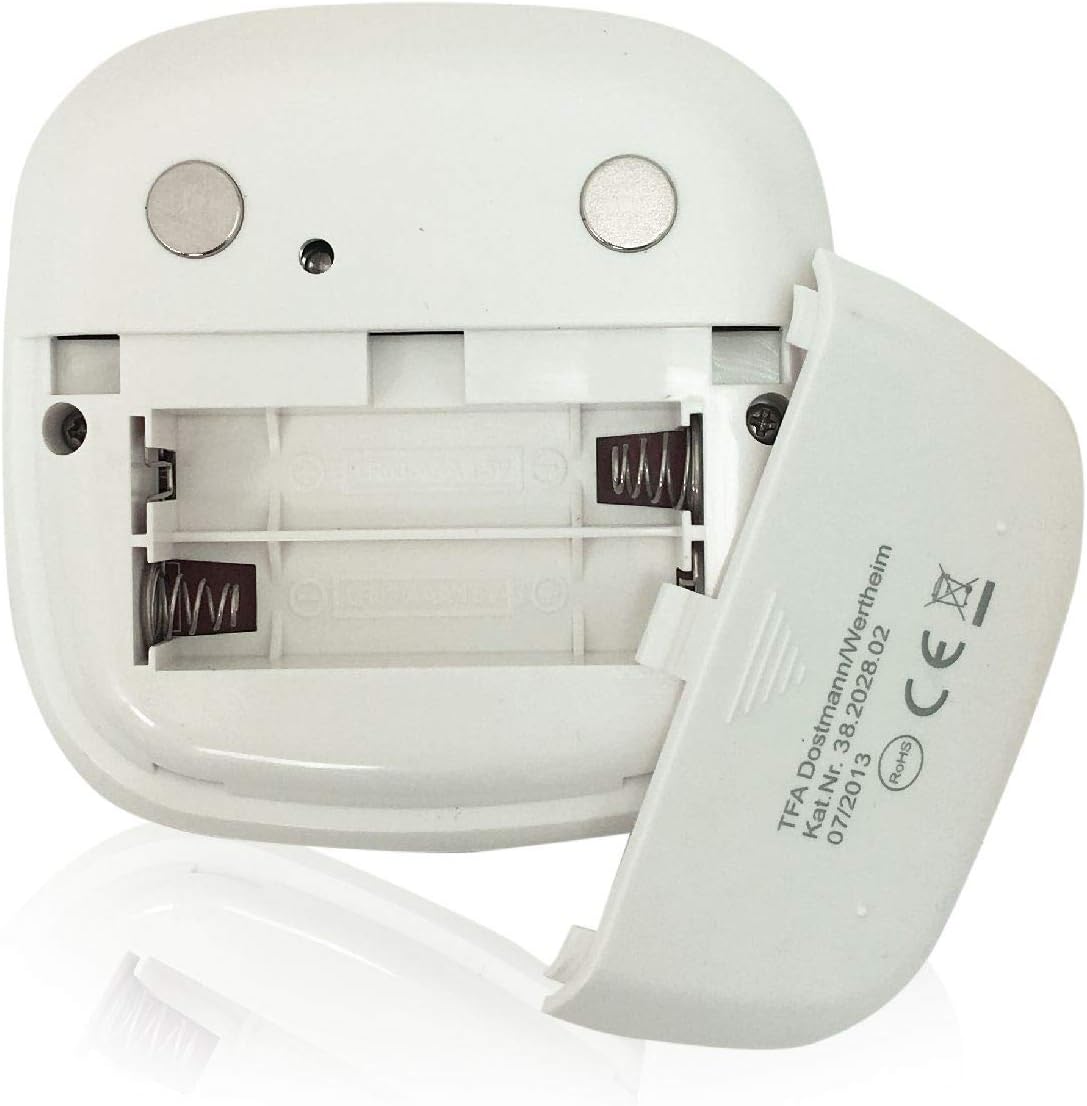
Слика: Заден дел view of the timer with the battery compartment open, illustrating where to insert the two AAA batteries.
4.2 Почетно вклучување
Once batteries are installed, the display will illuminate, and the device will be ready for use. The default display shows "00:00".
5. Упатства за работа

Слика: напред view of the TFA 38.2028.02 timer, highlighting the digital display and the three touch-sensitive buttons: 'M' for minutes, 'S' for seconds, and 'S/S' for Start/Stop.
5.1 Функции на копчињата
- М (Минути): Press to increase minutes. Hold to rapidly increase minutes.
- S (секунди): Press to increase seconds. Hold to rapidly increase seconds.
- S/S (Start/Stop): Press to start or stop the timer/stopwatch.
5.2 Поставување на тајмерот (одбројување)
- Ensure the display shows "00:00". If not, press M и S simultaneously to reset.
- Притиснете го M button to set the desired minutes (up to 99 minutes).
- Притиснете го S button to set the desired seconds (up to 59 seconds).
- Откако ќе го поставите посакуваното време, притиснете го копчето С/С копче за да започне одбројувањето.
- За да го паузирате одбројувањето, притиснете С/С повторно. Притиснете С/С да продолжи.
- When the timer reaches "00:00", an alarm will sound. Press any button to stop the alarm.
5.3 Користење на штоперицата (одбројување)
- Ensure the display shows "00:00". If not, press M и S simultaneously to reset.
- Притиснете го С/С button to start the count-up. The display will begin counting from "00:00".
- За да ја паузирате стоперката, притиснете С/С повторно. Притиснете С/С да продолжи.
- To reset the stopwatch to "00:00", pause the stopwatch, then press M и S истовремено.
5.4 Функција за позадинско осветлување
The display features a backlight for improved visibility. The backlight activates automatically when buttons are pressed and typically remains on for approximately 30-40 seconds before dimming to conserve battery life.
6. Опции за монтирање
The TFA 38.2028.02 timer offers flexible mounting solutions:
- Магнетен додаток: The back of the timer is equipped with magnets, allowing it to be securely attached to refrigerators, oven hoods, or any other metallic surface.
- Поставување на маса: The timer's design allows it to stand upright on a flat surface, such as a kitchen counter or desk.
- Монтирање на ѕид: The unit can also be mounted on a wall using a small hook or screw (not included) through the designated hole on the back.

Слика: Заден дел view of the timer, showing the integrated magnets for secure attachment to metallic surfaces and the model number.
7. Одржување
7.1 Чистење
To clean the timer, wipe it with a soft, damp cloth. Do not use abrasive cleaners or immerse the device in water. Avoid getting moisture into the battery compartment or display area.
7.2 Замена на батеријата
When the display becomes dim or the device stops responding, it is time to replace the batteries. Follow the battery installation steps in Section 4.1. Always use fresh 1.5V AAA batteries and dispose of old batteries responsibly.
8 Смена на проблеми
| Проблем | Можна причина | Решение |
|---|---|---|
| Уредот не се вклучува. | Батериите се празни или неправилно инсталирани. | Проверете го поларитетот на батериите или заменете ги со нови AAA батерии. |
| Екранот е затемнет или трепка. | Ниска моќност на батеријата. | Заменете ги батериите. |
| Копчињата не реагираат. | Low battery power or temporary software glitch. | Replace batteries. If problem persists, remove batteries for 1 minute and reinsert. |
| Timer alarm is too quiet. | Alarm volume is fixed and cannot be adjusted. | Ensure the timer is placed in a location where the alarm can be heard. |
9. Спецификации
| Карактеристика | Детал |
|---|---|
| Број на модел | 38.2028.02 |
| Бренд | ТФА |
| Димензии (Д x Ш x В) | 76 x 25 x 76 mm (approximately 2.5P x 7.6l x 7.6H cm) |
| Тежина | 92 грама |
| Материјал | Plastic with integrated magnets |
| Напојување | 2 x 1.5V AAA батерии (не се вклучени) |
| Опсег на тајмер | Up to 99 minutes, 59 seconds |
| Приказ | Digital with backlight |
| Опции за монтирање | Magnetic, Tabletop, Wall-mountable |

Image: The timer held in a hand, visually demonstrating its compact size and indicating its dimensions (7.6 cm x 7.6 cm x 2.5 cm).
10. Гаранција и поддршка
TFA products are manufactured with quality and precision. For specific warranty information, please refer to the documentation provided with your purchase or visit the official TFA website. For technical support or inquiries, please contact TFA customer service through their official channels.
Чувајте го ова упатство за идна референца.


