Производот завршиview
The Sagemcom Sixty Cordless Telephone and Answer Machine combines modern technology with a classic design. Its unique aesthetic, smooth finish, and touchscreen functionality make it a distinctive addition to any environment. Designed for user comfort, the Sixty offers a range of features including hands-free mode, extended battery life, and an intuitive interface for easy communication.
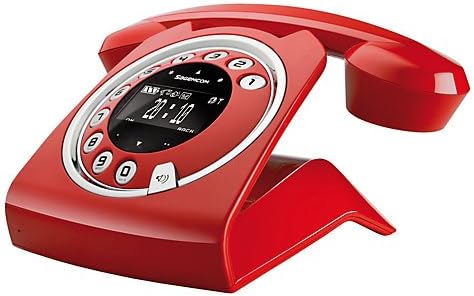
Image: The Sagemcom Sixty Cordless Telephone and Answer Machine in red, showcasing its unique retro-modern design with a circular dial and digital display.

Слика: Страна view of the Sagemcom Sixty Cordless Telephone, highlighting its sleek profile and the cradle design.
Водич за поставување
1. Отпакување
Carefully remove all components from the packaging. Ensure you have the base unit, handset, power adapter, and telephone line cord.
2. Поврзување на основната единица
- Connect the power adapter to the 'DC IN' port on the back of the base unit and plug the other end into a wall outlet.
- Connect one end of the telephone line cord to the 'LINE' port on the base unit and the other end to your telephone wall jack.
3. Инсталација и полнење на батеријата
- Отворете ја преградата за батерии на слушалката.
- Insert the supplied rechargeable batteries, observing the correct polarity (+ and -).
- Затворете ја преградата за батерии.
- Place the handset on the base unit. The display will indicate charging. Allow the handset to charge for at least 16 hours before first use to ensure optimal battery performance.
Упатства за работа
Упатување и примање повици
- За да остварите повик: Подигнете ја слушалката или притиснете го Јавете се button. Dial the number using the touchscreen keypad.
- За да добиете повик: Подигнете ја слушалката или притиснете го Јавете се копче кога телефонот ѕвони.
- За да завршите повик: Вратете ја слушалката на базата или притиснете го Заврши повик копче.
Користење на екранот на допир
The Sixty features a responsive touchscreen for navigation and input. Tap icons or numbers to select functions or dial. Swipe to scroll through lists or menus.
Режим без раце
За време на повик, притиснете на Говорник копчето за да го активирате режимот без раце. Притиснете го повторно за да се вратите во режим на слушалка.
Управување со телефонски именик
- Додавање контакт: Navigate to the Phonebook menu, select 'Add New Contact', enter the name and number using the touchscreen, and save. The phonebook can store up to 150 names.
- Барам контакт: Access the Phonebook and use the search function or scroll through the list.
- Editing/Deleting a Contact: Select the desired contact from the Phonebook and choose the 'Edit' or 'Delete' option.
Функции на телефонската секретарка
The integrated answering machine has a recording capacity of 10 minutes.
- Активирање/Деактивирање: Access the Answering Machine menu to turn it on or off.
- Репродукција на пораки: Select 'Play Messages' from the Answering Machine menu.
- Снимање на излезна порака: Follow the prompts in the Answering Machine menu to record a personalized outgoing message.
Одржување
Чистење на вашиот телефон
To clean the phone, wipe it with a soft, damp cloth. Do not use abrasive cleaners or solvents, as these can damage the surface. Ensure the phone is disconnected from power before cleaning.
Нега на батерии
- Секогаш користете ги испорачаните батерии што се полнат.
- Доколку телефонот не се користи подолг период, извадете ги батериите за да спречите протекување.
- Отстранете ги старите батерии одговорно во согласност со локалните прописи.
Решавање проблеми
| Проблем | Можно решение |
|---|---|
| Нема тон за бирање | Check if the telephone line cord is securely connected to both the base unit and the wall jack. Ensure the power adapter is plugged in. |
| Слушалката не се полни | Ensure the handset is correctly placed on the base unit. Clean the charging contacts on both the handset and base unit with a dry cloth. Verify the power adapter is working. |
| Лош квалитет на звукот | Приближете се до базата. Проверете дали има пречки од други електронски уреди. Уверете се дека телефонскиот кабел не е оштетен. |
| Екранот е празен | Check if the handset battery is charged. If not, place it on the base unit to charge. Ensure the power adapter is connected to the base unit. |
| Не може да се остваруваат или примаат повици | Verify that the telephone line is active. Check all cable connections. Restart the base unit by unplugging and replugging the power adapter. |
Технички спецификации
| Карактеристика | Спецификација |
|---|---|
| Бренд | Sagemcom |
| Модел | Шеесет |
| Боја | Црвено |
| Тип на телефон | Безжичен |
| Време за разговор на телефон | До 10 часа |
| Време на мирување | До 120 часа |
| Recording Capacity (Answering Machine) | 10 минути |
| Капацитет на именик | 150 Имиња |
| ASIN | B00DX64LPI |
| Прво достапен датум | 15 април 2014 година |
Гаранција и поддршка
For warranty information and customer support, please refer to the documentation included with your purchase or visit the official Sagemcom webстраница. Зачувајте го доказот за купување за какви било гаранциски побарувања.