1. Вовед
Thank you for choosing the Antec HCG-850M 850W Power Supply. This manual provides essential information for the safe and efficient installation, operation, and maintenance of your power supply unit. Please read this manual thoroughly before installation and retain it for future reference.
2. Информации за безбедност
Always observe the following safety precautions to prevent injury or damage to your system:
- Немојте отворете го напојувањето casing. Висок волуменtagсе присутни внатре, дури и кога уредот е исклучен од струја.
- Немојте insert any objects into the power supply's ventilation openings.
- Осигурајте се дека напојувањето е инсталирано во добро проветрено место.
- Користете само модуларни кабли што се испорачуваат со ова напојување. Користењето некомпатибилни кабли може да предизвика штета.
- Disconnect the AC power cord from the wall outlet before installing or removing the power supply.
- This product is designed for use in personal computers only.
3. Содржина на пакетот
Проверете дали сите артикли се присутни во вашиот пакет:
- Antec HCG-850M 850W Power Supply
- Modular Cable Set (PCI-E, SATA, Peripheral, CPU)
- Кабел за напојување со наизменична струја
- Завртки за монтирање
- Упатство за употреба (овој документ)
4. Производот завршиview
The Antec HCG-850M is an 850-watt, 80 PLUS Bronze certified, semi-modular power supply designed for high-performance personal computers. It features a quiet 135mm fan for efficient cooling and robust protection circuits to ensure stable power delivery.
4.1 Клучни карактеристики
- 850 Watts Continuous Power
- 80 PLUS Bronze Certified Efficiency
- Semi-Modular Cable Management
- 135мм тивок вентилатор
- ATX Форма фактор
- Multiple Protection Circuits (OCP, OVP, UVP, SCP, OPP, OTP)
4.2 Единица за напојување
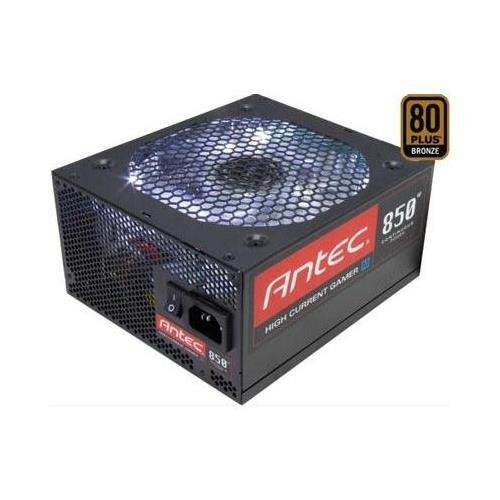
Слика 1: напред view of the Antec HCG-850M 850W Power Supply, showing the fan grille and modular cable connectors. This unit provides stable power to your computer components.
5. Поставување и инсталација
Follow these steps to install your Antec HCG-850M power supply:
- Подгответе го вашиот систем: Проверете дали вашиот компјутер е целосно исклучен и изваден од штекерот. Отворете го куќиштето на компјутерот.
- Отстранете го стариот напојувач (доколку е применливо): Disconnect all cables from your old power supply. Unscrew and remove the old PSU from the case.
- Монтирајте го новиот напојувач: Carefully place the Antec HCG-850M into the power supply bay of your computer case. Secure it with the provided mounting screws. Ensure the fan is oriented correctly for optimal airflow (typically facing down if there's a bottom vent, or up if not).
- Поврзете ги основните кабли:
- Поврзете го 24-пинскиот ATX кабел за напојување на матичната плоча.
- Connect the 4+4-pin or 8-pin EPS/CPU power cable to your motherboard.
- Поврзете модуларни кабли: Attach the necessary modular cables for your components (e.g., PCI-E for graphics cards, SATA for hard drives/SSDs, Peripheral for fans/accessories). Connect them securely to both the power supply and the respective components.
- Управување со кабли: Уредно поставете ги каблите за да го подобрите протокот на воздух и естетиката.
- Затворете го куќиштето и вклучете го: Close your computer case. Connect the AC power cord to the power supply and then to a wall outlet. Flip the power switch on the PSU to the 'ON' position. Power on your computer.
6. Упатства за работа
Once installed, the Antec HCG-850M operates automatically. Here are some general operating guidelines:
- Вклучување/исклучување: Use your computer's power button to turn the system on or off. The switch on the power supply itself should generally remain in the 'ON' position during normal operation.
- Стабилност на системот: Ensure your system is stable. If you experience unexpected shutdowns or reboots, refer to the troubleshooting section.
- Вентилација: Maintain good airflow around your computer case to prevent overheating of components, including the power supply.
7. Одржување
Правилното одржување може да го продолжи животниот век на вашето напојување:
- Чистење прашина: Periodically clean dust from the power supply's fan grille and the interior of your computer case using compressed air. Секогаш исклучувајте го кабелот за наизменична струја пред чистење.
- Проверка на кабел: Occasionally check that all power cables are securely connected to the power supply and components.
- Животна средина: Operate the power supply in a clean, dry environment with stable temperatures.
8 Смена на проблеми
If you encounter issues with your power supply, try the following steps:
8.1 Нема напојување во системот
- Ensure the AC power cord is securely plugged into both the wall outlet and the power supply.
- Check that the power supply's ON/OFF switch is in the 'ON' position.
- Verify all internal power cables (24-pin ATX, CPU, PCI-E) are correctly and firmly connected.
- Тестирајте го ѕидниот штекер со друг уред за да се осигурате дека има струја.
- If possible, test the power supply in another known working system or with a PSU tester.
8.2 System Instability or Random Shutdowns
- Осигурајте се дека барањата за напојување на вашиот систем не го надминуваат капацитетот од 850 W на напојувањето.
- Check for overheating components. Ensure proper case ventilation and clean any dust buildup.
- Verify all power connections are secure. Loose connections can cause intermittent power delivery.
- If the issue persists, it may indicate a fault with the power supply or another component. Consider professional diagnosis.
9. Спецификации
| Карактеристика | Детал |
|---|---|
| Број на модел | HCG-850M |
| Излезен Ватtage | 850 вати |
| Сертификација на ефикасност | 80 ПЛУС бронза |
| Форма фактор | ATX |
| Метод на ладење | Воздух (вентилатор од 135 мм) |
| Модуларен тип | Полумодуларен |
| Компатибилни уреди | Личен компјутер |
| Тежина на ставката | 9 фунти (приближно 4.08 кг) |
| ASIN | B00ESAI3M0 |
10. Гаранција и поддршка
Antec products are backed by a manufacturer's warranty. For specific warranty terms and conditions, please refer to the warranty card included with your product or visit the official Antec website. For technical support or customer service, please contact Antec directly through their official support channels.
Официјален Антек Webсајт: www.antec.com


