1. Вовед
The D-Link DIR-808L Wireless AC600 Dual-Band Cloud Router provides high-speed Wi-Fi connectivity with dual-band technology and Fast Ethernet ports. This device is designed to deliver a reliable networking experience for home use, supporting activities such as HD media streaming, online gaming, and web browsing. It includes security features and mydlink Cloud Services for remote network management.
The DIR-808L is backward compatible with existing Wi-Fi devices (802.11a/b/g/n) for seamless integration into your current network setup.
2. Содржина на пакетот
Потврдете дека вашиот пакет ги содржи следниве ставки:
- Wireless AC600 Dual Band Cloud Router (DIR-808L)
- Адаптер за напојување
- Етернет кабел
- Водич за брзо инсталирање
Доколку некој од горенаведените делови недостасува или е оштетен, ве молиме контактирајте го вашиот локален продавач на D-Link.
3. Минимални системски барања
To set up and use the D-Link DIR-808L router, ensure your computer meets the following minimum requirements:
- Оперативен систем: Windows® 8, Windows® 7, Windows Vista®, Windows® XP SP3, or Mac OS® X (v10.4 or higher)
- Web Прелистувач: Internet Explorer® v6, Mozilla® Firefox®, Google Chrome, or Safari 4 or higher
- Хардвер: Картичка за мрежен интерфејс (NIC)
For Internet access, you will also need:
- Кабелски или DSL модем
- Претплата со давател на интернет услуги (ISP)
4. Хардверот завршиview
Familiarize yourself with the physical components and ports of your DIR-808L router.

Слика 4.1: Предна страна view of the DIR-808L router with power and internet status indicators.

Слика 4.2: Rear panel of the DIR-808L router, detailing port layout.
Опис на задниот панел:
- LAN порти (1-4): Four Fast Ethernet ports for connecting wired devices such as computers, gaming consoles, or network storage.
- Интернет порта: Се поврзува со вашиот модем за пристап до интернет.
- Копче за ресетирање: Press and hold for 10 seconds to restore the router to factory default settings.
- Влез на енергија: Поврзете го вклучениот адаптер за напојување овде.
- Копче WPS: Use for easy, secure wireless connection to WPS-compatible devices.
5. Поставување и инсталација
Follow these steps to set up your D-Link DIR-808L router.
5.1 Физичка врска
- Исклучено: Исклучете го напојувањето од модемот и рутерот (доколку е применливо).
- Поврзете модем: Connect an Ethernet cable from your modem's Ethernet port to the Интернет port on the back of your DIR-808L router.
- Поврзување на компјутер (опционално): For initial setup, connect an Ethernet cable from your computer's Ethernet port to any of the LAN ports (1-4) on the back of your DIR-808L router. You can also connect wirelessly using the default Wi-Fi name and password found on the device label.
- Вклучување на модемот: Connect the power adapter to your modem and power it on. Wait for the modem's indicator lights to stabilize, indicating an active internet connection.
- Вклучување на рутерот: Поврзете го вклучениот адаптер за напојување со Влез на енергија on the back of your DIR-808L router and plug it into a power outlet. The power LED on the front of the router should illuminate.
5.2 Почетна конфигурација (Web Прелистувач)
After physical connections are made, configure your router using a web прелистувач.
- Отвори a web прелистувач (на пр., Chrome, Firefox, Edge) на компјутер поврзан со рутерот.
- Во лентата за адреси, напишете
http://dlinkrouter.localor192.168.0.1и притиснете Enter. - The D-Link Setup Wizard should appear. Follow the on-screen instructions to configure your Internet connection, wireless network name (SSID), and password.
- Create a unique password for your router's administration interface for security.
5.3 Quick Router Setup Mobile App
Alternatively, you can use the D-Link Quick Router Setup mobile app for convenient setup from your smartphone or tablet.
- Download the "D-Link QRS Mobile" app from the Apple App Store or Google Play Store.
- Поврзете го вашиот мобилен уред со стандардната Wi-Fi мрежа на рутерот (SSID и лозинката се на етикетата на рутерот).
- Launch the QRS Mobile app and follow the instructions to complete the setup.
6. Операција
This section covers the basic operation of your DIR-808L router.
6.1 Dual-Band Wireless Performance
DIR-808L работи на два фреквенциски опсези: 2.4 GHz и 5 GHz.
- Опсег од 2.4 GHz: Овозможува поширока покриеност и подобра пенетрација низ ѕидови, погодна за општа употреба на интернет и постари уреди.
- Опсег од 5 GHz: Offers faster speeds and less interference, ideal for high-bandwidth activities like HD video streaming and online gaming, but with a shorter range.
You can configure separate SSIDs (network names) for each band or use a single SSID for both, allowing the router to intelligently assign devices to the optimal band.
6.2 Жична конекција
The four Fast Ethernet LAN ports allow you to connect up to four wired devices directly to the router for stable and fast connections.
6.3 Управување со mydlink во облак
mydlink Cloud Services enable you to monitor and manage your network remotely from anywhere using the mydlink Lite app or the mydlink web портал.
- Далечински пристап: View connected devices, block unwanted users, and receive notifications.
- Родителска контрола: Manage internet access schedules and block specific webсајтови.
To use mydlink services, you will need to register your router with a mydlink account during or after the initial setup process.
6.4 Безжична безбедност
The DIR-808L supports WPA/WPA2 encryption to secure your wireless network. It is recommended to use WPA2-PSK (AES) for the strongest security.
- WPS (заштитено поставување преку Wi-Fi): Provides a simple way to connect WPS-compatible devices to your wireless network by pressing the WPS button on the router and the device.
7. Одржување
Правилното одржување обезбедува оптимални перформанси и долготрајност на вашиот рутер.
- Ажурирања на фирмверот: Периодично проверувајте ја поддршката на D-Link website for firmware updates. Updating firmware can improve performance, add new features, and fix security vulnerabilities. Instructions for updating firmware are typically provided with the update package.
- Чистење: Keep the router in a clean, dust-free environment. Use a soft, dry cloth to clean the exterior. Do not use liquid cleaners or aerosols.
- Поставување: Place the router in a central location, away from obstructions and devices that may cause interference (e.g., cordless phones, microwaves).
8 Смена на проблеми
This section addresses common issues you might encounter with your DIR-808L router.
8.1 Нема интернет конекција
- Проверете ги каблите: Проверете дали сите Ethernet кабли се безбедно поврзани со точните порти на рутерот и модемот.
- Циклус на напојување: Power off your modem, then your router. Wait 30 seconds, then power on your modem first. Once the modem is fully online (indicator lights stable), power on your router.
- Статус на модемот: Verify that your modem has an active internet connection. Check its indicator lights or consult your modem's manual.
- Поставки на интернет-провајдерот: Confirm your Internet Service Provider (ISP) settings are correctly entered in the router's web интерфејс.
8.2 Slow Wireless Speed or Poor Range
- Поставување на рутерот: Position the router in a central location, elevated, and away from large metal objects, concrete walls, and other electronic devices that may cause interference.
- Пречки: Other wireless devices (cordless phones, microwaves, Bluetooth devices) can interfere with Wi-Fi signals. Try changing the wireless channel in the router's settings.
- Употреба на двоен опсег: Connect devices that require high bandwidth (e.g., streaming devices) to the 5 GHz band, and other devices to the 2.4 GHz band.
- Фирмвер: Осигурајте се дека фирмверот на вашиот рутер е ажуриран.
8.3 Не можам да пристапам до рутерот Web Интерфејс
- IP адреса: Осигурајте се дека вашиот компјутер е подесен автоматски да добива IP адреса (DHCP).
- Точна адреса: Проверете уште еднаш дали ја внесувате точната адреса:
http://dlinkrouter.localor192.168.0.1. - Temporary Disable Firewall/Antivirus: Привремено оневозможете го секој заштитен ѕид или антивирусен софтвер на вашиот компјутер што може да го блокира пристапот.
- Ресетирај го рутерот: If all else fails, perform a factory reset by pressing and holding the Reset button on the back of the router for 10 seconds. Забелешка: Ова ќе ги избрише сите ваши прилагодени поставки.
9. Технички спецификации
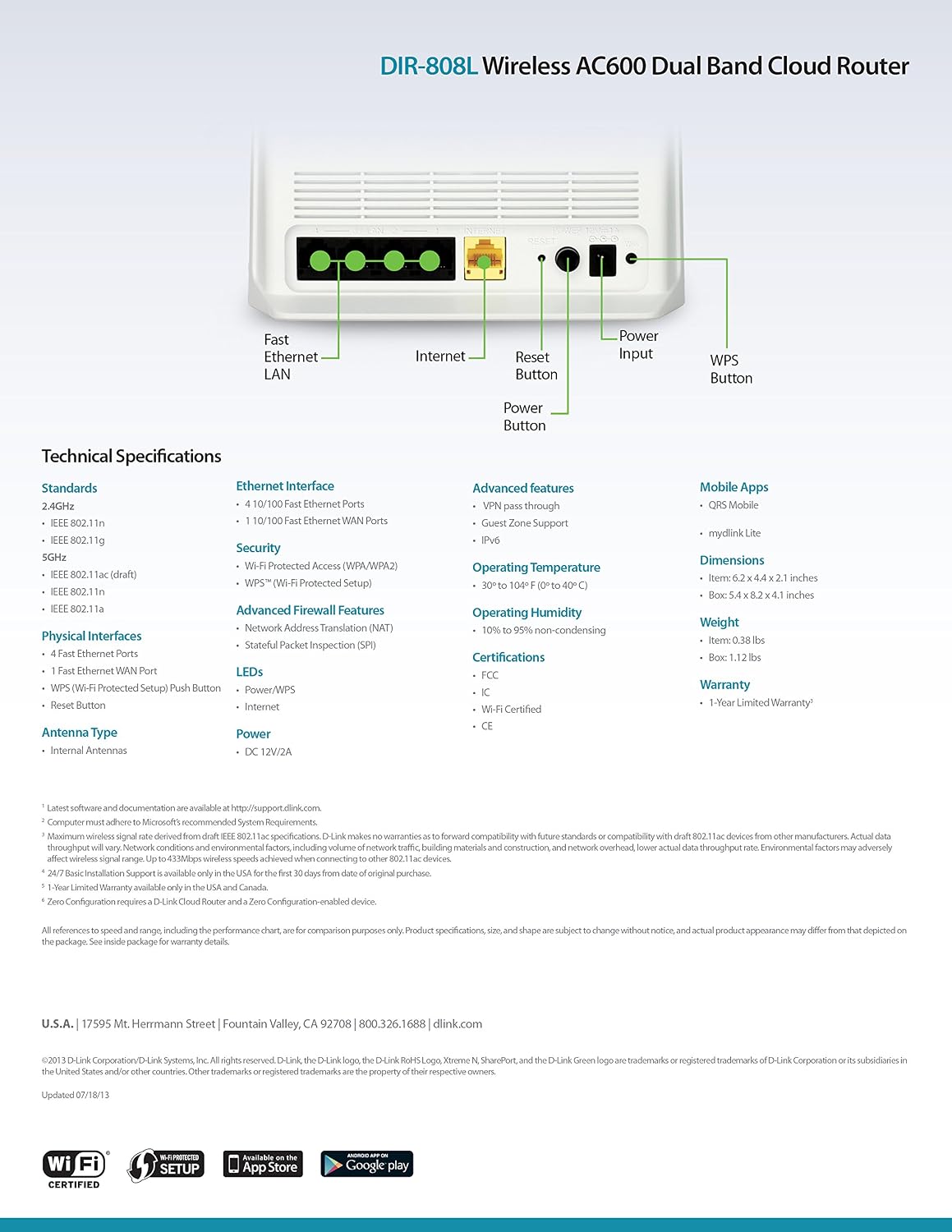
Слика 9.1: Technical specifications and rear panel diagram of the DIR-808L router.
| Карактеристика | Опис |
|---|---|
| Име на моделот | DIR-808L |
| Безжичен тип | 802.11ac (AC600), 802.11a/b/g/n |
| Класа на фреквентен опсег | Двоен опсег (2.4 GHz и 5 GHz) |
| Жична врска | 4 x Fast Ethernet LAN Ports, 1 x Fast Ethernet WAN Port |
| Безбедност | WPA/WPA2, WPS (Wi-Fi Protected Setup) |
| Компатибилност на оперативниот систем | Windows, Mac, Android |
| Димензии (ДxШxВ) | 2.1 x 6.1 x 4.4 инчи |
| Тежина на ставката | 7.2 унци (0.45 фунти) |
| Влез на енергија | 12V DC, 1A |
| Работна температура | 0 до 40°C (32 до 104°F) |
| Работна влажност | 10% до 95% некондензирачки |
| Сертификати | FCC, Wi-Fi Certified, CE |
10. Информации за гаранцијата
The D-Link DIR-808L Wireless AC600 Dual-Band Cloud Router comes with a 1-годишна Ограничена гаранција од датумот на купување. Оваа гаранција ги покрива дефектите на материјалите и изработката при нормална употреба.
For full warranty terms and conditions, please refer to the warranty card included with your product or visit the official D-Link webсајт.
Legal Disclaimer: D-Link is not responsible for honoring warranty claims from unauthorized resellers. Please contact the manufacturer directly for official warranty service.
11. Техничка поддршка
If you encounter problems that are not addressed in this manual, or require further assistance, please contact D-Link Technical Support.
- Поддршка за D-Link Webсајт: Посетете поддршка.dlink.com for FAQs, documentation, and firmware downloads.
- Phone Support (U.S.): You may contact D-Link customer support at 1-877-453-5465. Please have your product model number (DIR-808L) and serial number ready when calling.