1. Вовед
This manual provides comprehensive instructions for the installation, operation, and maintenance of your Swann SWDVK-163208S-US 3200S 16-Channel 960H DVR Security System. Please read this manual thoroughly before using the product to ensure proper setup and functionality. Keep this manual for future reference.
The system includes a 16-channel 960H Digital Video Recorder (DVR) with a pre-installed 1TB hard drive and eight 700TVL security cameras designed for both indoor and outdoor use. It supports continuous recording, motion detection, and remote viewспособности за работа.
2. Информации за безбедност
- Осигурајте се дека сите напојувачки приклучоци се безбедни и правилно оценети за уредот.
- Do not expose the DVR or cameras to water or excessive moisture.
- Избегнувајте поставување на DVR-от на директна сончева светлина или во близина на извори на топлина.
- Use only the power adapters supplied with the system.
- Do not attempt to open or service the DVR or cameras yourself. Refer all servicing to qualified personnel.
- Keep cables organized to prevent tripping hazards and ensure proper ventilation.
3. Содржина на пакетот
Verify that all items listed below are present in your package. If any items are missing or damaged, contact Swann customer support.
- Swann SWDVK-163208S-US 16-Channel 960H DVR with 1TB HDD
- 8 x 700TVL Security Cameras
- 8 x BNC Cables (60ft/18m)
- Power Adapters for DVR and Cameras
- Етернет кабел
- HDMI кабел
- USB глушец
- Монтирачки завртки и приклучоци
- Водич за брз почеток
- Налепници за спречување кражба
4. Системот завршиview
4.1 DVR Front Panel
The front panel of the DVR provides access to essential controls and indicators.
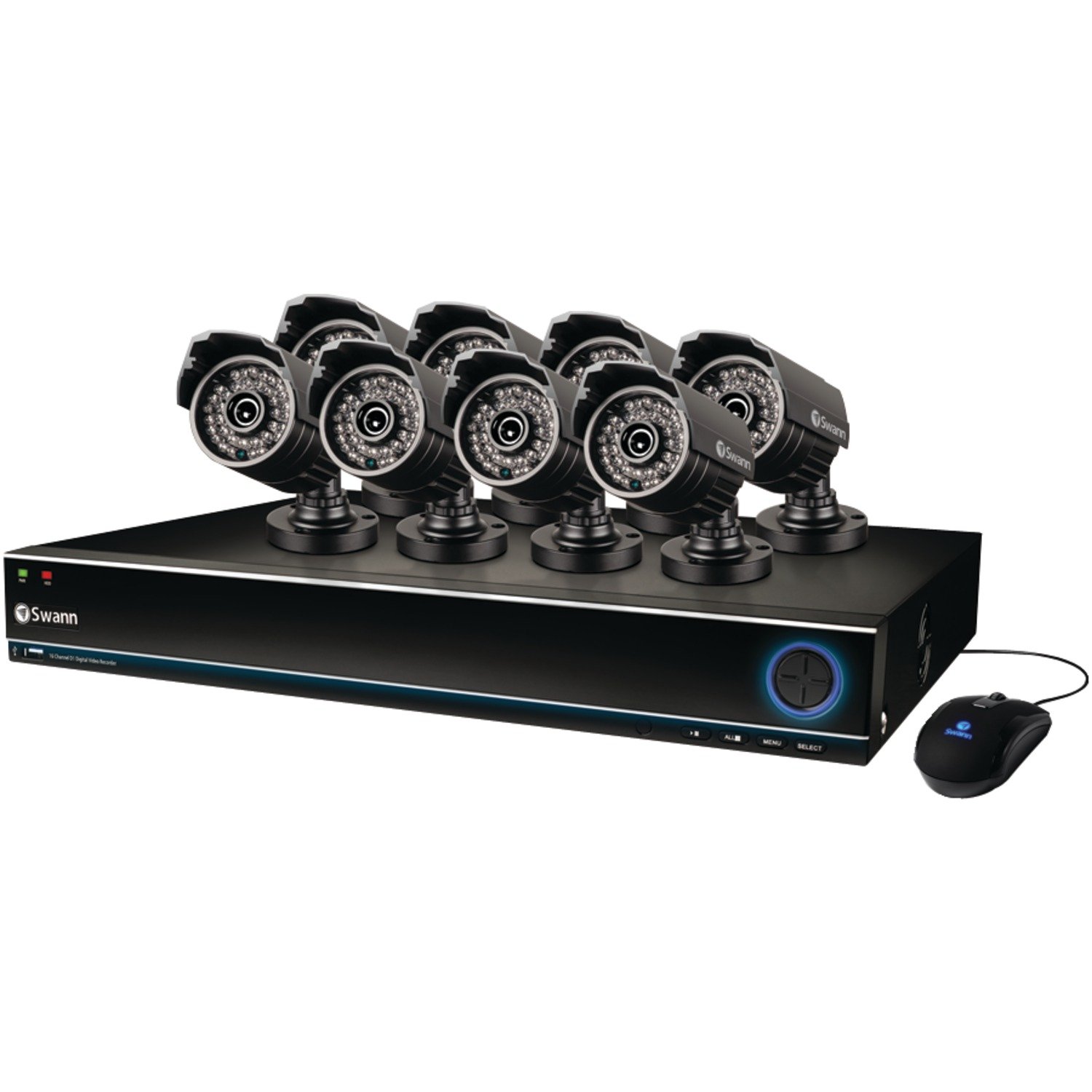
Image: The Swann SWDVK-163208S-US security system, showing the DVR unit and several cameras. The DVR features a blue-lit front panel with control buttons and status indicators.
- Индикатор за моќност: Illuminates when the DVR is powered on.
- Индикатор за HDD: Трепка кога тврдиот диск е активен.
- Мрежен индикатор: Означува мрежна поврзаност.
- USB порта: For connecting a USB mouse or for data backup.
- Контролни копчиња: Navigate menus and control playback.
4.2 DVR Rear Panel
The rear panel contains all the necessary ports for connecting cameras, monitors, and network cables.
- Video Input (BNC): 16 ports for connecting security cameras.
- Video Output (HDMI/VGA): For connecting a monitor or TV.
- Аудио влез/излез (RCA): For connecting microphones and speakers (if supported).
- Етернет порта (RJ45): За мрежно поврзување.
- USB порти: Дополнителни USB порти за периферни уреди.
- eSATA порт: For connecting an external hard drive for expanded storage.
- Влез на енергија: For connecting the DVR power adapter.
4.3 Карактеристики на камерата
The included 700TVL cameras offer clear video surveillance with night vision capabilities.
- Резолуција: 700TVL (Television Lines) for detailed images.
- Ноќно гледање: Infrared LEDs provide visibility up to 82ft (25m) in low light or complete darkness.
- Отпорен на временски услови: Designed for both indoor and outdoor installation.
- Монтирање: Adjustable brackets for flexible positioning.
5. Поставување
5.1 Поврзување на DVR
- Connect the included USB mouse to one of the USB ports on the DVR.
- Connect the HDMI cable from the DVR's HDMI output to an HDMI input on your TV or monitor. Alternatively, use a VGA cable for VGA connections.
- За далечински viewing, connect an Ethernet cable from the DVR's Ethernet port to your router or network switch.
5.2 Поврзување на камери
- Mount each camera in your desired location using the provided screws and plugs. Ensure the camera has a clear field of view и е заштитен од директен удар.
- Connect one end of the BNC cable to the camera's video output.
- Connect the other end of the BNC cable to a video input port on the DVR (e.g., Video In 1, Video In 2, etc.).
- Connect the camera's power input to the power splitter cable, then connect the power adapter to the splitter and a power outlet.
5.3 Вклучување
- Connect the DVR power adapter to the DVR's power input and then to a power outlet.
- The DVR will power on automatically. The power indicator light on the front panel will illuminate.
- Wait for the system to boot up. The Swann logo will appear on your connected monitor, followed by the live view приказ.
5.4 Почетна конфигурација
Upon first boot-up, the DVR will guide you through an initial setup wizard.
- Избор на јазик: Изберете го саканиот јазик.
- Датум и време: Set the correct date, time, and time zone. This is crucial for accurate recording timestamps.
- Мрежни поставки: Configure network settings (DHCP is usually sufficient for automatic setup).
- Поставување лозинка: Create a strong password for the administrator account to secure your system.
- Формат на хард диск: The system may prompt to format the hard drive. Confirm to proceed.
6. Ракување со системот
6.1 Во живо View
After initial setup, the DVR will display the live view from all connected cameras. You can switch between single-camera view, multi-camera grids (e.g., 4-channel, 8-channel, 16-channel), and sequence modes using the on-screen menu or front panel controls.
6.2 Режими на снимање
DVR-от поддржува различни режими на снимање:
- Континуирано снимање: Снимање 24/7, пребришување на најстарата хранаtage кога хард дискот е полн.
- Снимање на откривање на движење: Снима само кога ќе се открие движење во камерата view. This conserves hard drive space. Sensitivity and detection areas can be configured for each camera.
- Закажано снимање: Records during specific times of the day or week.
- Рачно снимање: Start and stop recording manually from the DVR interface.
Access recording settings via the DVR's main menu: Menu > Record > Record Schedule.
6.3 Репродукција
За повторноview снимен footage:
- Од во живо view, right-click with the mouse to open the main menu.
- Изберете Репродукција.
- Choose the desired date and camera channel(s).
- Use the timeline to navigate through recorded events. Different colors on the timeline indicate different recording types (e.g., continuous, motion).
- Use the playback controls (play, pause, fast forward, rewind) to review footage.
6.4 Резервна копија
You can back up important video footage to a USB flash drive or external hard drive.
- Insert a USB storage device into a USB port on the DVR.
- Одете на Menu > Backup.
- Select the camera channel, date, and time range for the footage you wish to back up.
- Choose the backup device and file format (e.g., AVI).
- Кликнете Започнете to begin the backup process.
6.5 Далечински управувач Viewing (SwannLink & SwannView)
The SwannLink and SwannView applications allow you to view your cameras remotely from a smartphone or tablet.
- Ensure your DVR is connected to the internet via the Ethernet port.
- Download the SwannView апликација од продавницата за апликации на вашиот уред.
- Open the app and follow the on-screen instructions to add your DVR. This typically involves scanning a QR code displayed on the DVR's monitor (Menu > Network > SwannLink) or manually entering the device ID.
- Enter the DVR's username and password when prompted.
- Сега треба да бидете во можност view живеј фаоtage and access playback remotely.
7. Одржување
7.1 Управување со хард диск
Хард дискот од 1TB автоматски ќе ја пребрише најстарата датотека за храна.tage when full. To ensure optimal performance, it is recommended to periodically check the hard drive status via Menu > HDD > Disk Manage. You can also connect an external hard drive to the eSATA port for additional storage capacity.
7.2 Cleaning Cameras
Периодично чистете ги леќите на фотоапаратот со мека, дamp крпа за отстранување прашина, нечистотија или дамки од вода што може да го заматат viewНе користете груби хемикалии или абразивни материјали.
7.3 Ажурирања на фирмверот
Swann may release firmware updates to improve system performance or add new features. Check the Swann support website for the latest firmware for your model. Follow the instructions provided with the firmware update carefully to avoid damaging the DVR.
8 Смена на проблеми
| Проблем | Можна причина | Решение |
|---|---|---|
| Нема слика на мониторот | Loose video cable, incorrect input selected on monitor, DVR not powered on. | Проверете ги поврзувањата на HDMI/VGA кабелот. Осигурајте се дека мониторот е на правилен влез. Проверете го напојувањето на DVR. |
| Нема слика од камерата | Loose BNC cable, camera power issue, faulty camera. | Check BNC and power connections for the specific camera. Test camera with a known working cable/power supply. |
| DVR не снима | Recording schedule not set, hard drive full or faulty, motion detection not configured. | Check recording schedule. Verify hard drive status. Ensure motion detection is enabled and configured correctly. |
| Не може view од далечина | No network connection, incorrect network settings, app configuration error. | Verify DVR has internet access. Check network settings (DHCP). Reconfigure the DVR in the SwannView апликација. |
| Purple image on camera | IR filter stuck, camera malfunction. | Power cycle the camera. If the issue persists, the camera may be faulty and require replacement. |
9. Спецификации
- Број на модел: SWDVK-163208S-US
- Влези за видео: 16 Channels BNC
- Видео излез: hdmi, vga
- Резолуција на екранот: Up to 1080p (HDMI)
- Резолуција на снимање: 960H (960x576/960x480)
- Хард диск: 1TB SATA HDD (expandable via eSATA)
- Формат на компресија: H.264
- Мрежен интерфејс: RJ45 Ethernet порта
- USB интерфејс: 3 x USB 2.0 порти
- Резолуција на камерата: 700TVL
- Camera Night Vision: До 82 стапки (25 м)
- Camera Weatherproof Rating: IP66 (за надворешна употреба)
- Dimensions (DVR): 22.5 x 15.3 x 8.1 инчи (приближно)
- Weight (DVR): 14 фунти (приближно)
- Извор на енергија: DC 12V
10. Информации за гаранцијата
Swann products are covered by a limited warranty. The specific terms and duration of your warranty may vary by region and product. Please refer to the warranty card included with your product or visit the official Swann webстраница за детални информации за гаранцијата и процедури за регистрација. Зачувајте го доказот за купување за рекламации за гаранција.
11. Поддршка
For technical assistance, product support, or to download the latest software and manuals, please visit the official Swann support website. You can typically find FAQs, troubleshooting guides, and contact information for customer service there. Have your product model number (SWDVK-163208S-US) ready when contacting support.
Поддршка на Сван Webсајт: https://www.swann.com/us/support


