1. Вовед
Welcome to the user manual for your new Salora SM508 mobile phone. This guide provides essential information to help you set up, operate, maintain, and troubleshoot your device. Please read this manual carefully to ensure proper use and to maximize the performance and longevity of your phone.
2. Производот завршиview
The Salora SM508 is a compact and reliable basic mobile phone designed for essential communication. It features a color display, a comfortable keypad, and dual SIM support.
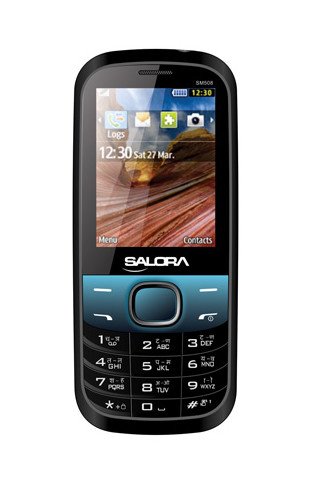
Оваа слика го прикажува предниот дел view of the Salora SM508 mobile phone. It features a color display at the top, a central navigation button, and a standard alphanumeric keypad below. The phone has a black body with blue accents around the navigation cluster.
3. Поставување
3.1 Вметнување на SIM картичка(и)
- Turn off the phone and remove the back cover.
- Внимателно отстранете ја батеријата.
- Locate the SIM card slots. The Salora SM508 supports dual SIM cards.
- Insert your SIM card(s) into the designated slot(s) with the gold contacts facing down. Ensure they are securely seated.
3.2 Inserting Battery
- Align the battery contacts with the contacts in the phone's battery compartment.
- Gently press the 1800 mAh Li-Ion battery into place until it clicks.
- Вратете го задниот капак, осигурувајќи се дека е безбедно прицврстен.
3.3 Inserting Memory Card (Optional)
- With the back cover and battery removed, locate the memory card slot.
- Insert a microSD card (up to 8GB) into the slot with the gold contacts facing down.
- Заменете ја батеријата и задниот капак.
3.4 Полнење на уредот
- Поврзете го полначот со приклучокот за полнење на вашиот телефон.
- Приклучете го полначот во штекер.
- The battery indicator on the screen will show the charging status. Charge the phone fully before first use.
3.5 Initial Power On/Off
- За вклучување: Притиснете и задржете го копчето за вклучување/завршување на повик додека не светне екранот.
- За исклучување: Притиснете го и задржете го копчето за вклучување/завршување на повик додека не се појават опциите за исклучување, а потоа изберете „Исклучи“.
4. Упатства за работа
4.1 Основна навигација
- Use the navigation keys (up, down, left, right) to move through menus and options.
- Press the central 'OK' or 'Select' button to confirm a selection.
- Use the 'Back' or 'Clear' button to return to the previous screen or delete characters.
4.2 Остварување и примање повици
- За да остварите повик: Внесете го телефонскиот број користејќи ја тастатурата и притиснете го зеленото копче за повик.
- За да добиете повик: When the phone rings, press the Green Call button to answer.
- За да завршите повик: Притиснете го црвеното копче за завршување на повикот.
4.3 Испраќање и примање на SMS пораки
- Одете во менито „Пораки“.
- Select 'Write Message' or 'New SMS'.
- Внесете ја вашата порака користејќи ја тастатурата.
- Add the recipient's number or select from contacts.
- Притиснете „Испрати“.
4.4 Употреба на камерата
- Access the camera application from the main menu.
- The phone features a 1.3 MP primary (rear) camera.
- Кадрирај ја снимката користејќи го екранот.
- Press the 'OK' or 'Capture' button to take a photo.
4.5 Multimedia and Connectivity
- Аудио Jackек: The phone includes a 3.5 mm audio jack for connecting headphones or external speakers.
- Bluetooth: Enable Bluetooth from the settings menu to connect to compatible devices for file пренос или комуникација без раце.
- GPRS: The phone supports GPRS for basic internet connectivity. Consult your network provider for data plan details.
5. Одржување
5.1 Чистење на вашиот уред
- Користете мека, сува крпа без влакненца за чистење на екранот и куќиштето на телефонот.
- Избегнувајте употреба на груби хемикалии, растворувачи за чистење или силни детергенти.
- Do not allow water or liquids to enter the phone.
5.2 Грижа за батерии
- Избегнувајте изложување на батеријата на екстремни температури (топли или ладни).
- Не ја дупнувајте, расклопувајте и не ја поврзувајте батеријата.
- If the battery is damaged or swollen, discontinue use immediately and replace it with an authorized Salora battery.
5.3 Складирање
- Чувајте го телефонот на ладно и суво место, подалеку од директна сончева светлина и влага.
- If storing for an extended period, ensure the battery is partially charged (around 50%) to preserve its lifespan.
6 Смена на проблеми
If you encounter issues with your Salora SM508, please refer to the following common solutions:
- Телефонот не се вклучува:
Ensure the battery is charged. Connect the charger and wait a few minutes before attempting to power on. Check if the battery is properly inserted. - Нема мрежен сигнал:
Check if your SIM card is correctly inserted. Ensure you are in an area with network coverage. Try restarting the phone. - Не можам да остварувам/примам повици:
Verify that your SIM card is active and has sufficient balance/plan. Check network signal strength. Ensure call barring or flight mode is not enabled. - Проблеми со полнењето:
Ensure the charger is properly connected to both the phone and the power outlet. Try using a different compatible charger. Check the charging port for any debris. - Тастатурата не реагира:
Рестартирајте го телефонот. Ако проблемот продолжи, проверете дали тастатурата нема физички оштетувања.
If the problem persists after trying these steps, please contact Salora customer support.
7. Спецификации
Below are the detailed technical specifications for the Salora SM508 mobile phone:
| Карактеристика | Спецификација |
|---|---|
| Бренд | Салора |
| Модел | SM508 |
| Оперативен систем | Android 5.1, Android v5 1 OS (Note: This specification appears to be an error in the source data for a basic phone with a keypad interface. The phone operates on a proprietary feature phone OS.) |
| Големина на екранот | 6.1 Centimetres (2.4" TFT Screen) |
| Резолуција | 320 x 240 пиксели |
| Примарна камера | 1.3 MP (задна) |
| Батерија | 1800 mAh, Li-Ion |
| Капацитет за складирање на меморија | Може да се прошири до 8 GB |
| Поддршка за SIM | Двојна СИМ-картичка |
| Технологии за поврзување | Bluetooth, GPRS |
| Аудио Џек | 3.5 мм |
| Интерфејс на уредот - Примарен | Тастатура |
| Форма фактор | Бар |
| Боја | Црно, сино |
| Тежина на ставката | 140 гр |
| Димензии на пакетот | 14 x 9.4 x 6.2 cm |
| Датум прв на располагање | 18 февруари 2014 година |
8. Гаранција и поддршка
8.1 Информации за гаранцијата
The Salora SM508 comes with a 1-годишна гаранција на производителот за уредот од датумот на купување. Додатоците во кутијата, вклучувајќи ги и батериите, се покриени со 6-месечна гаранција на производителот од датумот на купување. Оваа гаранција ги покрива производствените дефекти и проблемите што произлегуваат од нормална употреба.
Ве молиме зачувајте ја вашата сметка како доказ за купување за гаранциски побарувања.
8.2 Поддршка за корисници
For any technical assistance, warranty claims, or further inquiries regarding your Salora SM508 mobile phone, please contact Salora customer support directly. Refer to the packaging or the official Salora webстраница за најактуелните информации за контакт.


