1. Вовед и повеќеview
The Chief TA501 In-Wall Swing Arm Accessory is designed to provide a recessed mounting solution for compatible Chief THINSTALL swing arm mounts. This accessory allows your display to sit flush with the wall when retracted, offering a clean, low-profile aesthetic while maintaining full articulation capabilities of the swing arm mount. It is suitable for displays ranging from 26 to 52 inches and supports a maximum weight of 75 lbs (34 kg) when used with a compatible THINSTALL mount such as the TS318TU.
Key features include large conduit and gang knock-outs for simplified cable management and an included black trim kit to ensure a finished, professional appearance after installation.
2. Информации за безбедност
Важно: Read all instructions thoroughly before beginning installation. Failure to follow these instructions may result in property damage, serious injury, or death.
- Ensure the wall structure is capable of safely supporting the combined weight of the TA501 accessory, the swing arm mount, and the display. Consult a structural engineer if unsure.
- Use appropriate fasteners for securing the TA501 to wall studs. Fasteners are not included and must be purchased separately based on your wall construction.
- Do not exceed the maximum weight capacity of 75 lbs (34 kg) for the combined display and mount.
- Инсталирањето треба да го изврши квалификуван персонал.
- Verify that no electrical wires, plumbing, or other obstructions are present within the wall cavity before cutting or drilling.
3. Содржина на пакетот
Carefully unpack the box and ensure all items are present and undamaged. If any parts are missing or damaged, contact Chief customer service immediately.
- Chief TA501 In-Wall Swing Arm Accessory
- Црн комплет за трим
Забелешка: A compatible Chief THINSTALL swing arm mount (e.g., TS318TU), display mounting hardware, and wall fasteners are sold separately and are required for a complete installation.
4. Поставување и инсталација
The TA501 accessory is designed for in-wall installation, providing a recessed space for a compatible swing arm mount. This allows the display to be pushed back into the wall cavity, achieving a flush appearance.
Чекори за инсталација:
- Подготовка на шуплината на ѕидот: Identify the desired location for the mount. Use a stud finder to locate wall studs. Carefully mark and cut an opening in the drywall or other wall material that is suitable for the TA501 unit. Ensure the opening is level and plumb.
- Secure the TA501: Insert the TA501 in-wall box into the prepared opening. Align the mounting holes with the wall studs. Secure the unit to the wall studs using appropriate fasteners (not included). Ensure the accessory is firmly attached and level.
- Integrate Swing Arm Mount: Attach your compatible Chief THINSTALL swing arm mount (e.g., TS318TU) to the TA501 in-wall accessory. Follow the specific installation instructions provided with your swing arm mount for this step. Ensure all connections are secure.
- Управување со кабли: Utilize the large conduit and gang knock-outs on the TA501 to route power and video cables through the wall and into the accessory. This helps conceal cables and maintain a clean installation.
- Attach Display: Mount your television or display to the swing arm mount according to the mount's instructions. Ensure all connections are secure and the display is properly balanced.
- Apply Trim Kit: Once the installation is complete and the display is mounted, attach the included black trim kit around the perimeter of the TA501. This trim kit covers the edges of the wall opening, providing a finished and aesthetic appearance.
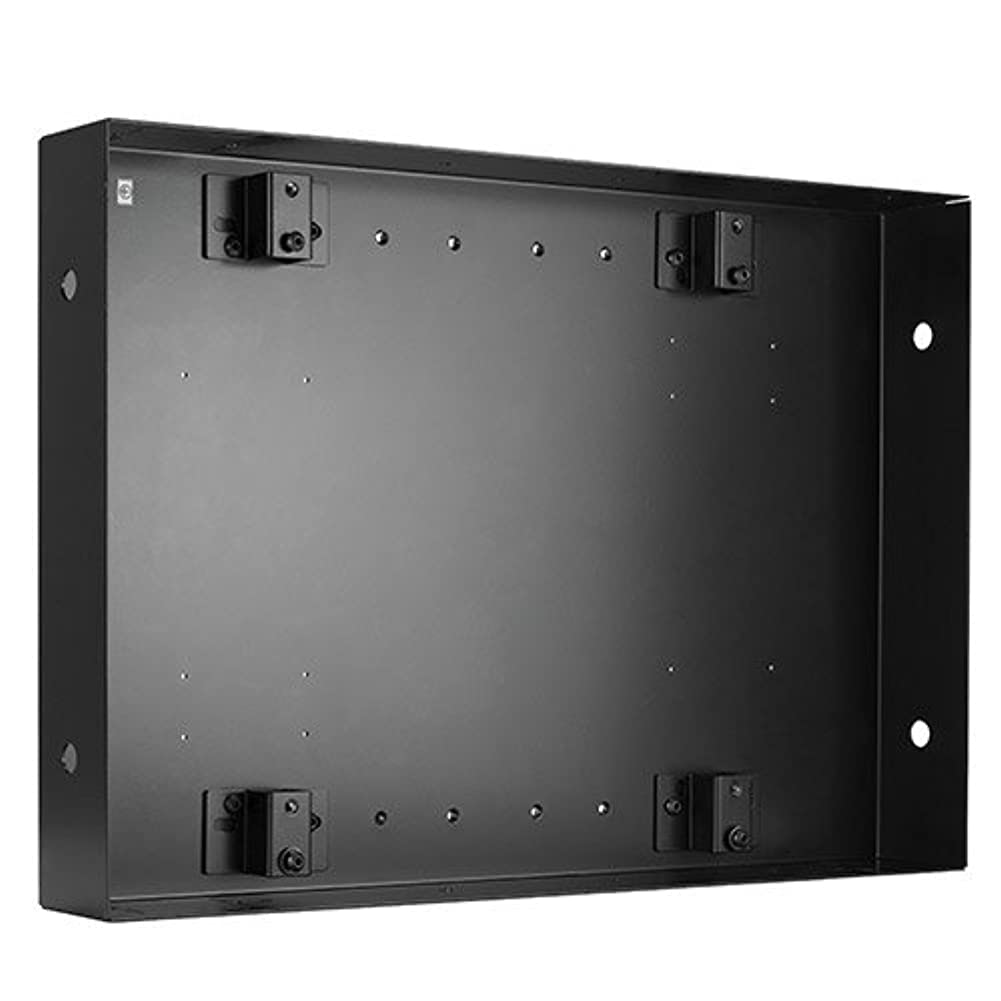
This image illustrates the Chief TA501 In-Wall Swing Arm Accessory installed within a wall, with a Chief TS318TU swing arm mount attached and extended. The in-wall box provides a recessed space for the swing arm, allowing the display to sit flush with the wall when retracted. Note the various mounting points and cable management options within the accessory.
5. Упатства за работа
Once installed, the Chief TA501 accessory enables the attached THINSTALL swing arm mount to function as designed, allowing for flexible display positioning while maintaining a low-profile кога е повлечен.
Движење:
To adjust the display's position, grasp the sides of the display firmly and gently pull it away from the wall. The swing arm will extend, allowing for tilt, swivel, and extension adjustments as supported by your specific THINSTALL mount. To return the display to its flush position, gently push it back towards the wall until it is fully recessed within the TA501 accessory. Ensure no cables are pinched during movement.
6. Одржување
Regular maintenance helps ensure the longevity and safe operation of your Chief TA501 accessory.
- Периодична инспекција: Periodically inspect all mounting hardware and connections to ensure they remain secure. Tighten any loose fasteners.
- Чистење: Clean the exterior surfaces of the trim kit and any exposed parts with a soft, dry cloth. Avoid using abrasive cleaners, solvents, or harsh chemicals, as these may damage the finish.
- Подмачкување: The swing arm mechanism of your THINSTALL mount may require periodic lubrication. Refer to the specific instructions for your THINSTALL mount for lubrication guidelines.
7 Смена на проблеми
If you encounter issues with your Chief TA501 accessory, refer to the following troubleshooting guide:
- Issue: Display does not sit flush with the wall when retracted.
Решение: Ensure the swing arm mount is fully retracted into the TA501 accessory. Verify that no cables or other obstructions are preventing the full retraction of the swing arm. Check that the depth of your display and the THINSTALL mount are compatible with the TA501's recess. - Issue: Mount feels loose or unstable.
Решение: Immediately cease use. Re-check all mounting fasteners securing the TA501 to the wall studs and the swing arm mount to the TA501. Ensure all fasteners are tightened to the manufacturer's specifications. Verify that the wall structure is adequate to support the combined weight of the accessory, mount, and display. If the issue persists, consult a qualified installer or Chief technical support. - Issue: Difficulty moving the swing arm.
Решение: Refer to the instruction manual for your specific Chief THINSTALL swing arm mount. The TA501 accessory itself does not contain moving parts that affect arm movement.
8. Спецификации
| Име на брендот | Главен |
| Број на модел | TA501 |
| Тежина на ставката | 34.9 фунти (15.8 кг) |
| Димензии на производот | 5 x 20 x 36 инчи (12.7 x 50.8 x 91.4 см) |
| Боја | Црното |
| Посебни карактеристики | Swing Arm Accessory, In-Wall Design |
| Компатибилност | Designed for Chief THINSTALL swing arm mounts (e.g., TS318TU) |
| Supported Display Size | 26 to 52 inches (with compatible THINSTALL mount) |
| Максимална тежина капацитет | 75 lbs (34 kg) (with compatible THINSTALL mount) |
| Во согласност со TAA | Да |
9. Гаранција и поддршка
For detailed warranty information, product registration, and technical support, please visit the official Chief website or contact Chief customer service directly. It is recommended to retain your purchase receipt as proof of purchase for any warranty claims.


