Вовед
This manual provides comprehensive instructions for the setup, operation, maintenance, and troubleshooting of your Nixplay Original 18 Inch Digital WiFi Photo Frame, Model W18A. Please read this manual thoroughly before using your device to ensure optimal performance and longevity.

Слика: напред view of the Nixplay Original 18 Inch Digital WiFi Photo Frame, showcasing a vibrant image of a family.
Што има во кутијата
Upon unboxing your Nixplay Digital Photo Frame, verify that all components are present:
- Digital Photo Frame (Nixplay Original 18 Inch)
- Адаптер за напојување
- Далечински управувач
- Застанете

Слика: Под агол view of the Nixplay Original 18 Inch Digital WiFi Photo Frame, highlighting its slim profile и прикажување.
Поставување
1. Прикачување на држачот
Locate the circular stand. Align the stand with the mounting point on the back of the frame. Insert and rotate the stand until it securely locks into place. This stand allows for both landscape and portrait orientation.
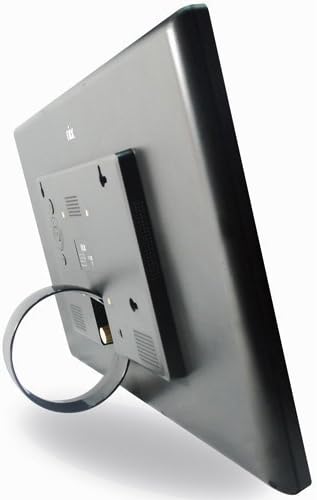
Слика: Заден дел view of the Nixplay Digital Photo Frame, illustrating the attachment point for the circular stand.
2. Powering On the Frame
- Поврзете го адаптерот за напојување со DC IN приклучокот на задната страна од рамката.
- Приклучете го адаптерот за напојување во ѕиден штекер.
- The frame will automatically power on and display the Nixplay logo.
3. Првично поврзување со Wi-Fi
Follow the on-screen prompts to connect your frame to a Wi-Fi network. You will need your Wi-Fi network name (SSID) and password. Use the remote control to navigate the on-screen keyboard.
4. Creating a Nixplay Account
To manage your frame and upload photos, you will need to create a Nixplay account. This can be done via the Nixplay mobile app (available for iOS and Android) or through the Nixplay website. Follow the instructions provided by the app or website to link your frame to your account.
Ракување со рамката
Поставување фотографии и видеа
Photos and videos can be uploaded to your Nixplay frame through several methods:
- Nixplay Mobile App: Easily upload photos and short videos directly from your smartphone.
- Е-пошта: Each Nixplay frame has a unique email address. Send photos directly to your frame via email.
- Никсплеј Webсајт: Access your account online to upload, organize, and manage playlists. Integration with Google Photos, Dropbox, Facebook, and Instagram is supported.
- USB Drive / SD Card: The frame supports local playback from USB drives and SD cards. Insert the storage device into the corresponding port on the frame.
Управување со плејлисти
Organize your content into playlists using the Nixplay app or website. You can assign specific playlists to display on your frame. Multiple playlists can be active simultaneously, and you can switch between them using the remote control.
Функционалност на сензорот за движење
The Nixplay W18A features a motion sensor that automatically turns the frame on when motion is detected and off when no motion is detected for a set period. This feature helps conserve energy. You can enable or disable this function and adjust its sensitivity through the frame's settings menu or the Nixplay app.

Image: The Nixplay Digital Photo Frame seamlessly integrated into a home environment, placed on a shelf.
Користење на далечинскиот управувач
The included remote control allows you to navigate menus, adjust settings, switch playlists, and control playback. Ensure the remote is pointed towards the sensor on the frame for proper operation.
Одржување
Чистење на рамката
За чистење на екранот, нежно избришете го со мека крпа што не остава влакненца. За тврдокорни дамки, малку избришете гоampen the cloth with water or a screen-safe cleaning solution. Avoid using harsh chemicals or abrasive materials. Clean the frame's body with a dry, soft cloth.
Софтверски ажурирања
Nixplay regularly releases software updates to improve performance and add new features. Ensure your frame is connected to Wi-Fi to receive these updates automatically. You can check for updates manually through the frame's settings menu.
Решавање проблеми
| Проблем | Можна причина | Решение |
|---|---|---|
| Рамката не се вклучува. | Адаптерот за напојување не е поврзан или штекерот е неисправен. | Проверете дали адаптерот за напојување е безбедно поврзан со рамката и со функционален штекер. Обидете се со друг штекер. |
| Не може да се поврзе на Wi-Fi. | Неточна лозинка, слаб сигнал или проблем со мрежата. | Double-check the Wi-Fi password. Move the frame closer to the router. Restart your router. |
| Photos are not displaying. | No photos uploaded, incorrect playlist selected, or network issue. | Verify photos are uploaded to your Nixplay account and assigned to an active playlist. Ensure the frame is connected to Wi-Fi. |
| Далечинскиот управувач не работи. | Low battery or obstructed sensor. | Replace the remote control battery (1 Lithium Metal battery required). Ensure no obstructions between the remote and the frame's sensor. |
Спецификации
- Модел: W18A
- Големина на екранот: 18.5 инчи
- Резолуција: 720 стр
- Димензии на производот: 18.39 x 1.3 x 11.42 инчи
- Тежина на ставката: 6.17 фунти
- Компатибилни уреди: Smartphone (via Nixplay App)
- Поврзување: Wi-Fi
- Складирање: 10GB Online Storage (with Nixplay account), supports USB Drive and SD Card
- Карактеристики: Сензор за движење
- Моќност: Адаптер за напојување со наизменична струја
- Далечинска батерија: 1 Lithium Metal battery (required for remote)

Image: Technical diagram illustrating the precise dimensions of the Nixplay Digital Photo Frame.
Гаранција и поддршка
Информации за гаранцијата
For detailed warranty information regarding your Nixplay Original 18 Inch Digital WiFi Photo Frame, please refer to the warranty card included with your product or visit the official Nixplay webлокација. Условите за гаранција може да се разликуваат во зависност од регионот.
Поддршка за корисници
Should you encounter any issues not covered in this manual or require further assistance, please contact Nixplay Customer Service. Support resources, including FAQs and contact information, are available on the official Nixplay webсајт:


