1. Вовед
This manual provides essential information for the safe and efficient installation, operation, and maintenance of your APEX AL-A300ATX 300W ATX12V Power Supply. Please read this manual thoroughly before installation and retain it for future reference.
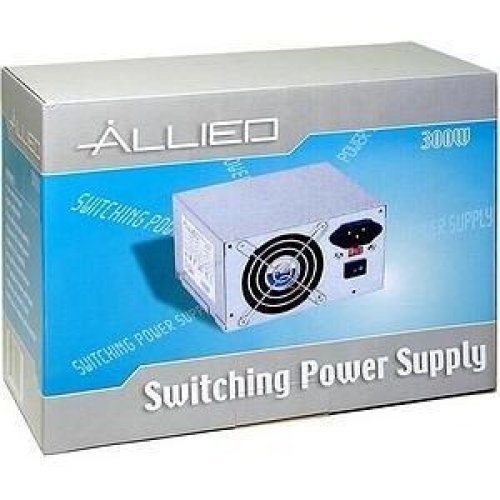
Image: The AL-A300ATX 300W ATX12V Power Supply shown in its retail packaging, indicating it is a "Switching Power Supply" from "ALLIED".
2. Информации за безбедност
Always observe the following safety precautions to prevent injury or damage to the power supply or other components:
- Пред инсталација или отстранување, осигурајте се дека напојувањето со електрична енергија е исклучено од штекерот за наизменична струја.
- Не го отворајте напојувањето casing. Висок волуменtages are present inside, even when disconnected. There are no user-serviceable parts.
- Install the power supply in a well-ventilated area. Do not block ventilation openings.
- Избегнувајте изложување на напојувањето на влага или екстремни температури.
- Use only the cables provided or approved for use with this power supply.
- If the power supply is damaged or malfunctioning, discontinue use immediately and contact support.
3. Содржина на пакетот
Проверете дали сите артикли се присутни во пакувањето:
- APEX AL-A300ATX 300W ATX12V Power Supply Unit
- AC Power Cord (may vary by region)
- Завртки за монтирање
- Упатство за употреба (овој документ)
4. Поставување и инсталација
Follow these steps to install the power supply into your computer system:
- Подготовка:
- Исклучете го компјутерот и исклучете го кабелот за наизменична струја од ѕидниот штекер.
- Open your computer case. Refer to your computer case manual for specific instructions.
- Ако заменувате постоечко напојување, исклучете ги сите кабли од старото напојување и извадете го од куќиштето.
- Монтирање на напојувањето:
- Carefully slide the AL-A300ATX power supply into the designated PSU bay in your computer case.
- Порамнете ги дупките за завртките на напојувањето со оние на куќиштето.
- Обезбедете го напојувањето со помош на обезбедените завртки за монтирање.
- Поврзување кабли:
- 24-Pin ATX Main Power Connector: Поврзете го овој голем конектор со соодветниот порт на вашата матична плоча. Проверете дали ќе кликне на своето место.
- CPU Power Connector (4-pin or 8-pin): Connect the appropriate CPU power cable to the CPU power port on your motherboard.
- SATA конектори за напојување: Connect these flat connectors to your SATA hard drives, SSDs, and optical drives.
- Molex (Peripheral) Connectors: Connect these 4-pin connectors to older drives or case fans if needed.
- PCI-E Power Connectors (if applicable): If your graphics card requires additional power, connect the appropriate PCI-E power cable from the PSU to the graphics card. This model is listed with a "24 Pin" PCI-Express Connector Configuration, implying the main ATX connector.
- Управување со кабли: Уредно распоредете ги каблите за да го подобрите протокот на воздух и естетиката во вашето куќиште.
- Конечна проверка: Двојно проверете ги сите врски за да се уверите дека се безбедни.
- Затвори случај: Close your computer case and secure it.
5. Упатства за работа
After successful installation, follow these steps to power on your system:
- Поврзете AC напојување: Plug the AC power cord into the power supply's inlet and then into a grounded wall outlet or surge protector.
- Прекинувач: Locate the power switch on the back of the power supply (usually a rocker switch labeled "I" for ON and "O" for OFF). Ensure it is in the "ON" (I) position.
- Вклучување на компјутерот: Press the power button on your computer case. The system should now power on.
To turn off your computer, always use the operating system's shutdown procedure. Do not use the power supply's switch for regular shutdowns, as this can lead to data loss or system instability.
6. Одржување
Правилното одржување помага да се обезбеди долготрајност и оптимални перформанси на вашето напојување:
- Чистење прашина: Periodically (every 3-6 months, depending on environment) clean dust from the power supply's fan and ventilation grilles using compressed air. Ensure the computer is powered off and unplugged before cleaning.
- Проток на воздух: Ensure that the computer case has adequate airflow and that the power supply's fan is not obstructed.
- Управување со кабли: Maintain tidy cable routing to prevent obstruction of airflow.
7 Смена на проблеми
Доколку наидете на проблеми со напојувањето, погледнете ги следните вообичаени проблеми и решенија:
| Проблем | Можна причина | Решение |
|---|---|---|
| Компјутерот не се вклучува. |
|
|
| Системот се вклучува, но веднаш се исклучува. |
|
|
| Вентилаторот е бучен или не се врти. |
|
|
If the problem persists after attempting these solutions, contact APEX customer support or a qualified technician.
8. Спецификации
| Карактеристика | Детал |
|---|---|
| Име на моделот | AL-A300ATX |
| Бренд | APEX |
| Излезен Ватtage | 300 вати |
| Форма фактор | ATX12V |
| Компатибилни уреди | Личен компјутер |
| Тип на конектор | ATX (24 Pin PCI-Express Connector Configuration) |
| Метод на ладење | Воздух |
| Минимален влезен волуменtage | 110 волти (AC) |
| Тежина на ставката | 3.64 фунти |
| Димензии на пакетот | 9.6 x 7.2 x 4.1 инчи |
| Датум прв на располагање | 22 април 2014 година |
9. Гаранција и поддршка
For information regarding warranty coverage, technical support, or service, please refer to the official APEX webстраницата или директно контактирајте ја нивната служба за корисници. Зачувајте ја сметката за купување како доказ за купување.
APEX Contact Information: Please visit the official APEX webстраница за најактуелните контакт информации и ресурси за поддршка.


