1. Вовед
Thank you for choosing the HMF FS-20A Electronic Biometric Safe. This safe is designed to provide secure storage for your valuables using advanced fingerprint recognition technology and a robust electronic locking system. Please read this manual carefully before operating the safe to ensure proper use, optimal performance, and safety.
Чувајте го ова упатство за идна референца.
2. Инструкции за безбедност
- Клучеви за итни случаи: Always keep the emergency override keys in a secure location, separate from the safe itself. Never store them inside the safe.
- Безбедност на батеријата: Use only the specified type and size of batteries. Do not mix old and new batteries, or different types of batteries. Remove batteries if the safe will not be used for an extended period.
- Поставување: Ensure the safe is installed on a stable surface or securely mounted to a wall as instructed.
- Деца: Чувајте го сефот и неговите клучеви подалеку од дофат на деца.
- Влага: Avoid placing the safe in areas with high humidity or direct exposure to water.
3. Содржина на пакетот
Проверете ја содржината на пакувањето за да се осигурате дека сите артикли се присутни:
- HMF FS-20A Electronic Biometric Safe
- Копчиња за итно поништување (2x)
- External Battery Box
- АА батерии (4x)
- Mounting Bolts (2x)
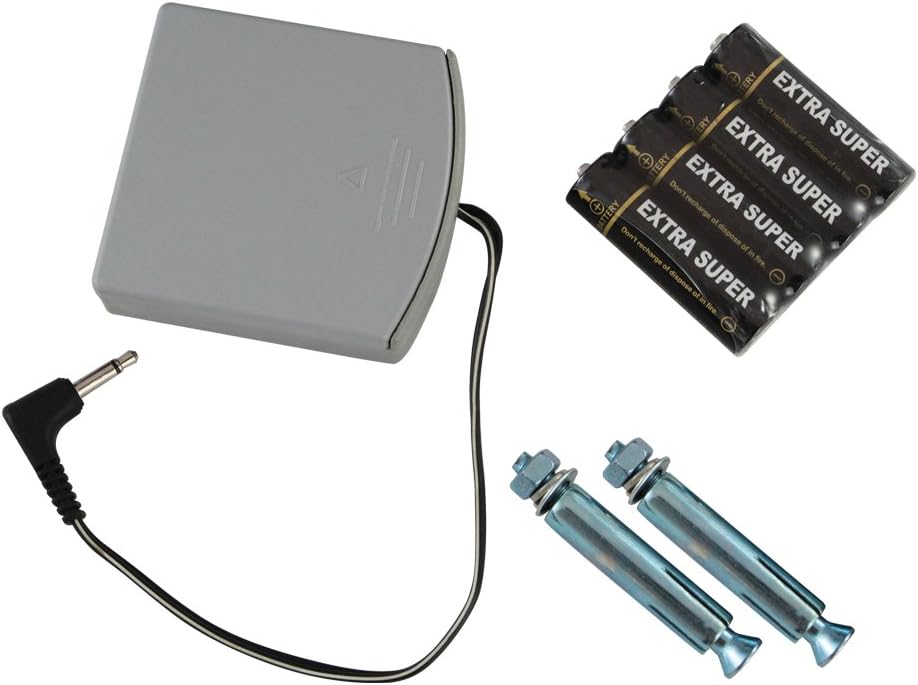
Слика 3.1: Included accessories for the HMF FS-20A safe, featuring an external battery box, four AA batteries, and two mounting bolts for installation.
4. Поставување
4.1 Првично отворање
Upon receiving your safe, it will be in a locked state. To open it for the first time:
- Locate the emergency keyhole, usually concealed behind a cover on the front panel.
- Вметнете еден од обезбедените клучеви за итни случаи во клучалката и свртете го во насока на стрелките на часовникот.
- While holding the key turned, rotate the handle to open the safe door.

Слика 4.1: The HMF FS-20A safe with its door open, revealing the internal compartment and the electronic biometric locking system on the door panel.
4.2 Инсталација на батерија
The safe requires 4 AA batteries for its electronic system. The battery compartment is typically located on the inside of the safe door.
- Open the safe door using the emergency key (if not already open).
- Locate the battery compartment cover on the inside of the door.
- Remove the cover and insert 4 AA batteries, ensuring correct polarity (+/-).
- Заменете го капакот на преградата за батерии.
- You should hear a beep, indicating the safe is powered on.
4.3 Монтирање на сефот
The HMF FS-20A safe can be securely mounted to a wall or floor. This provides additional security against theft. Mounting hardware is included.
- Choose a suitable location for mounting. Ensure the surface is strong enough to support the safe's weight and contents.
- Open the safe door. Locate the pre-drilled mounting holes on the back or bottom of the safe.
- Position the safe and mark the drilling points on the wall or floor through the mounting holes.
- Drill pilot holes at the marked locations using an appropriate drill bit for your wall/floor material.
- Align the safe with the drilled holes and secure it using the provided mounting bolts. Tighten firmly.

Слика 4.2: Rear panel of the HMF FS-20A safe, illustrating the two pre-drilled holes designed for secure mounting to a wall or floor surface.
5. Упатства за работа
5.1 Регистрирање на отпечатоци од прсти
The safe allows you to register multiple fingerprints for convenient access. Refer to your specific model's internal instructions for the exact programming button location (often a small button inside the safe door near the battery compartment).
- With the safe door open, press the internal programming button (usually a red or green button). The indicator light on the fingerprint scanner will illuminate.
- Place the pad of the finger you wish to register firmly on the fingerprint scanner.
- Lift your finger and repeat the scan approximately 3-5 times, slightly adjusting the angle each time, until the safe confirms successful registration (e.g., a long beep or green light).
- To register additional fingerprints, repeat steps 1-3 for each finger.
- Test all registered fingerprints before closing the safe door.

Слика 5.1: A user's finger positioned on the biometric sensor of the HMF FS-20A safe, demonstrating the interaction point for fingerprint recognition.
5.2 Opening with Fingerprint
За да го отворите сефот со регистриран отпечаток од прст:
- Цврсто и целосно ставете го регистрираниот прст на скенерот за отпечатоци од прсти.
- If the fingerprint is recognized, the indicator light will turn green, and you will hear a beep. The lock mechanism will disengage.
- Within a few seconds, rotate the handle clockwise to open the safe door.
- If the fingerprint is not recognized, the indicator light may turn red, and you will hear an error beep. Try again, ensuring your finger is clean and properly positioned.
5.3 Отворање со клуч за итни случаи
In case of battery failure, forgotten fingerprints, or electronic malfunction, the safe can be opened using the emergency override key:
- Locate the emergency keyhole cover on the front panel and remove it.
- Insert the emergency key into the keyhole and turn it clockwise.
- While holding the key turned, rotate the handle to open the safe door.
- Once open, you can replace the batteries if needed.
6. Одржување
6.1 Замена на батеријата
When the batteries are low, the safe will typically indicate this with a warning light or a series of beeps during operation. Replace all 4 AA batteries promptly to ensure continuous functionality.
- Отворете ја вратата на сефот.
- Отстранете го капакот на преградата за батерии.
- Отстранете ги старите батерии и фрлете ги одговорно.
- Insert new 4 AA batteries, observing correct polarity.
- Заменете го капакот на преградата за батерии.
Using the External Battery Box: If the internal batteries are completely depleted and you cannot open the safe with your fingerprint, connect the external battery box to the emergency power port on the safe's front panel. This will provide temporary power to open the safe, allowing you to replace the internal batteries.
6.2 Чистење
За да го одржите изгледот и функционалноста на вашиот сеф:
- Избришете ја надворешноста со мека, гamp крпа. Избегнувајте абразивни средства за чистење или растворувачи.
- Gently clean the fingerprint scanner surface with a soft, lint-free cloth to ensure optimal recognition.
7 Смена на проблеми
| Проблем | Можна причина | Решение |
|---|---|---|
| Сефот не се отвара со отпечаток од прст. | Fingerprint not registered, finger dirty/wet, incorrect placement, low batteries. | Ensure finger is clean and dry. Reposition finger firmly on scanner. Re-register fingerprint if necessary. Replace batteries. Use emergency key. |
| No power/Safe is unresponsive. | Мртви или неправилно инсталирани батерии. | Replace all 4 AA batteries, ensuring correct polarity. Use the external battery box for temporary power. |
| Вратата не се затвора правилно. | Obstruction in the door frame, locking bolts misaligned. | Check for any objects blocking the door. Ensure the safe is on a level surface or securely mounted. |
| Клучот за итни случаи не работи. | Key not fully inserted, wrong key, lock mechanism jammed. | Ensure the key is fully inserted and turned correctly. Do not force the key. Contact customer support if issues persist. |
8. Спецификации
| Карактеристика | Детал |
|---|---|
| Модел | FS-20A (Manufacturer ID: 49121) |
| Димензии (В x Ш x Д) | Прибл. 19.99 cm x 30.99 cm x 19.99 cm |
| Тежина | Прибл. 7.02 кг |
| Материјал | Легуриран челик |
| Тип на заклучување | Electronic Biometric (Fingerprint) with Emergency Key Override |
| Извор на енергија | 4x AA батерии (вклучени) |
| Тип на монтирање | Wall Mountable (mounting hardware included) |
| Посебни карактеристики | Portable design, External Battery Box for emergency power |
9. Гаранција и поддршка
HMF products are manufactured to high-quality standards. For warranty information or technical support, please refer to the documentation provided with your purchase or visit the official HMF webстраница. Зачувајте го доказот за купување за какви било гаранциски побарувања.
If you encounter issues not covered in this manual, please contact HMF customer service for assistance.


