1. Вовед
This manual provides essential information for the safe and efficient use of your Somfy Universal RTS Interface II (URTS II). Please read these instructions carefully before installation and operation. Keep this manual for future reference.
The Somfy Universal RTS Interface II is designed to integrate Somfy RTS (Radio Technology Somfy) motorized products with third-party control systems, offering 16 channels of control. It allows for seamless automation and enhanced control over your motorized window coverings, awnings, and other RTS-enabled devices.
2. Производот завршиview
The Somfy Universal RTS Interface II (URTS II) acts as a bridge between your Somfy RTS motors and various home automation systems. It receives commands from a third-party controller (e.g., RS232, RS485, or contact closure) and translates them into RTS radio signals to operate your Somfy motorized products.

Figure 2.1: Somfy Universal RTS Interface II (URTS II) device. This image shows the compact white rectangular unit with the Somfy logo.
Клучни карактеристики:
- 16 independent RTS channels for controlling multiple devices or groups.
- Multiple input options for integration with various control systems.
- Компактен дизајн за лесна инсталација.
- Enables advanced automation scenarios when paired with a compatible home automation hub.
3. Поставување и инсталација
Правилната инсталација е клучна за оптимални перформанси. Препорачливо е инсталацијата да ја изврши квалификуван професионалец.
3.1. Содржина на пакетот
- Somfy Universal RTS Interface II (URTS II) unit
- Адаптер за напојување (доколку е вклучен во вашиот модел)
- Хардвер за монтирање
- Овој прирачник за употреба
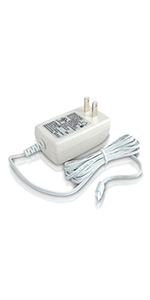
Слика 3.1: Прample of a Somfy power adapter. Ensure you use the correct power supply for your device.
3.2. Mounting the Interface
- Choose a suitable location for the interface, ideally centrally located within the range of your RTS devices and near your control system.
- Ensure the location is dry, protected from extreme temperatures, and away from potential sources of radio interference.
- Use the provided mounting hardware to securely attach the interface to a wall or other stable surface.
3.3. Жици и врски
- Поврзување за напојување: Connect the power adapter to the interface and plug it into a standard electrical outlet.
- Control System Connection: Connect your third-party control system to the appropriate input ports on the URTS II (e.g., RS232, RS485, or contact closure terminals). Refer to your control system's manual for specific wiring diagrams.
- Антена: Ensure the RTS antenna is properly positioned for optimal signal transmission. Avoid coiling the antenna or placing it near large metal objects.
3.4. Programming RTS Motors
The URTS II must be programmed to control your RTS motors. This typically involves putting the motor into programming mode and then sending a programming command from the URTS II or a connected control system. Consult the specific programming instructions for your Somfy RTS motor and your third-party control system.
For programming with the TaHoma switch, refer to the following video tutorial:
Video 3.1: How to Program the TaHoma Switch with Somfy RTS Motors. This video demonstrates the step-by-step process of connecting and programming Somfy RTS motors using the TaHoma switch application. It covers initial setup, device detection, and naming devices within the app.
4. Операција
Once the Somfy Universal RTS Interface II is properly installed and programmed, operation is typically managed through your connected third-party control system. The URTS II translates commands from your control system into RTS signals to operate your motorized products.
- Испраќање команди: Use your home automation system's interface (e.g., touchscreen, app, voice command) to send commands (Open, Close, My/Stop) to the specific RTS channels linked to your motors.
- Контрола на каналот: Each of the 16 channels on the URTS II can control an individual RTS motor or a group of RTS motors that have been programmed to that channel.
- "My" Position: The "My" button on RTS controls allows you to set a favorite intermediate position. This position can also be triggered via the URTS II if supported by your control system.
5. Одржување
The Somfy Universal RTS Interface II is designed for minimal maintenance. Follow these guidelines to ensure its longevity:
- Чистење: Чистете ја надворешноста на уредот со мека, сува крпа. Не користете абразивни средства за чистење или растворувачи.
- Животна средина: Ensure the unit remains in a dry environment, free from excessive dust, moisture, and extreme temperatures.
- Ажурирања на фирмверот: Periodically check the Somfy website or your control system's documentation for any available firmware updates for the URTS II. Follow the instructions provided for updating.
6 Смена на проблеми
If you experience issues with your Somfy Universal RTS Interface II, consult the following common troubleshooting steps:
| Проблем | Можна причина | Решение |
|---|---|---|
| Motor not responding to commands. |
|
|
| Interface LED not illuminating. |
|
|
| Intermittent control. |
|
|
If problems persist after attempting these steps, contact Somfy technical support or your installer.
7. Спецификации
- Модел: URTS II (Universal RTS Interface II)
- Број на дел: 1810872
- Контролни канали: 16 RTS Channels
- Димензии: 3 x 1.75 x 4 инчи (приближно)
- Тежина на ставката: 0.01 унци (приближно)
- Радио фрекфенција: RTS (Radio Technology Somfy)
- Влез волуменtage: (Специфичен томtage not provided, typically low voltage DC via adapter)
- Поврзување: RS232, RS485, Contact Closure (check specific model for all available inputs)
- Работна температура: (Not provided, typically indoor residential range)
Note: Specifications are subject to change without notice. Refer to the product packaging or Somfy's official webсајт за најактуелни информации.
8. Гаранција и поддршка
Somfy products are designed and manufactured to the highest quality standards. For detailed warranty information, please refer to the warranty card included with your product or visit the official Somfy webсајт.
Поддршка за корисници:
If you require technical assistance, have questions about installation, or need to report a product issue, please contact Somfy customer support. Contact information can typically be found on the Somfy webна страницата или на пакувањето на вашиот производ.
Онлајн ресурси:
- Посетете го Somfy Store on Amazon за информации за производот.
- Refer to the official Somfy webстраница за сеопфатна документација, често поставувани прашања и статии за поддршка.


