1. Вовед
The Bogen 1126-BG-UTI1 is a single-zone paging controller designed to integrate a paging system with a telephone system. It provides a reliable interface for making announcements over a public address system from a telephone. This manual provides detailed instructions for the proper installation, operation, and maintenance of your Bogen paging controller.
2. Важни безбедносни информации
Ве молиме прочитајте ги и разберете ги сите безбедносни упатства пред да го користите овој уред. Зачувајте го ова упатство за во иднина.
- Извор на енергија: Поврзете го уредот само на наведениот извор на енергија со јачина на звукtage.
- Влага: Не го изложувајте уредот на дожд или влага.
- Вентилација: Обезбедете соодветна вентилација. Не ги блокирајте отворите за вентилација.
- Сервисирање: За сите сервиси обратете се кај квалификуван сервисер. Не обидувајте се сами да го сервисирате овој производ.
- Чистење: Чистете само со сува крпа.
3. Содржина на пакетот
Проверете дали сите артикли се присутни во пакувањето:
- Bogen 1126-BG-UTI1 Single Zone Paging Controller Unit
- Адаптер за напојување
- Упатство за употреба (овој документ)
- Хардвер за монтирање (доколку е применливо)
4. Производот завршиview
The Bogen 1126-BG-UTI1 features various ports and indicators for seamless integration and operation. Familiarize yourself with the unit's components before installation.
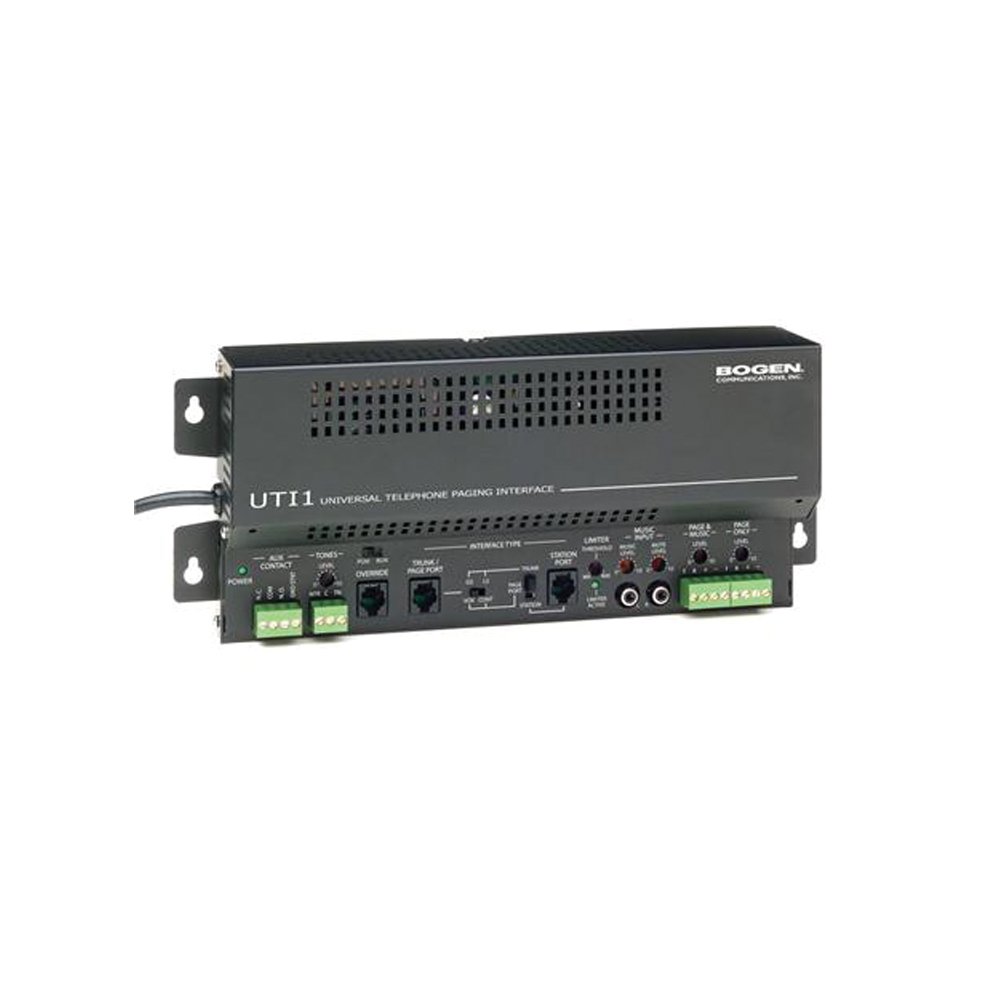
Слика 1: Предна страна view of the Bogen Single Zone Paging Controller. This image displays the main unit, highlighting its compact design and essential connection points for audio input and output, as well as power. The various ports and indicators are visible, crucial for understanding the device's functionality and connectivity.
4.1 Преден панел
- Напојување LED: Покажува статус на моќност.
- Контрола на ниво на влез: Adjusts the audio input sensitivity.
- Контрола на излезно ниво: Ја прилагодува јачината на звукот на излезниот аудио сигнал.
4.2 Заден панел
- Telephone Line Input: RJ-11 jack for connecting to the telephone system.
- Аудио излез: RCA or screw terminal connections for connecting to an ampживописен.
- Влез на енергија: Jack for connecting the power adapter.
- MOH Output: Music On Hold output (if applicable).
5. Поставување и инсталација
Follow these steps to properly install your paging controller:
- Монтирање: Choose a suitable location for the controller, away from excessive heat or moisture. Secure the unit using appropriate mounting hardware if desired.
- Connect to Telephone System: Connect an RJ-11 cable from your telephone system's paging port or a suitable analog extension to the "Telephone Line Input" on the controller. Consult your telephone system's manual for specific paging port details.
- Поврзете се на Ampпоживо: Connect the "Audio Output" of the paging controller to an available input on your paging amplifier. Ensure correct polarity if using screw terminals.
- Поврзете напојување: Plug the provided power adapter into the "Power Input" jack on the controller, then plug the adapter into a standard electrical outlet. The Power LED should illuminate.
- Initial Level Adjustment: Start with the Input Level and Output Level controls set to their minimum positions.
6. Упатства за работа
Once installed, the Bogen 1126-BG-UTI1 is ready for operation.
6.1 Making a Page
- From a telephone connected to the system, dial the designated paging access code or extension.
- Wait for the confirmation tone or voice prompt from the paging controller.
- Speak clearly into the telephone handset to make your announcement.
- Hang up the telephone when finished.
6.2 Прилагодување на нивоата на аудио
- Ниво на внесување: Slowly increase the "Input Level Control" until the paging audio is clear and distortion-free. If the audio is too loud or distorted, decrease this level.
- Излез Ниво: Adjust the "Output Level Control" to achieve the desired volume through the paging speakers. This should be done in conjunction with the ampконтрола на јачината на звукот на лафијаторот.
7. Одржување
The Bogen 1126-BG-UTI1 is designed for reliable operation with minimal maintenance.
- Чистење: Periodically wipe the unit with a soft, dry cloth. Do not use liquid cleaners or aerosols.
- Вентилација: Ensure that ventilation openings remain clear of dust and debris.
- Врски: Occasionally check all cable connections to ensure they are secure.
8 Смена на проблеми
If you encounter issues, refer to the following troubleshooting guide:
| Проблем | Можна причина | Решение |
|---|---|---|
| Нема индикаторско светло за напојување. | Power adapter not connected or faulty; no power at outlet. | Check power adapter connection. Verify outlet has power. Test with another adapter if available. |
| No paging audio. | Incorrect telephone system connection; amplifier off or muted; audio levels too low. | Verify telephone line and audio output connections. Ensure amplifier is on and not muted. Adjust Input and Output Level controls. |
| Paging audio is distorted. | Input or output levels set too high. | Reduce Input Level and/or Output Level controls. |
| Cannot access paging from telephone. | Incorrect paging access code; telephone system not configured correctly. | Confirm the correct paging access code with your telephone system administrator. Verify telephone system programming. |
If the problem persists after attempting these solutions, contact Bogen technical support.
9. Спецификации
| Карактеристика | Детал |
|---|---|
| Број на модел | 1126-BG-UTI1 |
| Бренд | Боген |
| Димензии на пакетот | 15 x 9 x 7 инчи |
| Тежина на ставката | 6.7 фунти |
| ASIN | B00P1AOL2C |
| Производител | Боген |
| Paging Zones | Единечна зона |
| Компатибилност | Telephone systems with analog paging port or extension |
10. Гаранција и поддршка
Bogen products are designed for durability and performance. For specific warranty information, please refer to the warranty card included with your product or visit the official Bogen website. Technical support is available to assist with any questions or issues you may encounter.
- Поддршка преку Интернет: Посетете www.bogen.com/support for FAQs, documentation, and contact information.
- Контакт информации: Refer to the Bogen website for current telephone numbers and email addresses for technical assistance.


