Вовед
This manual provides detailed instructions for the setup, operation, and maintenance of your Astrum ELETE Combe UB USB Keyboard and Mouse Combo KC110. Please read this manual thoroughly before using the product to ensure proper functionality and longevity.
The Astrum ELETE Combe UB is designed for comfort and efficiency, featuring low-profile Quiet Touch keys and a spill-resistant design. It is a plug-and-play device, making it easy to set up for both home and office environments.
Карактеристики на производот
- Удобно пишување: Designed with low-profile Quiet Touch keys for a comfortable typing experience.
- Дизајн отпорен на истурање: Protects the keyboard from accidental liquid spills.
- Елегантен дизајн: Suitable for various home and office setups.
- Plug and Play USB: Simple USB connection for immediate use without driver installation.
- Мултимедијални клучеви: Features 7 hot multimedia keys for easy access to common functions and web прелистување
- Optical Mouse: Includes a 1000dpi optical mouse for precise and smooth cursor control.
- US Layout: Keyboard features a standard US layout.
Содржина на пакетот
- Astrum ELETE Combe UB USB Keyboard
- Astrum ELETE Combe UB USB Mouse

Image: The Astrum ELETE Combe UB Keyboard and Mouse Combo as packaged in its retail box.
Инструкции за поставување
- Распакувајте го Комбото: Внимателно извадете ја тастатурата и глувчето од нивното пакување.
- Поврзете ја тастатурата: Пронајдете слободен USB порт на вашиот компјутер. Вметнете го USB конекторот на тастатурата во USB портата.
- Поврзете го глувчето: Locate another available USB port on your computer. Insert the USB connector of the mouse into the USB port.
- Системско препознавање: Your operating system (Windows, macOS, Linux) should automatically detect and install the necessary drivers. This process typically takes a few seconds. No additional software installation is required.
- Тест функционалност:
- Open a text editor (e.g., Notepad, WordPad) and type to ensure the keyboard is functioning correctly.
- Move the mouse cursor around the screen and click to verify mouse functionality.

Image: The Astrum ELETE Combe UB USB Keyboard and Mouse Combo, ready for connection.
Упатства за работа
Употреба на тастатура
The Astrum ELETE Combe UB keyboard operates like a standard USB keyboard. Its low-profile копчињата обезбедуваат удобно и тивко искуство при пишување.
Мултимедијални копчиња
The keyboard features 7 dedicated multimedia hotkeys located at the top right. These keys provide quick access to common functions:
- Пушти/Пауза: Контролирајте ја репродукцијата на медиумите.
- Стоп: Запрете ја репродукцијата на медиуми.
- Претходна песна: Go to the previous media track.
- Следна песна: Go to the next media track.
- Јачина на звук нагоре: Increase system volume.
- Намалување на јачината на звукот: Decrease system volume.
- Исклучи звук: Mute/unmute system volume.
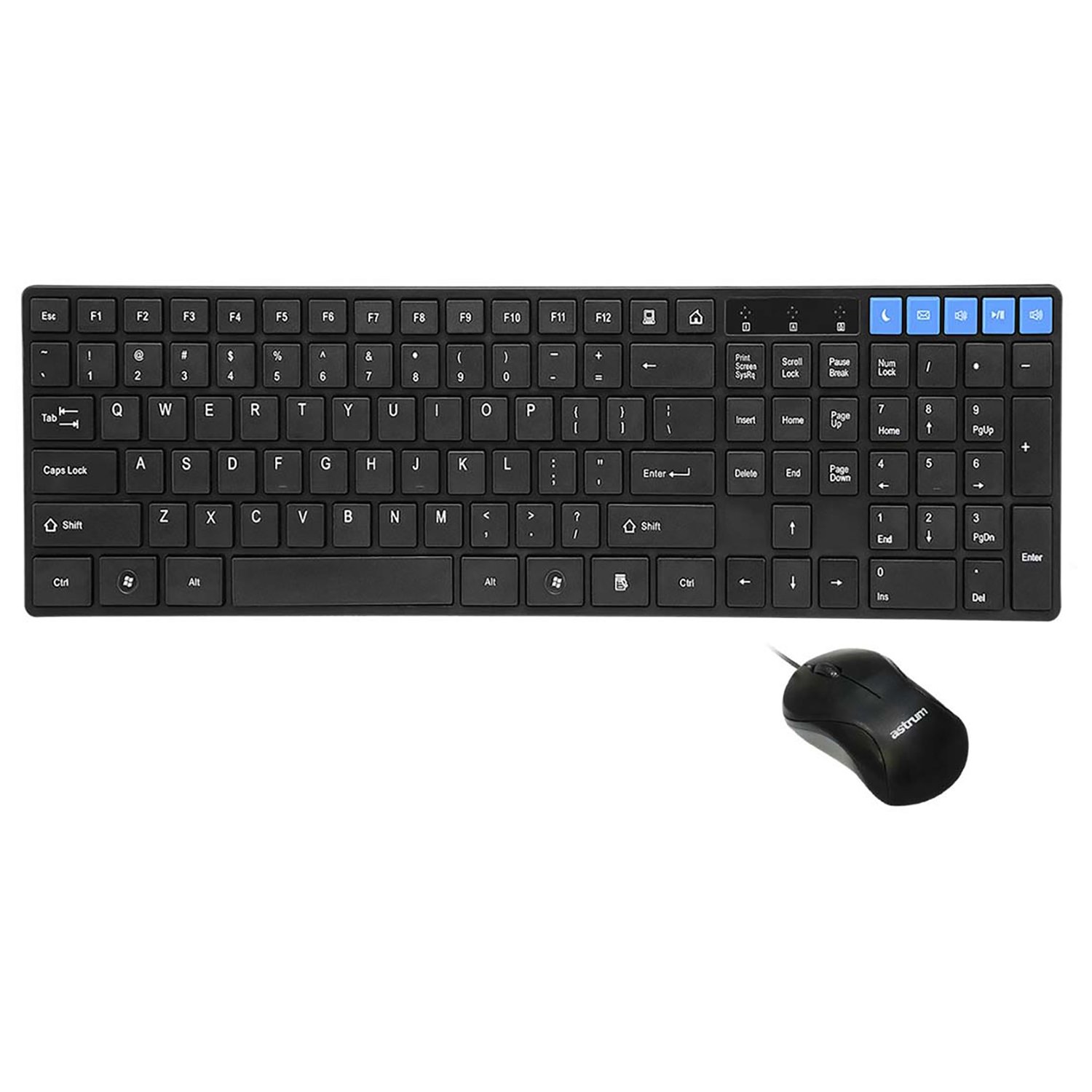
Слика: Од горе надолу view of the keyboard and mouse, showing the layout and multimedia keys.
Употреба на глувчето
The included optical mouse provides precise cursor control. It features standard left-click, right-click, and scroll wheel functionality.
- Лев клик: Primary action, selection, opening items.
- Десен клик: Отвора контекстуални менија.
- Тркало за лизгање: Скролувајте низ документите и web страници. Може да функционира и како копче со среден клик.
Одржување и нега
To ensure the longevity and optimal performance of your Astrum ELETE Combe UB combo, follow these maintenance guidelines:
- Чистење:
- Disconnect the keyboard and mouse from your computer before cleaning.
- Користете мека крпа без влакненца малку гampened with water or a mild cleaning solution. Avoid harsh chemicals, abrasives, or solvents.
- За тастатурата, можете да користите компримиран воздух за отстранување на прашина и остатоци од меѓу копчињата.
- For the mouse, clean the optical sensor area periodically to ensure smooth tracking.
- Отпорност на истурање: While the keyboard is spill-resistant, it is not waterproof. In case of a spill, immediately disconnect the keyboard, wipe off the liquid, and allow it to dry completely before reconnecting.
- Складирање: Чувајте го комбото на ладно и суво место, подалеку од директна сончева светлина и екстремни температури кога не го користите подолг период.
- Ракување: Avoid dropping the devices or subjecting them to strong impacts. Do not attempt to disassemble the keyboard or mouse, as this will void the warranty.
Решавање проблеми
If you encounter issues with your Astrum ELETE Combe UB combo, please refer to the following common solutions:
- Тастатурата или глувчето не реагираат:
- Ensure both USB connectors are firmly plugged into the computer's USB ports.
- Обидете се да ги поврзете тастатурата и глувчето во различни USB порти на вашиот компјутер.
- Рестартирајте го компјутерот.
- If using a USB hub, try connecting directly to the computer's USB ports.
- Keys Not Working or Typing Incorrectly:
- Проверете дали има физички пречки под клучевите.
- Ensure the keyboard layout in your operating system settings matches a US layout.
- Тестирајте ја тастатурата на друг компјутер за да исклучите проблем специфичен за системот.
- Курсорот на глувчето скока или е неправилен:
- Исчистете го оптичкиот сензор на дното на глувчето.
- Ensure you are using the mouse on a clean, non-reflective, and uniform surface. Mouse pads are recommended.
- Обидете се да го поврзете глувчето со друг USB порт.
- Мултимедијалните копчиња не функционираат:
- Ensure your media player or browser is active and supports standard multimedia key commands.
- Some operating systems may require specific settings for multimedia keys; consult your OS documentation if issues persist.
If the problem persists after trying these steps, please contact Astrum customer support.
Спецификации
| Бренд | Astrum |
| Број на модел | ELETE-COMBE-UB |
| Производител | Astrum |
| Хардверска платформа | USB |
| Распоред на тастатура | US Layout, Chocolate Keys Flat |
| DPI на глувчето | 1000 dpi Оптички |
| Димензии на производот (ДxШxВ) | 52.1 x 14 x 4.4 Centimeters (approx. 52.07 x 13.97 x 4.45 cm) |
| Тежина на ставката | 680 гр |
| Потребни се батерии | бр |
| Прво достапен датум | 5 март 2015 година |
Гаранција и поддршка
Astrum products are designed for reliability and performance. For information regarding warranty coverage and terms, please refer to the warranty policy provided with your purchase or visit the official Astrum webсајт.
For technical support, troubleshooting assistance beyond this manual, or inquiries about replacement parts, please contact Astrum customer service through their official channels. Details can typically be found on the product packaging or the Astrum brand webсајт.
Legal Disclaimer: The information provided in this manual is for general guidance. Specifications and features are subject to change without notice.


