Вовед
The Behringer NEKKST K8 is an ultra-linear 150-Watt reference-class studio monitor designed for accurate sound reproduction. It features an 8-inch woofer and a 1-inch silk dome tweeter, utilizing advanced waveguide technology for optimal acoustic dispersion and a wide 'sweet zone'. This monitor operates in a true bi-amping mode with two separate ampлифификатори за подобрена јасност на звукот.

Слика: напред view of the Behringer NEKKST K8 Studio Monitor, showcasing the 8-inch woofer and 1-inch tweeter.
Важни безбедносни инструкции
Please read and follow all safety instructions before operating the Behringer NEKKST K8 studio monitor. Retain these instructions for future reference.
- Ризик од електричен удар: Do not open the device. Refer all servicing to qualified service personnel.
- Не го изложувајте овој апарат на дожд или влага.
- Не користете го овој апарат во близина на вода.
- Чистете само со сува крпа.
- Не ги блокирајте отворите за вентилација. Инсталирајте во согласност со упатствата на производителот.
- Не инсталирајте во близина на извори на топлина како што се радијатори, топлински регистри, шпорети или други апарати (вклучувајќи ampлајфикатори) кои произведуваат топлина.
- Заштитете го кабелот за напојување од одење или стискање, особено на приклучоците, приклучните приклучоци и местото каде што тие излегуваат од апаратот.
- Користете само додатоци/додатоци наведени од производителот.
- Исклучете го овој апарат од струја за време на громови или кога не го користите подолг временски период.

Image: Safety and regulatory labels found on the Behringer NEKKST K8, indicating electrical warnings and compliance information.
Поставување
Отпакување
Carefully unpack your NEKKST K8 monitor. Inspect the unit for any signs of damage that may have occurred during transit. Retain the original packaging for future transport or storage.
Врски
The NEKKST K8 offers both balanced XLR and unbalanced RCA input options. Connect your audio source (e.g., audio interface, mixer) to the appropriate input on the rear panel of the monitor.
- Влез XLR: For balanced audio signals, providing optimal noise rejection.
- Влез RCA: For unbalanced audio signals, commonly used with consumer audio equipment.
Ensure the monitor is powered off before making any connections.
Placement and Room Compensation
Proper placement of your studio monitors is crucial for accurate sound reproduction. The NEKKST K8 features 'ROOM COMPENSATION' switches on the rear panel to help optimize its performance for your specific acoustic environment.
- Free Field: Use this setting when the monitor is placed away from walls and corners.
- Ѕид: Select this setting if the monitor is placed close to a wall.
- Катче: Choose this setting if the monitor is placed in a corner, which typically results in increased bass response.
Experiment with these settings to achieve the most balanced sound in your listening space.
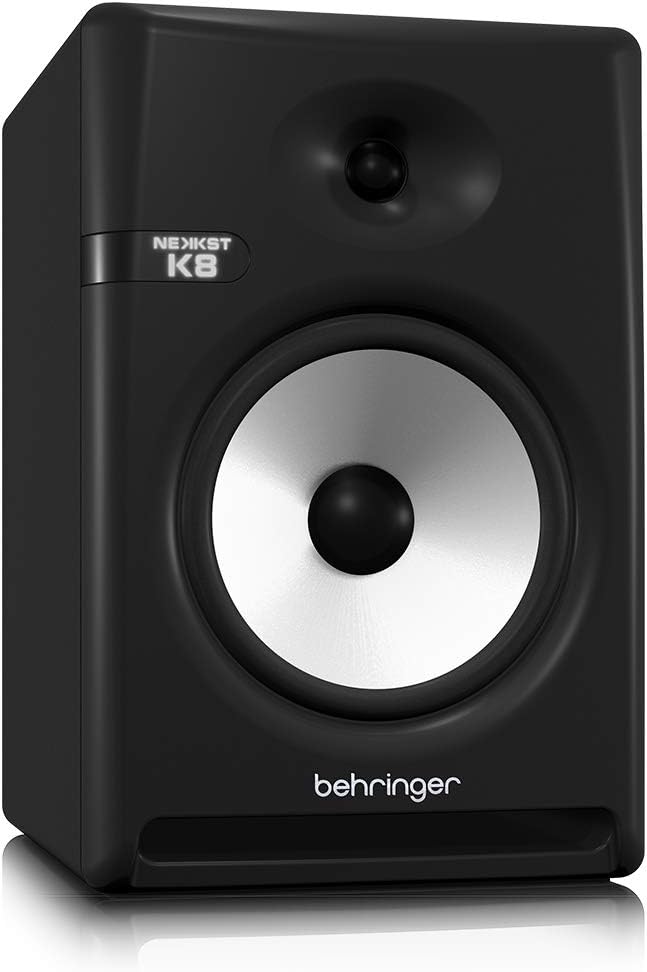
Image: Rear panel of the Behringer NEKKST K8, displaying XLR and RCA inputs, along with various control switches for room compensation and frequency adjustments.

Слика: Детална view of the NEKKST K8's rear control panel, highlighting the input trim, frequency adjustments, and room compensation switches.
Поврзување за напојување
Connect the provided power cord to the AC IN socket on the rear panel and then to a suitable power outlet. Ensure the power switch is in the OFF position before connecting to power.
Операција
Вклучување/исклучување
After all connections are made, switch the power button on the rear panel to the ON position. It is recommended to power on your monitors last and power them off first to prevent any pops or clicks through your speakers.
Input Trim Adjustment
The 'INPUT TRIM' knob on the rear panel allows you to adjust the input sensitivity of the monitor. Start with the knob at a lower setting and gradually increase it to achieve a comfortable listening level without distortion. This control helps match the output level of your audio source to the monitor's input.
Frequency Adjustments
The NEKKST K8 provides 'HIGH FREQUENCY' and 'LOW FREQUENCY' switches for fine-tuning the monitor's response to your listening environment and personal preference. These switches allow you to cut or boost specific frequency ranges.
- ВИСОКА ФРЕКВЕНЦИЈА: Adjusts the treble response. Options typically include flat, -2 dB, +2 dB.
- LOW FREQUENCY: Adjusts the bass response. Options typically include flat, -2 dB, -4 dB, -6 dB. This can be useful for compensating for room acoustics or when using a subwoofer.
Refer to the markings on the rear panel for specific dB adjustments.
Одржување
Чистење
To clean the exterior of your NEKKST K8 monitor, use a soft, dry cloth. Do not use liquid cleaners, abrasive cleaners, or solvents, as these can damage the finish or internal components. Ensure the monitor is unplugged before cleaning.
Складирање
If storing the monitor for an extended period, it is recommended to use the original packaging to protect it from dust and physical damage. Store in a cool, dry place away from direct sunlight and extreme temperatures.
Решавање проблеми
| Проблем | Можна причина | Решение |
|---|---|---|
| Нема звук |
|
|
| Искривен звук |
|
|
| Брмчење или бучава |
|
|
If the problem persists after trying these solutions, please contact Behringer customer support.
Спецификации
| Име на моделот | K8 |
| Тип на звучник | Монитор |
| Вуфер со дијаметар | 8 инчи |
| Дијаметар на високотонецот | 1 инчи |
| Максимална излезна моќност на звучникот | 150 вати |
| Ватtage | 150 вати |
| Фреквентен одговор | 20000 Hz (Upper limit; full range typically wider) |
| Технологија за поврзување | RCA, XLR |
| Режим за излез на звук | Стерео |
| Извор на енергија | Електричен со кабел |
| Димензии на производот | 13.4" Д x 13.4" Ш x 18.8" В |
| Тежина на ставката | 19.18 фунти |
| Материјал | Plastic, Metal, Fabric |
| Производител | Музичко племе САД |
| UPC | 748252139344 |
Информации за гаранцијата
The Behringer NEKKST K8 Studio Monitor comes with a Limited Warranty. For detailed information regarding warranty terms, conditions, and registration, please refer to the official Behringer webлокацијата или гарантната картичка вклучена со вашиот производ.
Поддршка
За дополнителна помош, техничка поддршка или за преземање на најновите драјвери и софтвер, посетете ја официјалната страница на Behringer. webсајт или контактирајте со нивниот оддел за услуги на клиентите.
Можете исто така да ја посетите Продавница „Берингер“ на Амазон за информации за производот и додатоци.


