1. Вовед
This manual provides essential information for the safe and efficient operation of your InFocus IN112a SVGA DLP Projector. Please read it thoroughly before using the projector and retain it for future reference. The InFocus IN112a is designed to deliver clear and bright projections for various applications, featuring SVGA resolution, HDMI connectivity, and 3D support.
2. Информации за безбедност
Следете ги следниве безбедносни мерки за да спречите оштетување на проекторот и да ја обезбедите безбедноста на корисникот:
- Do not look directly into the projector lens кога лamp е вклучено. Интензивната светлина може да предизвика оштетување на очите.
- Обезбедете соодветна вентилација. Не ги блокирајте отворите за вентилација.
- Only qualified service personnel should open the projector casing. Внатре нема делови што може да ги сервисира корисникот.
- Користете го само кабелот за напојување што е испорачан со проекторот.
- Чувајте го проекторот подалеку од вода или влажна средина.
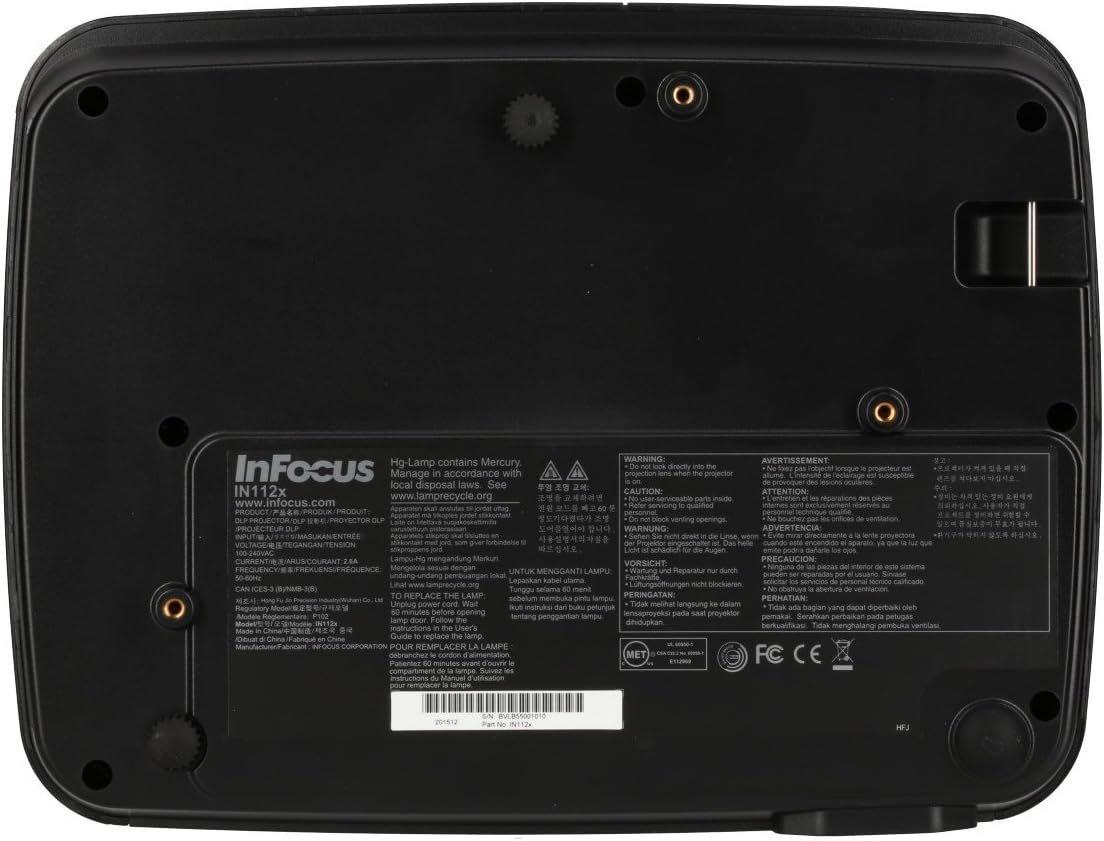
- Проекторот лamp contains mercury. Dispose of lamps according to local regulations. Visit www.lampрециклирај.org за повеќе информации.

Слика: Долу view of the InFocus IN112a projector, displaying various warning labels, regulatory compliance marks (like CE, FCC), and information regarding the mercury content in the lamp and recycling instructions.
3. Производот завршиview
3.1. Projector Dimensions

Слика: напред view of the InFocus IN112a projector, illustrating its physical dimensions. The projector measures approximately 292 mm in width, 220 mm in depth, and 108 mm in height.
3.2. Контроли на горниот панел
Слика: Горе view of the InFocus IN112a projector, highlighting the control panel. This panel includes buttons for power, menu access, source selection, and directional navigation for menu adjustments.
The top panel features buttons for power on/off, menu access, input source selection, and navigation arrows for adjusting settings within the on-screen display (OSD) menu. The focus and zoom rings are located near the lens.
3.3. Приклучоци на задниот панел

Слика: Заден дел view of the InFocus IN112a projector, displaying its comprehensive array of connectivity ports. These include HDMI 1.4, two VGA inputs (Computer 1, Computer 2), a VGA monitor output, S-Video, Composite video, two 3.5mm stereo audio inputs, one 3.5mm stereo audio output, an RS232C control port, and a USB-B port.
The rear panel provides a variety of connection options:
- HDMI1.4: For digital video and audio input.
- VGA (Computer 1, Computer 2): Two inputs for analog computer signals.
- VGA Monitor Out: За поврзување на надворешен монитор.
- Композитно видео: За видео влез со стандардна дефиниција.
- С-видео: For enhanced standard definition video input.
- Audio In (3.5mm x 2): For stereo audio input.
- Аудио излез (3.5 мм): For stereo audio output to external speakers.
- RS232C: За контрола на проекторот преку компјутер или контролен систем.
- USB-B: За сервис или ажурирања на фирмверот.
4. Поставување
4.1 Поставување
Position the projector on a stable, flat surface or mount it securely to a ceiling. Ensure there is adequate space around the projector for ventilation. The distance from the screen will determine the image size. Refer to the specifications section for throw ratio details.
4.2. Поврзување на енергија
Connect the supplied power cord to the projector's power inlet and then to a grounded electrical outlet. The power LED will illuminate, indicating standby mode.
4.3. Поврзување на видео извори
Connect your video source (e.g., computer, Blu-ray player, cable box) to the appropriate input port on the projector's rear panel using a compatible cable. For best quality, use the HDMI input.
- HDMI: Connect an HDMI cable from your source to the projector's HDMI port.
- VGA: Connect a VGA cable from your computer to either the Computer 1 or Computer 2 port.
- Composite/S-Video: Connect the respective cable for older video sources.
4.4. Поврзување на аудио
If using VGA, Composite, or S-Video inputs, connect an audio cable from your source's audio output to one of the projector's 3.5mm Audio In ports. HDMI carries both video and audio, so a separate audio connection is not typically needed for HDMI sources.
4.5. Adjusting Focus and Zoom
After powering on the projector and displaying an image, rotate the Фокус прстен around the lens until the image is sharp and clear. Use the Прстен за зумирање to adjust the image size to fit your screen.
5. Операција
5.1. Вклучување/исклучување
- За вклучување: Press the Power button on the projector's top panel or the remote control. The power indicator will turn green.
- За исклучување: Press the Power button twice. The projector will enter a cooling cycle, and the power indicator will turn red (standby) once complete.
5.2. Избор на влезен извор
Press the "Source" button on the projector or remote control repeatedly to cycle through available input sources (HDMI, VGA1, VGA2, S-Video, Video). The projector will automatically detect an active signal if "Auto Source" is enabled in the menu.
5.3. Навигација во менито
Press the "Menu" button to access the On-Screen Display (OSD) menu. Use the directional arrows to navigate through menu options and the "Enter" button to select. Press "Menu" again to exit.
5.4. 3D Content Playback
The IN112a supports 3D content from Blu-ray players, cable boxes, dish services (over HDMI), and PC-based 3D content at 120Hz. To view 3D content, you will need 144 Hz DLP Link 3D glasses (sold separately).
- Ensure your 3D source is connected via HDMI.
- Play 3D content from your source.
- Turn on your 144 Hz DLP Link 3D glasses. The projector should automatically detect the 3D signal.
6. Одржување
6.1. Cleaning the Projector Lens
Нежно избришете го објективот со мека крпа без влакненца, специјално дизајнирана за оптички површини. Не користете абразивни средства за чистење или прекумерна сила, бидејќи тоа може да го изгребе објективот.
6.2. Лamp Замена
Проекторот лamp has a lifespan of up to 10,000 hours. When the lamp life is nearing its end, a warning message may appear, or the lamp indicator LED may illuminate. Refer to the full service manual for detailed lamp инструкции за замена. Предупредување: лamp содржи жива. Фрлете го искористениот лamps according to local environmental regulations.
6.3. Чистење на филтрите за воздух
Regularly clean the air filters to ensure proper ventilation and prevent overheating. Dust and debris can accumulate, reducing cooling efficiency. Gently remove the filter cover and clean the filter with a soft brush or vacuum cleaner. Replace the filter cover securely.
7 Смена на проблеми
| Проблем | Можна причина | Решение |
|---|---|---|
| Нема прикажана слика |
|
|
| Сликата е матна |
|
|
| Нема аудио |
|
|
| Проекторот се прегрева и се исклучува |
|
|
8. Спецификации
| Карактеристика | Детал |
|---|---|
| Број на модел | IN112X |
| Технологија на прикажување | DLP |
| Мајчин резолуција | SVGA (800 x 600) |
| Осветленост | До 3200 лумени |
| Сооднос на контраст | 15,000:1 |
| Lamp Животот | До 10,000 часа |
| Поврзување | HDMI 1.4, VGA x 2, Composite video, S-Video, 3.5 mm stereo in x 2, 3.5mm stereo out, VGA monitor out, RS232C, USB-B |
| 3Д поддршка | Yes (requires 144 Hz DLP Link 3D glasses) |
| Сооднос на фрлање | 1.9 - 2.09 |
| Димензии на производот | 14.25 x 12 x 7.75 инчи (приближно 36.2 x 30.5 x 19.7 см) |
| Тежина на ставката | 5.4 фунти (приближно 2.45 кг) |
| Препорачана употреба | Внатрешна/Надворешна |
| Специјална карактеристика | Вградени звучници |
9. Гаранција и поддршка
For warranty information and technical support, please refer to the documentation included with your purchase or visit the official InFocus webстраница. Зачувајте го доказот за купување за гаранциски побарувања.


