Вовед
This manual provides instructions for setting up, operating, and maintaining your Mercury MW3030R Dual Band Wireless Router. Please read this manual carefully before use to ensure proper installation and optimal performance.
Информации за безбедност
- Не го изложувајте уредот на вода или прекумерна влажност.
- Не обидувајте се сами да го расклопите или поправате уредот.
- Користете го само адаптерот за напојување обезбеден со уредот.
- Обезбедете соодветна вентилација околу рутерот за да спречите прегревање.
Содржина на пакетот
Потврдете дека вашиот пакет ги содржи следниве ставки:
- Mercury MW3030R Wireless Router
- Адаптер за напојување
- Етернет кабел
- Quick Installation Guide (this manual serves as a detailed guide)
Производот завршиview
Запознајте се со компонентите и индикаторите на рутерот.
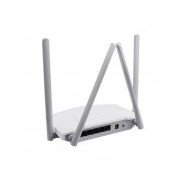
Слика 1: Заден дел view of the Mercury MW3030R router. This image displays the four external antennas, the WAN port (typically blue), multiple LAN ports (typically yellow), and the power input jack. The reset button and WPS button are also usually located on the rear panel.
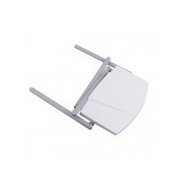
Слика 2: Горе-надолу view of the Mercury MW3030R router with its antennas folded. This perspective highlights the router's sleek, white casing and its overall compact form factor, suitable for various placements.
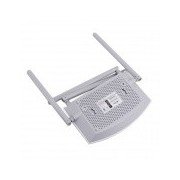
Слика 3: Дното view of the Mercury MW3030R router. This image shows the ventilation holes designed for heat dissipation and the product label, which typically contains important information such as the default Wi-Fi name (SSID), password, and web management address.
LED индикатори:
- Напојување LED: Го означува статусот на напојување на рутерот.
- Интернет LED: Ја означува состојбата на интернет-врската.
- WLAN LED: Означува безжична активност.
- LAN LED диоди: Indicate connection status for each LAN port.
Поставување
1. Врска со хардвер
- Вклучување: Connect the power adapter to the router's power port and plug it into a wall outlet. Wait for the Power LED to become stable.
- Поврзете се на интернет (WAN): Connect one end of an Ethernet cable to your modem's LAN port and the other end to the router's WAN port (usually distinctively colored, e.g., blue).
- Поврзување уреди (LAN): For wired connections, connect your computer or other devices to the router's LAN ports (usually yellow) using Ethernet cables.
- Антени: Adjust the four antennas for optimal signal coverage.
2. Почетна конфигурација (Web Интерфејс)
- Поврзете се со рутер: Connect your computer to the router either via an Ethernet cable to a LAN port or wirelessly using the default Wi-Fi SSID and password printed on the router's label (refer to Figure 3).
- Пристап Web Прелистувач: Отвори a web browser (e.g., Chrome, Firefox) and type the default access address (e.g., http://192.168.1.1 or http://tplinkwifi.net) во лентата со адреси и притиснете Enter.
- Најавете се: Внесете го стандардното корисничко име и лозинка (обично админ за обете, или како што е наведено на етикетата на рутерот).
- Извршете брзо поставување: Follow the on-screen instructions of the Quick Setup Wizard to configure your internet connection type (e.g., PPPoE, Dynamic IP, Static IP) and wireless settings (SSID, password).
- Промена на стандардна лозинка: Од безбедносни причини, препорачливо е да ја промените стандардната лозинка за најавување на рутерот. web интерфејс за управување.
Упатства за работа
Поврзување на Wi-Fi
- On your wireless device (smartphone, laptop), search for available Wi-Fi networks.
- Select your router's Wi-Fi network name (SSID) that you configured during setup.
- Enter the Wi-Fi password you set.
- Вашиот уред сега треба да биде поврзан на интернет.
Работа со двоен опсег
The MW3030R supports both 2.4GHz and 5.0GHz wireless bands. The 2.4GHz band offers wider coverage, while the 5.0GHz band provides faster speeds with less interference over shorter distances. You can connect your devices to either band based on your needs.
Гостинска мрежа
Пристапете до рутерот web interface to enable and configure a separate guest network. This allows guests to access the internet without accessing your main network resources.
Одржување
- Ажурирања на фирмверот: Редовно проверувајте ги упатствата на производителот website for firmware updates. Updating firmware can improve performance, add new features, and fix security vulnerabilities.
- Рестартирање на рутерот: Доколку имате проблеми со мрежата, обидете се да го рестартирате рутерот со исклучување на адаптерот за напојување, почекајте 10 секунди и потоа повторно вклучете го.
- Чистење: Одржувајте го рутерот чист и без прашина. Користете мека, сува крпа. Не користете течни средства за чистење.
- Поставување: Поставете го рутерот на централна локација, подалеку од пречки и уреди што можат да предизвикаат пречки (на пр., микробранови печки, безжични телефони).
Решавање проблеми
Нема пристап до Интернет
- Check if the Internet LED on the router is lit or blinking correctly.
- Проверете дали етернет кабелот од вашиот модем е безбедно поврзан со WAN портата на рутерот.
- Рестартирајте ги модемот и рутерот.
- Проверете ги поставките за интернет конекција во рутерот web интерфејс.
Бавна безжична брзина
- Ensure your device is connected to the 5.0GHz band if it supports it, for faster speeds.
- Move closer to the router or adjust antenna positions.
- Проверете дали има пречки од други електронски уреди.
- Reduce the number of devices connected to the network or bandwidth-intensive activities.
Не можам да пристапам до рутерот Web Интерфејс
- Осигурајте се дека вашиот уред е поврзан со рутерот (жичен или безжичен).
- Verify the IP address you are typing in the browser is correct (e.g., http://192.168.1.1).
- Обидете се да го исчистите кешот на прелистувачот или да користите друг прелистувач.
- If you forgot the login password, you may need to perform a factory reset (Warning: This will erase all your settings).
Спецификации
| Карактеристика | Опис |
|---|---|
| Модел | MW3030R |
| Безжични стандарди | IEEE 802.11ac/n/g/b/a |
| Фреквенција | 2.4 GHz и 5.0 GHz (двоен опсег) |
| Безжична брзина | Up to 600Mbps (combined) |
| Антени | 4 Надворешни антени |
| Интерфејси | 1x WAN Port, Multiple LAN Ports (typically 3 or 4) |
| Напојување | External Power Adapter (provided) |
Гаранција и поддршка
The Mercury MW3030R router comes with a standard manufacturer's warranty. For detailed warranty information, technical support, or service inquiries, please refer to the official Mercury webстраницата или контактирајте ја нивната корисничка поддршка. Зачувајте ја сметката за гаранциски барања.