1. Вовед
The Ohaus ST10C-A Pen Meter is designed for simple, fast, and accurate measurement. This economical device offers reliable performance for various applications. Its durable construction and user-friendly features make it suitable for consistent use in diverse environments.
2. Производот завршиview
The ST10C-A Pen Meter is a compact, handheld device. Key features include a clear digital display, an intuitive on/off button, a protective sensor cap, and a wrist strap for secure handling.
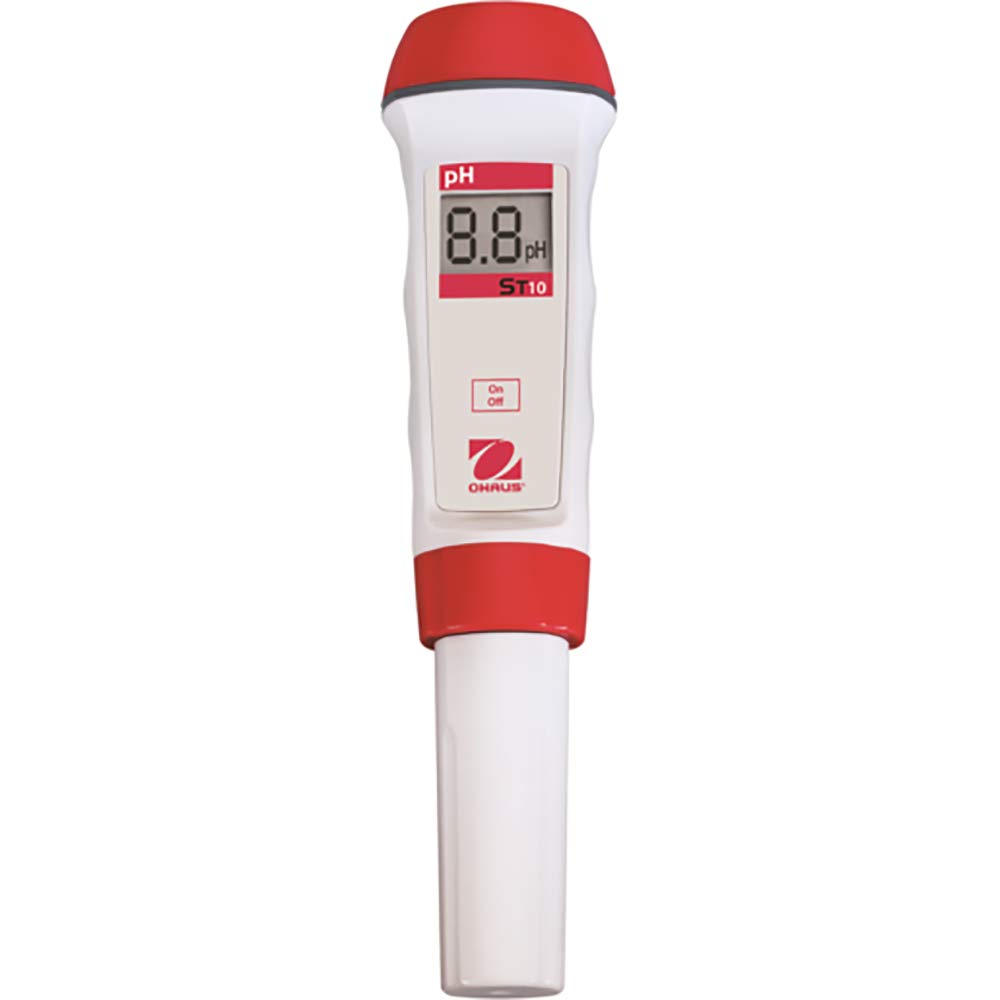
Слика 1: Ohaus ST10C-A Pen Meter. This image shows the Ohaus ST10C-A Pen Meter. It features a digital display for pH readings, an 'On/Off' button, and a durable, waterproof design with red accents.
The meter's IP67 waterproof ABS housing ensures protection against dust and water ingress, making it suitable for wet conditions. An automatic shutdown feature helps conserve battery life.
3. Поставување
- Отпакување: Carefully remove the meter and all accessories from the packaging. Inspect for any damage.
- Инсталација на батерија: The meter typically comes with batteries pre-installed or requires simple installation. Refer to the battery compartment cover for instructions on opening and inserting batteries, ensuring correct polarity.
- Sensor Preparation: Remove the protective sensor cap. If the sensor appears dry, condition it according to standard pH electrode practices (e.g., soaking in storage solution or pH 7 buffer for a short period).
- Почетна калибрација: For optimal accuracy, perform an initial calibration using fresh pH buffer solutions (e.g., pH 4.01, 7.00, and 10.01). Follow the calibration procedure outlined in the meter's specific quick start guide or on-screen prompts.
4. Упатства за работа
- Вклучување/исклучување: Притиснете го Вклучено/Исклучено button located on the front of the meter to turn the device on or off.
- Земање мерење:
- Ensure the sensor cap is removed.
- Rinse the sensor with distilled water before and after each measurement.
- Потопете го сензорот во sample solution, ensuring the sensor tip is fully submerged.
- Gently stir the solution to ensure homogeneity and allow the reading to stabilize.
- Read the pH value displayed on the screen once it becomes stable.
- Автоматско исклучување: The meter is equipped with an automatic shutdown feature to conserve battery life. It will power off after a period of inactivity.
5. Одржување
- Чистење на сензорот: After each use, rinse the sensor thoroughly with distilled or deionized water. Do not wipe the sensor bulb, as this can cause static charges and damage the sensitive glass.
- Складирање: Always replace the protective sensor cap after use. Ensure the cap contains a small amount of storage solution (or pH 7 buffer) to keep the sensor hydrated. Never store the sensor dry or in distilled water.
- Замена на батерија: When the battery indicator appears on the display, replace the batteries promptly. Refer to the battery compartment for the correct battery type and installation procedure.
- Општо чистење: The meter's housing can be cleaned with a damp крпа. Избегнувајте употреба на груби хемикалии или абразивни средства за чистење.
6 Смена на проблеми
| Проблем | Можна причина | Решение |
|---|---|---|
| Мерачот не се вклучува. | Мртви или неправилно инсталирани батерии. | Заменете ги батериите, осигурувајќи се дека е точен поларитетот. |
| Неточни или нестабилни отчитувања. |
|
|
| Бавно време на одговор. | Sensor is old or contaminated. | Clean the sensor. If problem persists, consider replacing the sensor. |
7. Спецификации
- Модел: ST10C-A
- Бренд: Охаус
- Домување: IP67 waterproof ABS
- Карактеристики: Protective sensor cap, automatic shutdown, wrist strap
- Димензии: Approximately 15 x 10 x 4 inches (Product dimensions as listed, note this might be packaging size)
- Тежина: Approximately 2 Pounds (Product weight as listed, might be shipping weight)
Note: Specific measurement ranges, accuracy, and resolution details should be confirmed with the official Ohaus product data sheet.
8. Гаранција и поддршка
For detailed warranty information, technical support, or service inquiries, please refer to the official Ohaus website or contact your local Ohaus representative. Keep your purchase receipt for warranty claims.
Официјален Охаус Webсајт: www.ohaus.com


