1. Започнување
1.1 Содржина на пакетот
Verify that all items are present in your Ultimate Ears Boom 2 package:
- Ultimate Ears Boom 2 Bluetooth Speaker
- Микро-USB кабел за полнење
- Адаптер за напојување (може да се разликува во зависност од регионот)
1.2 Полнење на вашиот звучник
Before initial use, fully charge your Ultimate Ears Boom 2 speaker. Connect the micro-USB cable to the charging port on the speaker and the other end to the power adapter, then plug into a wall outlet. The LED indicator will show charging status.

The Ultimate Ears Boom 2 speaker, ready for charging.
1.3 Спарување преку Bluetooth
За да го поврзете звучникот со уред со Bluetooth:
- Press and hold the Power button on the top of the speaker until you hear a tone and the LED flashes white.
- На вашиот мобилен уред, одете до поставките за Bluetooth.
- Select 'UE Boom 2' from the list of available devices.
- Once connected, you will hear a confirmation tone from the speaker.

Врвот view of the speaker, highlighting the power and Bluetooth pairing buttons.
1.4 Ultimate Ears App
For enhanced control and additional features, download the Ultimate Ears app from your device's app store (iOS 9.0 or later required for Apple devices, Android compatible). The app allows for remote power control, equalizer adjustments, and PartyUp mode.
2. Speaker Operation
2.1 Вклучување/исклучување
Press the Power button located on the top of the speaker to turn it on or off. A distinct sound will indicate the power status.
2.2 Контрола на јачината на звукот
Adjust the volume using the large '+' and '-' buttons located on the side of the speaker. You can also control the volume from your connected Bluetooth device.
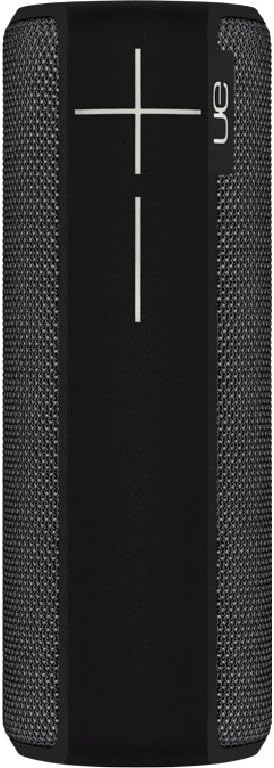
Страна view of the speaker, featuring the prominent volume control buttons.
2.3 Music Control (Tap Gestures)
The Boom 2 features tap controls for music playback:
- Еднократно допрете: Tap the top of the speaker once to play or pause the current track.
- Двојно допрете: Tap the top of the speaker twice to skip to the next track.
2.4 Статус на батерија
To check the battery level, press both the '+' and '-' volume buttons simultaneously. The speaker will announce the remaining battery percentage.
2.5 Waterproof and Durability Features
The Ultimate Ears Boom 2 is designed to be waterproof (IPX7 rated) and shockproof. It can be immersed in water up to 1 meter for 30 minutes. Ensure the charging port cover is securely closed before exposing the speaker to water.

The speaker's waterproof design allows for use in various environments.

The Ultimate Ears Boom 2 demonstrating its water resistance.
2.6 PartyUp Mode (Connecting Multiple Speakers)
Use the Ultimate Ears app to connect multiple Boom speakers together for a more expansive sound experience. Follow the instructions within the app to activate PartyUp mode.
3. Нега и одржување
3.1 Инструкции за чистење
За чистење на звучникот, користете мека, дamp крпа. Избегнувајте употреба на груби хемикалии или абразивни средства за чистење, бидејќи тие можат да ја оштетат завршната обработка на звучникот или водоотпорните заптивки. Пред полнење, проверете дали приклучокот за полнење е сув.
3.2 Долготрајност на батеријата
To maximize battery life, avoid fully discharging the speaker frequently. Charge the speaker regularly, and if storing for an extended period, ensure it has at least a 50% charge.
3.3 Складирање
Store the speaker in a cool, dry place away from direct sunlight and extreme temperatures. Ensure the charging port cover is closed to prevent dust and debris from entering.
4. Водич за решавање проблеми
4.1 Нема струја
- Ensure the speaker is charged. Connect it to the power adapter and allow it to charge for at least 15 minutes before attempting to power on.
- Press and hold the Power button firmly for a few seconds.
4.2 Проблеми со Bluetooth поврзувањето
- Ensure the speaker is in pairing mode (flashing white LED).
- Исклучете и вклучете го Bluetooth на вашиот мобилен уред.
- Forget 'UE Boom 2' from your device's Bluetooth list and attempt to re-pair.
- Move the speaker closer to your device; the maximum range is approximately 33 meters (100 feet).
4.3 Нема звук или има ниска јачина на звук
- Зголемете ја јачината на звукот и на звучникот и на поврзаниот уред.
- Проверете дали звучникот е правилно поврзан преку Bluetooth.
- Check if the audio source on your device is playing correctly.
4.4 Sound Distortion
- Lower the volume on both the speaker and your connected device.
- Обезбедете го аудиото file или квалитетот на стримингот не е низок.
- Move away from potential sources of interference (e.g., Wi-Fi routers, other Bluetooth devices).
4.5 Проблеми со поврзувањето на апликациите
- Ensure your mobile device's operating system meets the app's requirements (iOS 9.0+).
- Рестартирајте ја апликацијата или повторно инсталирајте ја.
- Ensure the speaker's firmware is up to date via the app.
5. Технички спецификации
| Карактеристика | Спецификација |
|---|---|
| Име на моделот | Бум 2 |
| Број на модел | 984-000557 |
| ASIN | B0141208EA |
| Технологија за поврзување | Bluetooth, USB |
| Технологија на безжична комуникација | Bluetooth |
| Компатибилни уреди | Computers, Smartphones (Android, iOS) |
| Траење на батеријата | До 15 часа |
| Водоотпорен рејтинг | IPX7 (up to 1 meter for 30 minutes) |
| Максимален опсег | 33 метри (100 стапки) |
| Излезна моќност на звучникот | 25 вати |
| Димензии на производот | 6.7D x 6.7W x 18H cm (approx. 15 x 5 x 5 cm; 0.54 grams) |
| Режим за излез на звук | Опкружувачки |
| Извор на енергија | Напојува со батерија (вклучена е 1 литиум полимерна батерија) |
6. Гаранција и корисничка поддршка
6.1 Ограничена гаранција
The Ultimate Ears Boom 2 comes with a Limited Warranty. For specific details regarding warranty coverage, terms, and conditions, please refer to the warranty documentation included with your product or visit the official Ultimate Ears webсајт.
6.2 Поддршка за корисници
If you encounter any issues not covered in this manual or require further assistance, please contact Ultimate Ears customer support through their official website. For return policies or issues related to your purchase, consult the retailer's (e.g., Amazon.it) help pages.


