1. Вовед
The Alpine IVA-W520E is a full-featured 2DIN DVD player solution designed for in-car entertainment and media. It integrates advanced video and audio technologies, including a 7-inch LED touchscreen and a Burr-Brown 24-bit DAC, to deliver high-quality sound and clear images. This manual provides essential information for the proper installation, operation, and maintenance of your IVA-W520E unit.
2. Информации за безбедност
Please read all safety instructions carefully before installing or operating the unit. Failure to follow these instructions may result in injury or damage to the unit or vehicle.
- Се препорачува професионална инсталација: Due to the complexity of car audio-visual systems, professional installation is highly recommended to ensure proper wiring and functionality.
- Извор на енергија: Поврзете го уредот само на напојување со негативна заземјување од 12V DC.
- Избегнувајте одвлекување на вниманието: Do not operate the unit's controls or view video content while driving, as this can lead to accidents. Always pull over to a safe location before making adjustments.
- Вентилација: Обезбедете соодветна вентилација околу уредот за да спречите прегревање. Не ги блокирајте отворите за вентилација.
- Влага и течности: Keep the unit away from moisture and liquids. Do not expose it to rain or water.
- Чистење: Користете мека, сува крпа за чистење. Избегнувајте абразивни средства за чистење или растворувачи.
3. Содржина на пакетот
Проверете дали сите елементи се присутни во пакувањето пред да продолжите со инсталацијата:
- Alpine IVA-W520E Head Unit
- Спој за напојување/звучник
- Монтажни хардвери (завртки, држачи)
- Намали прстен
- Упатство за употреба (овој документ)
- Информации за гаранцијата
4. Поставување и инсталација
4.1. Упатства за инсталација
Proper installation is crucial for optimal performance and safety. It is highly recommended to have the unit installed by a qualified professional.
- Исклучете ја батеријата: Before starting any electrical work, disconnect the vehicle's negative battery terminal to prevent short circuits.
- Монтирање: Securely mount the unit in the vehicle's double-DIN opening using the provided mounting brackets and screws. Ensure it is stable and does not obstruct any vehicle controls.
- Жици: Connect the power harness, speaker wires, and other input/output cables according to the wiring diagram provided in the separate installation guide. Pay close attention to ground connections.
- Antenna and External Devices: Connect the radio antenna and any external devices such as a reverse camera or external ampказните за слободни животи.
4.2. Почетно поставување
After installation, reconnect the battery and power on the unit for the first time.
- Избор на јазик: Следете ги упатствата на екранот за да го изберете вашиот претпочитан јазик.
- Време и датум: Set the correct time and date for accurate display.
- Аудио поставки: Adjust basic audio settings such as volume, balance, and fader.
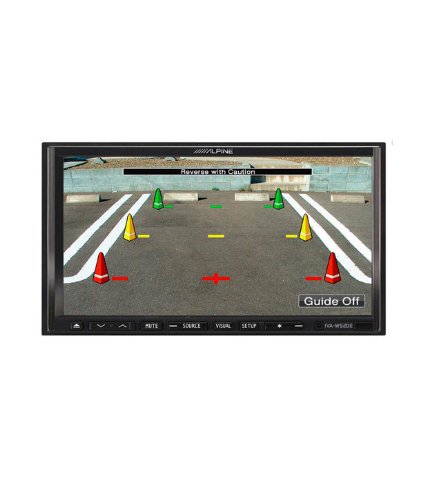
Слика 4.1: Прample of the IVA-W520E displaying a reverse camera feed, showing parking guidelines. This feature aids in safe vehicle maneuvering.
5. Ракување со уредот
5.1. Touchscreen and Button Controls
The IVA-W520E features a responsive 7-inch LED touchscreen for primary control, supplemented by physical buttons for quick access to common functions.
- Екран на допир: Navigate menus, select sources, and control playback by touching the screen.
- Контрола на јачината на звукот: Користете ги наменските копчиња за јачина на звук или контролите на екранот за да ги прилагодите нивоата на звук.
- Изворно копче: Press to cycle through available audio/video sources (Radio, DVD, USB, iPod, AUX, Bluetooth).
- Нечујно копче: Привремено го исклучува аудио излезот.
- Копче за поставување: Пристапете до менито за системски поставки.
5.2. Аудио репродукција
The unit supports various audio formats and sources, enhanced by its Burr-Brown 24-bit DAC for superior sound quality.
- USB аудио: Поврзете USB уред што содржи аудио files. The unit will display track information and allow navigation through folders.
- iPod/iPhone Connectivity: Connect your iPod or iPhone for direct audio playback and control.
- Репродукција на ДВД/ЦД: Insert a DVD or CD into the disc slot for audio or video playback.
- Радио приемник: Access AM/FM radio stations.
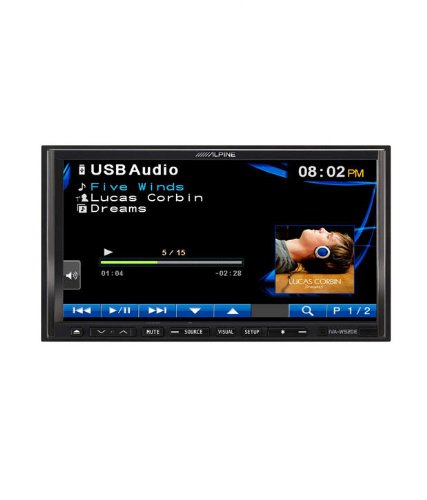
Figure 5.1: The IVA-W520E displaying the USB Audio interface, showing current track, artist, and playback controls. This allows for easy navigation of digital music files.
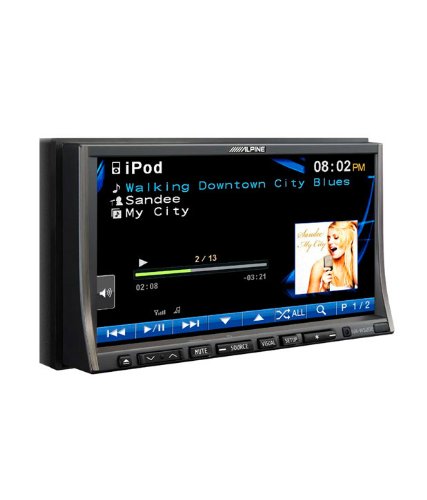
Figure 5.2: The IVA-W520E displaying the iPod interface, showing a list of songs and album art. This demonstrates seamless integration with Apple devices for music playback.
5.3. Репродукција на видео
The 7-inch LED screen provides enhanced image quality with higher resolution, better contrast, and improved color reproduction compared to standard LCD screens.
- DVD Video: Insert a video DVD for playback. Ensure the parking brake safety wire is correctly connected for video to display while the vehicle is stationary.
- Надворешен видео влез: The unit supports external video sources, such as a reverse camera or other video devices.
5.4. Bluetooth поврзување
The IVA-W520E is upgradable for Bluetooth hands-free system functionality, allowing for safe and convenient communication while driving.
- Спарување: Refer to the separate Bluetooth module manual (if applicable) for pairing instructions with your mobile phone.
- Повикување без раце: Воспоставувајте и примајте повици директно преку уредот.
- Аудио стриминг: Stream audio from your Bluetooth-enabled device.
5.5. Navigation System (Upgradable)
The unit is designed to be upgradable with a navigation system. Consult your Alpine dealer for compatible navigation modules and installation.
6. Одржување
Regular maintenance helps ensure the longevity and optimal performance of your Alpine IVA-W520E.
- Чистење на екранот: Gently wipe the touchscreen with a soft, lint-free cloth. For stubborn smudges, slightly dampen the cloth with water or a screen-specific cleaner. Do not spray cleaner directly onto the screen.
- Слот за диск: Keep the disc slot free of dust and debris. Avoid inserting bent, scratched, or irregular discs.
- Општо чистење: Use a soft, dry cloth to wipe the unit's exterior. Avoid harsh chemicals or abrasive materials.
7 Смена на проблеми
If you encounter issues with your IVA-W520E, refer to the following common problems and solutions:
| Проблем | Можна причина | Решение |
|---|---|---|
| Нема моќ | Прегорен осигурувач, неправилно поврзување, лабава врска. | Check vehicle fuses and unit's fuse. Verify power and ground wiring connections. Ensure battery is connected. |
| Нема звук | Volume too low, mute activated, speaker wiring issue, incorrect source selected. | Increase volume. Deactivate mute. Check speaker connections. Select correct audio source. |
| Грешка на дискот | Dirty, scratched, or incompatible disc. | Clean the disc. Try a different, known-good disc. Ensure disc format is supported. |
| Video Not Displaying (while driving) | Parking brake safety wire not connected or incorrectly connected. | This is a safety feature. Video playback is disabled while the vehicle is in motion. Ensure the parking brake wire is correctly connected to the vehicle's parking brake circuit. |
| Проблеми со спарување Bluetooth | Bluetooth module not connected, phone not in pairing mode, interference. | Ensure optional Bluetooth module is correctly installed. Put phone in pairing mode. Move closer to the unit. |
If the problem persists after trying these solutions, please contact your authorized Alpine dealer or customer support.
8. Спецификации
Key technical specifications for the Alpine IVA-W520E:
- Модел: IVA-W520E
- Големина на екранот: 7 инчи (18 см)
- Тип на приказ: LED LCD Touchscreen
- Резолуција: 480 x 272 пиксели
- Аудио DAC: Burr-Brown 24-bit
- Компатибилни уреди: Smartphone (via USB/iPod, Bluetooth upgradable)
- Посебни карактеристики: Touchscreen, Bluetooth (upgradable)
- Режим за излез на звук: Говорник
- Производител: Алпски
- Прв достапен: 20 август 2015 година
9. Гаранција и поддршка
For detailed warranty information, please refer to the warranty card included with your product package or visit the official Alpine webстраница. Чувајте ја сметката за купување како доказ за купување.
For technical support, service, or inquiries about compatible accessories and upgrades (such as navigation modules or Bluetooth kits), please contact your authorized Alpine dealer or visit the Alpine customer support portal online.
Алпски официјален Webсајт: www.alpine.com


