1. Вовед
Ви благодарам за купувањетоasing the Gotech GTV-7-TFT 7-inch Portable Color TFT LCD TV. This manual provides essential information for the safe and efficient operation of your device. Please read it thoroughly before use and retain it for future reference.
2. Важни безбедносни инструкции
- Не го изложувајте уредот на дожд или влага за да спречите пожар или електричен удар.
- Не го отворајте casing. Целото сервисирање обратете се на квалификуван персонал.
- Избегнувајте поставување на уредот во близина на извори на топлина или на директна сончева светлина.
- Обезбедете соодветна вентилација околу уредот.
- Користете го само наведениот адаптер за напојување.
- Чувајте го уредот подалеку од силни магнетни полиња.
- Чистете го уредот со мека, сува крпа. Не користете течни средства за чистење.
3. Содржина на пакетот
Проверете дали сите артикли се присутни во пакувањето:
- Gotech GTV-7-TFT Portable TV Unit
- Далечински управувач
- AC/DC адаптер
- Car Cord (Car Holder not explicitly listed as included, but mentioned as a feature)
- Антена Jackек
- AV кабел
- Одвоен држач

Image 3.1: The retail box for the Gotech GTV-7-TFT Portable TV, showing the product, remote control, and included accessories.
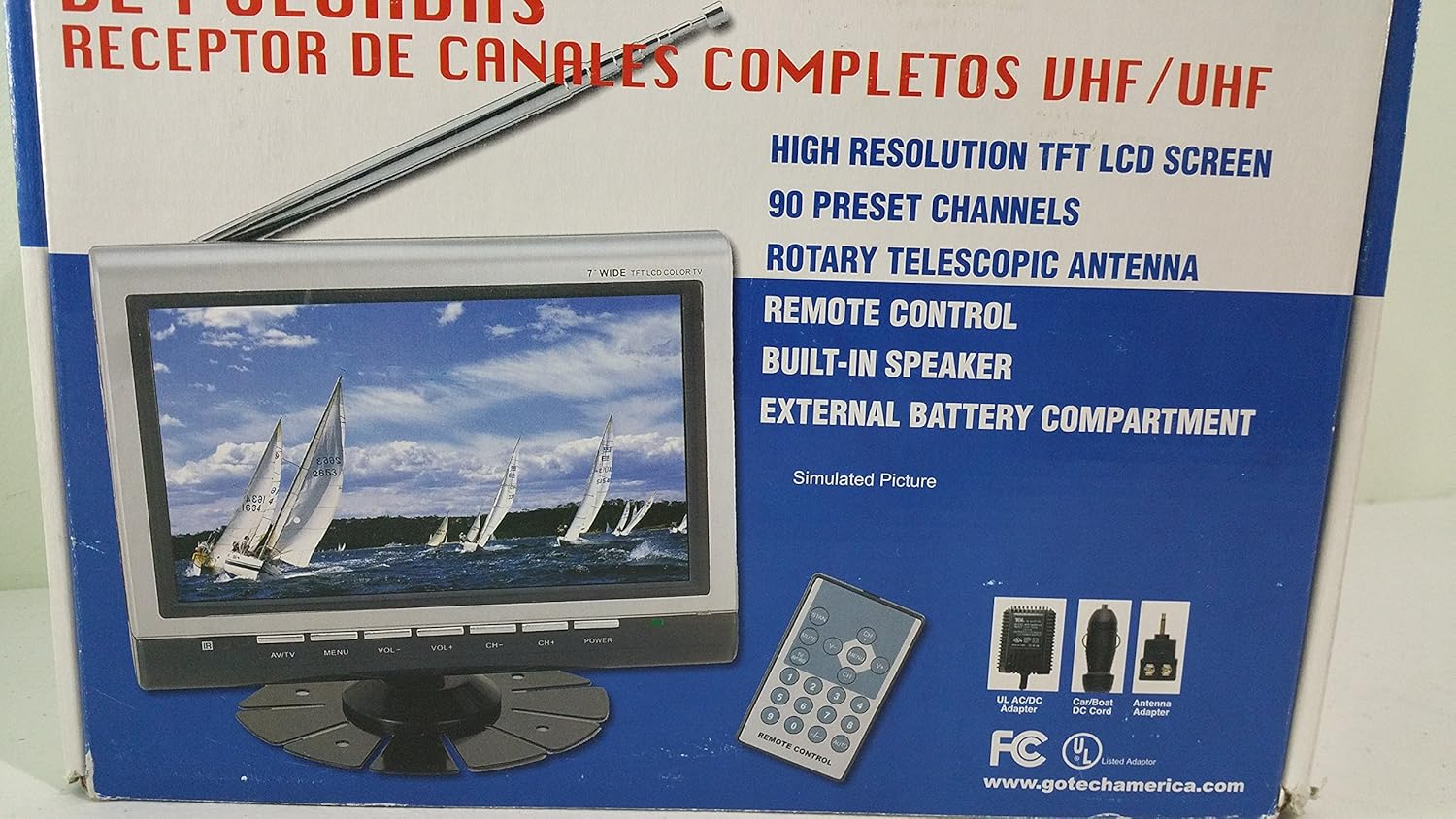
Слика 3.2: Затворач view of the Gotech GTV-7-TFT TV screen and the remote control, as depicted on the product packaging.
4. Производот завршиview
4.1 Клучни карактеристики
- 7-inch High Resolution TFT LCD Screen
- Full Channel VHF/UHF Receiver
- 90 Претходно поставени канали
- Digital Up/Down Tuning
- Auto Channel Programming
- Ротирачка телескопска антена
- On-Screen Display (OSD) for Picture and Volume Adjustment
- Вграден звучник
- External Battery Compartment (requires 10x AA batteries, not included)
- Remote Control with Button Cell
- New Detachable Stand with Battery

Image 4.1: Side panel of the Gotech GTV-7-TFT packaging, detailing the product's main features.
5. Поставување
5.1 Powering the TV
The GTV-7-TFT can be powered in several ways:
- AC/DC адаптер: Connect the provided AC/DC adapter to the TV's power input and then to a standard wall outlet.
- Car Cord: For in-vehicle use, connect the car cord to the TV's power input and then to your vehicle's 12V power outlet.
- Надворешни батерии: Open the external battery compartment and insert 10x AA size batteries (UM3) according to the polarity indicators. Ensure the batteries are fresh and correctly oriented.
5.2 Поврзување на антената
Extend the rotary telescopic antenna for optimal signal reception. For improved reception, you may connect an external antenna to the antenna jack using the provided antenna jack adapter.
5.3 Connecting External Devices (AV Input)
To connect external devices such as a DVD player or gaming console, use the provided AV cable. Connect one end to the TV's AV input port and the other end to the AV output ports of your external device. Select the AV input source on the TV to view содржина од поврзаниот уред.
6. Операција
6.1 Вклучување/исклучување
Притиснете го МОЌ button on the TV unit or the remote control to turn the TV on or off.
6.2 Channel Tuning
- Auto Channel Programming: It is recommended to perform an auto channel scan upon first use or when moving to a new location. Access the menu, navigate to the channel setup, and select 'Auto Scan' or 'Auto Program'. The TV will search and store available channels.
- Digital Up/Down Tuning: Користете го CH+ и CH- buttons on the TV or remote control to navigate through the preset channels.
6.3 Volume and Picture Adjustment
Користете го VOL+ и VOL- buttons on the TV or remote control to adjust the volume. Picture settings (brightness, contrast, color) can be adjusted via the on-screen display (OSD) menu. Press the МЕНИ button to access these options.
Далечински управувач 6.4
The remote control allows convenient operation from a distance. Ensure the button cell battery is correctly inserted. Point the remote control directly at the TV's infrared sensor.
7. Одржување
7.1 Чистење
Wipe the TV screen and casing with a soft, dry, lint-free cloth. Do not use abrasive cleaners, waxes, or solvents as they may damage the finish or screen.
7.2 Складирање
If the TV will not be used for an extended period, remove the external batteries to prevent leakage. Store the unit in a cool, dry place away from direct sunlight and extreme temperatures.
8 Смена на проблеми
| Проблем | Можна причина | Решение |
|---|---|---|
| Нема моќ | Адаптерот за напојување не е поврзан; Батериите се испразнети или неправилно вметнати. | Check power connections; Replace or correctly insert batteries. |
| Нема слика/звук | Incorrect input source; Antenna not connected or extended; No channels scanned. | Select correct input (TV/AV); Extend antenna or connect external one; Perform auto channel scan. |
| Лош прием | Weak signal; Antenna position. | Adjust antenna position; Try an external antenna; Check for local signal strength. |
| Далечинскиот управувач не работи | Battery depleted; Obstruction between remote and TV. | Replace remote control battery; Remove any obstructions. |
9. Спецификации
| Карактеристика | Детал |
|---|---|
| Број на модел | gtv-7-tft |
| Големина на екранот | 7 инчи (17.8 см) |
| Тип на дисплеј | TFT LCD екран во боја |
| Тип на тјунер | Full Channel VHF/UHF Receiver |
| Претходно поставени канали | 90 |
| Тип на аудио излез | Вграден звучник |
| Контролен метод | Далечински управувач |
| Компатибилни уреди | Телевизија, спикер |
| Извор на енергија | AC/DC Adapter, Car Cord, External Battery Compartment (10x AA batteries, not included) |
10. Гаранција и поддршка
Specific warranty information and customer support details are not provided within this manual. Please refer to the product packaging or contact your retailer for warranty claims and technical assistance.


