PRORECK Party 15 Portable PA Speaker System
Упатство за употреба
Model: PARTY 15
Вовед
Ви благодарам за купувањетоasing the PRORECK Party 15 Portable PA Speaker System. This system is designed to deliver powerful and clear audio for various applications, including parties, DJ events, home studios, and social gatherings. Featuring Bluetooth connectivity, USB/SD card playback, FM radio, and integrated LED lights, the Party 15 offers versatile audio solutions. Please read this manual thoroughly before operating the system to ensure proper use and to maximize its performance and longevity.
Важни безбедносни информации
Секогаш следете ги основните безбедносни мерки на претпазливост при користење на овој производ за да го намалите ризикот од пожар, електричен удар и повреда.
- Не го изложувајте овој уред на дожд или влага.
- Do not open the speaker enclosure. There are no user-serviceable parts inside. Refer all servicing to qualified service personnel.
- Обезбедете ја јачината на напојувањетоtage одговара на томtage наведено на единицата.
- Заштитете го кабелот за напојување од одење или стискање, особено на приклучоците, приклучните приклучоци и местото каде што тие излегуваат од апаратот.
- Исклучете го овој апарат од струја за време на громови или кога не го користите подолг временски период.
- Не ги блокирајте отворите за вентилација. Инсталирајте во согласност со упатствата на производителот.
- Користете го само со количка, држач, статив, држач или маса назначена од производителот или се продава со апаратот.
Што има во кутијата
Carefully unpack your PRORECK Party 15 system and ensure all items listed below are present and in good condition. If any items are missing or damaged, please contact your retailer immediately.

Image: Complete PRORECK Party 15 system with all included accessories.
- 1 x Активен звучник
- 1 x Passive Speaker
- 2 x држачи за звучници
- 1 x жичен микрофон
- 1 x Speakon Cable (for connecting active to passive speaker)
- 1 x кабел за напојување
- 1 x далечински управувач

Слика: Детална view of the wired microphone, remote control, and various cables.
Поставување
Follow these steps to set up your PRORECK Party 15 speaker system.
1. Склоп на држач за звучници
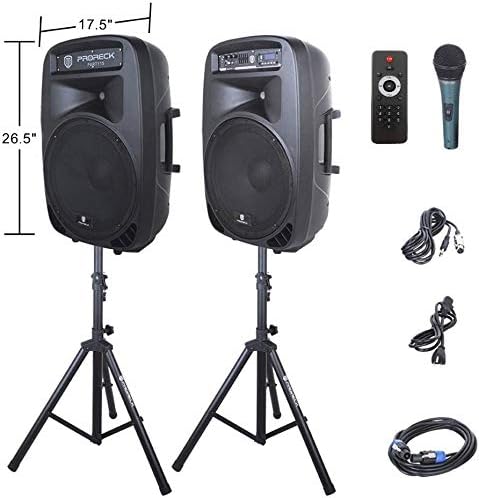
Image: The two included speaker stands.
- Unfold the tripod legs of each speaker stand until they are fully extended and stable.
- Loosen the height adjustment knob on the stand and extend the pole to your desired height. Ensure the safety pin is inserted through the appropriate hole to secure the height.
- Цврсто затегнете го копчето за прилагодување на висината.
2. Поставување звучници
- Carefully lift each speaker and place it onto the top pole of a speaker stand. Ensure the speaker is securely seated.
- Position the active speaker (the one with the control panel) near a power outlet.
- Place the passive speaker within reach of the included Speakon cable from the active speaker.
Image: PRORECK Party 15 speakers set up on their stands.
3. Поврзување на звучници
- Locate the Speakon output on the rear panel of the active speaker and the Speakon input on the rear panel of the passive speaker.
- Connect one end of the Speakon cable to the active speaker's Speakon output and the other end to the passive speaker's Speakon input. Ensure a secure connection.

Image: Rear panels of the active and passive speakers, highlighting the Speakon connection.
4. Поврзување за напојување
- Ensure the master volume knob on the active speaker is turned down to its minimum setting.
- Connect the power cable to the active speaker's power input and then plug it into a suitable electrical outlet.
Упатства за работа
This section details how to operate your PRORECK Party 15 speaker system and utilize its various features.
Контролниот панел завршиview

Слика: Детална view of the active speaker's control panel.
The active speaker features a comprehensive control panel with an LCD display, various input options, volume controls, and an equalizer.
1. Вклучување/исклучување
- After connecting the power cable, locate the power switch on the rear panel of the active speaker.
- Flip the switch to the "ON" position to power on the system. The LCD display will illuminate.
- To power off, flip the switch to the "OFF" position.
2. Избор на режим
Притиснете го РЕЖИМ button on the control panel or remote control to cycle through available input modes: Bluetooth, USB, SD Card, FM Radio, and Line Input.
3. Bluetooth поврзување
- Select "Bluetooth" mode using the РЕЖИМ button. The LCD display will show "BLUE".
- На вашиот уред со Bluetooth (паметен телефон, таблет итн.), пребарајте достапни Bluetooth уреди.
- Select "PRORECK PARTY 15" from the list. Once paired, the speaker will emit a confirmation sound.
- You can now play audio from your device through the speakers.
4. Репродукција од USB/SD картичка
- Вметнете USB-уред или SD-картичка што содржи MP3-аудио files во соодветниот отвор на контролната табла.
- The system will automatically switch to USB or SD mode and begin playing the first compatible audio file. If not, press the РЕЖИМ копчето за да го изберете точниот влез.
- Користете го PLAY/PAUSE, ПРЕТХОДЕН, и СЛЕДНО buttons on the control panel or remote to manage playback.
5. FM радио
- Select "FM Radio" mode using the РЕЖИМ копче.
- Притиснете го PLAY/PAUSE button to initiate an automatic scan for available FM stations. The system will save detected stations.
- Користете го ПРЕТХОДЕН и СЛЕДНО копчиња за навигација низ зачуваните станици.
6. Употреба на микрофон
- Connect the wired microphone to the 1/4'' MIC input on the control panel.
- Adjust the "MIC VOL" knob to control the microphone's volume level.
- Ensure the main volume is set appropriately to avoid feedback.
7. Функции на далечински управувач
Image: The included remote control.
The remote control allows for convenient operation from a distance (up to 20 feet). Functions include:
- МОД: Префрлувајте се помеѓу режимите на внесување.
- ПРОИГРАЈ/ПАУЗИРАЈ: Пушти или паузирај репродукција на аудио.
- ПРЕТХОДНО/СЛЕДНО: Прескокни песни или навигирај низ FM станици.
- VOL+/VOL-: Прилагодете ја главната јачина на звук.
- EQ: Циклусно прелистување низ претходно поставените поставки за еквилајзерот.
- Numeric buttons for direct track selection (in USB/SD mode).
8. Прилагодување на еквилајзерот
The control panel features a 5-band graphic equalizer. Adjust the sliders to fine-tune the audio output to your preference. Experiment with different settings to achieve the desired sound for various music genres or vocal performances.
9. LED светилки

Image: PRORECK Party 15 speakers demonstrating various LED light colors.
The PRORECK Party 15 speakers are equipped with built-in LED lights that activate with sound. These lights enhance the party atmosphere. There is a dedicated switch on the rear of the active speaker to turn the LED lights on or off.
Одржување
Proper maintenance ensures the longevity and optimal performance of your speaker system.
- Чистење: Use a soft, dry cloth to clean the exterior of the speakers. Do not use abrasive cleaners, waxes, or solvents.
- Складирање: Кога не ги користите подолг период, чувајте ги звучниците на ладно и суво место, подалеку од директна сончева светлина и екстремни температури.
- Вентилација: Осигурајте се дека отворите за вентилација се исчистени од прашина и остатоци за да спречите прегревање.
- Кабли: Редовно проверувајте ги сите кабли за знаци на абење или оштетување. Веднаш заменете ги сите оштетени кабли.
Решавање проблеми
If you encounter issues with your PRORECK Party 15 system, refer to the following common problems and solutions.
| Проблем | Можна причина | Решение |
|---|---|---|
| Нема моќ | Power cable not connected; Power switch off; Outlet malfunction. | Ensure power cable is securely connected and plugged into a working outlet. Check power switch on rear panel. |
| Нема звук од звучници | Volume too low; Incorrect input mode; Speakon cable loose/damaged; Audio source issue. | Increase master volume. Select correct input mode. Check Speakon cable connection between active and passive speakers. Verify audio source is playing. |
| Bluetooth не се спарува | Speaker not in Bluetooth mode; Device too far; Device already paired to another speaker. | Ensure speaker is in Bluetooth mode ("BLUE" on display). Move device closer to speaker. Disconnect device from other Bluetooth connections. |
| Микрофонот не работи | Mic volume too low; Microphone not connected properly; Microphone faulty. | Increase "MIC VOL" knob. Ensure microphone is fully inserted into the 1/4'' input. Test with another microphone if available. |
| Искривен звук | Volume too high; Input signal too strong; Equalizer settings. | Reduce master volume or input source volume. Adjust equalizer settings. |
| LED светлата не работат | LED switch off; Volume too low for activation. | Ensure the LED switch on the rear panel is in the "ON" position. Increase volume to activate sound-reactive lights. |
Спецификации
| Име на моделот | ЗАБАВА 15 |
| Тип на звучник | Вуфер |
| Големина на звучникот | 15 инчи |
| Максимална излезна моќност на звучникот | 2000 Watts P.M.P.O (Peak Music Power Output) |
| Технологија за поврзување | Жичен, безжичен (Bluetooth) |
| Технологија на безжична комуникација | Bluetooth |
| Опсег на Bluetooth | 10 метри (приближно 33 стапки) |
| Посебни карактеристики | LED Light, FM Radio, USB Port, SD Card Reader, Digital LCD Display |
| Влезови | 1/4'' Mic, RCA Line Inputs, USB, SD Card |
| Излези | Speakon Output (for passive speaker), RCA Line Output |
| Материјал | Акрилонитрил бутадиен стирен (ABS) |
| Димензии на производот (за секој звучник) | 19"D x 30"W x 29"H (approximate, likely including handles/feet) |
| Тежина на предметот (вкупно) | 81.6 фунти |
| Извор на енергија | Електричен со кабел |
Гаранција и поддршка
PRORECK products come with a limited warranty. For specific warranty terms and conditions, please refer to the warranty card included with your product or visit the official PRORECK website. For technical support, troubleshooting assistance, or parts inquiries, please contact PRORECK customer service through their official channels.
Manufacturer: PRORECK AUDIO


