1. Вовед
This manual provides detailed instructions for the installation, operation, maintenance, and troubleshooting of your Gateway SX2865 SFF Desktop Motherboard H61 (Model DB.U7411.001). This motherboard is designed for Small Form Factor (SFF) desktop systems, featuring the Intel H61 Express chipset and supporting LGA 1155/1156 CPUs and DDR3 RAM. Please read this manual thoroughly before proceeding with any installation or configuration to ensure proper functionality and safety.
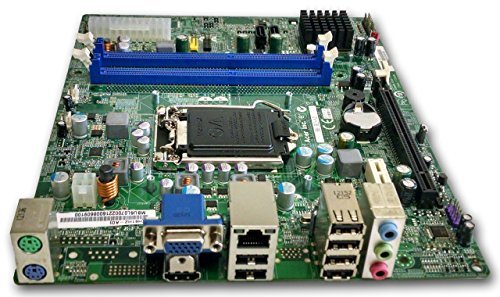
Слика 1: Во текот наview of the Gateway SX2865 SFF Desktop Motherboard H61. This image displays the main components and layout of the motherboard, including the CPU socket, RAM slots, and various connectors.
2. Информации за безбедност
Always observe the following safety precautions when handling and installing computer components:
- Исклучете го кабелот за напојување од ѕидниот штекер пред да инсталирате или отстраните било кои компоненти.
- Носете антистатички ремен за зглоб за да спречите оштетување на чувствителните компоненти од електростатско празнење (ESD).
- Држете ја матичната плоча за нејзините рабови за да избегнете допирање на чувствителни компоненти или кола.
- Обезбедете соодветна вентилација во куќиштето на компјутерот за да спречите прегревање.
- Не ја изложувајте матичната плоча на влага или екстремни температури.
- Доколку не сте сигурни за кој било чекор од инсталацијата, консултирајте се со квалификуван техничар.
3. Поставување и инсталација
Follow these steps to properly install the Gateway SX2865 SFF Desktop Motherboard into your system:
3.1. Подготовка на шасијата
- Open your computer chassis and ensure it is clean and free of dust.
- Install the I/O shield provided with your chassis or motherboard into the rear panel opening.
- Verify that the standoffs in the chassis align with the mounting holes on the motherboard. Adjust if necessary.
3.2. Инсталација на процесорот
- Locate the CPU socket (LGA 1155/1156) on the motherboard.
- Нежно подигнете ја рачката за оптоварување и отворете го капакот на приклучокот на процесорот.
- Carefully align the CPU with the socket, matching the golden triangle on the CPU with the triangle mark on the socket. Do not force the CPU into the socket.
- Затворете го капакот на приклучокот и притиснете ја рачката за товарење додека не се заклучи на своето место.
- Apply a thin layer of thermal paste to the CPU surface (if not pre-applied on the cooler).
- Install the CPU cooler according to its manufacturer's instructions, ensuring it is securely fastened.
3.3. Инсталација на RAM меморија
- Пронајдете ги слотовите DDR3 DIMM на матичната плоча.
- Отворете ги штипките на двата краја од слотот за DIMM.
- Порамнете го засекот на RAM модулот со клучот во слотот за DIMM.
- Цврсто притиснете ги двата краја на RAM модулот додека штипките не се заклучат на своето место.
3.4. Монтирање на матична плоча
- Carefully place the motherboard into the chassis, aligning the mounting holes with the standoffs.
- Прицврстете ја матичната плоча со завртки, внимавајќи да не ја затегнете премногу.
3.5. Поврзување на периферни уреди и напојување
- Поврзете го 24-пинскиот ATX конектор за напојување и 4-пинскиот конектор за напојување на процесорот од напојувањето со матичната плоча.
- Поврзете ги SATA каблите за податоци од вашите уреди за складирање (HDD/SSD) со SATA портите на матичната плоча.
- Connect front panel connectors (power button, reset button, USB, audio) to their respective headers on the motherboard. Refer to the motherboard's silkscreen labels for correct orientation.
- Install any expansion cards (e.g., graphics card) into the appropriate PCIe slots and secure them.
- Connect all necessary cables to your power supply.
4. Работење и конфигурација
4.1. Првично стартување
- After all components are installed and connected, close the chassis.
- Поврзете го мониторот, тастатурата и глувчето.
- Connect the power cord to the power supply and a wall outlet.
- Притиснете го копчето за вклучување на вашиот компјутер.
4.2. Поставување на BIOS/UEFI
The BIOS (Basic Input/Output System) or UEFI (Unified Extensible Firmware Interface) is firmware that initializes hardware during the booting process. To enter the BIOS/UEFI setup utility:
- During the initial boot-up sequence, repeatedly press the designated key (commonly Дел, F2, или F10). The exact key may vary; check the on-screen prompts.
- Within the BIOS/UEFI, you can configure settings such as:
- Датум и време на системот
- Boot Order (to install an operating system from a USB drive or DVD)
- SATA Mode (AHCI, IDE)
- CPU and Memory settings (advanced users)
- Зачувајте ги промените и излезете од BIOS/UEFI за да продолжите со подигнувањето.
4.3. Инсталација на оперативен систем и драјвер
After configuring the BIOS/UEFI, proceed with installing your preferred operating system (e.g., Windows, Linux). Once the OS is installed, install the necessary drivers for the motherboard's components (chipset, audio, LAN, etc.). These drivers are typically available on the manufacturer's website (Acer/Gateway) or can be found through the operating system's update features.
5. Одржување
Редовното одржување помага да се обезбеди долговечност и стабилни перформанси на вашата матична плоча:
- Отстранување прашина: Periodically clean the inside of your computer case, including the motherboard, CPU cooler, and fan vents, using compressed air. Ensure the system is powered off and unplugged before cleaning.
- Ажурирања на BIOS-от: Проверете го производителот website (Acer/Gateway) for BIOS/UEFI updates. Updates can improve stability, add support for new hardware, or fix bugs. Follow the update instructions carefully to avoid damaging the motherboard.
- Ажурирања на возачот: Ажурирајте ги драјверите на вашиот систем за да обезбедите оптимални перформанси и компатибилност.
- Физичка инспекција: Повремено проверувајте ја матичната плоча за какви било знаци на оштетување, лабави врски или испакнати кондензатори.
6 Смена на проблеми
Доколку наидете на проблеми со вашата матична плоча, погледнете ги следните вообичаени чекори за решавање проблеми:
- Без моќност:
- Ensure the power supply is connected correctly to the motherboard (24-pin ATX and 4-pin CPU).
- Check that the power supply switch is in the 'ON' position.
- Verify the power cord is securely plugged into both the power supply and the wall outlet.
- Confirm the front panel power button connector is correctly attached to the motherboard.
- Нема приказ:
- Ensure the monitor is powered on and connected to the correct video output (either integrated graphics or a dedicated graphics card).
- Reseat the RAM modules. Try booting with only one RAM module installed.
- Повторно поставете ја графичката картичка (доколку е применливо).
- Check if the CPU cooler is properly installed and the CPU power connector is secure.
- System Fails to Boot / POST Errors:
- Listen for beep codes from the motherboard's speaker (if installed). Consult the motherboard's documentation for beep code meanings.
- Clear the CMOS (Complementary Metal-Oxide-Semiconductor) by removing the CMOS battery for a few minutes or using the clear CMOS jumper (refer to motherboard layout).
- Ensure all essential components (CPU, RAM, GPU) are correctly installed.
- Проблеми со оперативниот систем:
- Verify that all necessary drivers are installed and up to date.
- Check SATA cable connections for storage devices.
- Run diagnostic tools for hard drives/SSDs and RAM.
7. Спецификации
Key technical specifications for the Gateway SX2865 SFF Desktop Motherboard H61 (Model DB.U7411.001):
| Карактеристика | Детал |
|---|---|
| Бренд | Порта |
| Име на моделот | SX2865 |
| Број на модел на ставка | DB.U7411.001 |
| Производител | Acer |
| Тип на чипсет | Intel H61 Express |
| Сокет на процесорот | LGA 1155 or LGA 1156 |
| Компатибилни процесори | Intel Xeon (and other compatible LGA 1155/1156 CPUs) |
| Технологија на RAM меморија | DDR3 |
| Брзина на мемориски часовник | 2133 MHz (Max supported, actual speed depends on CPU and RAM) |
| Капацитет за складирање на меморија | 16 GB (Maximum supported) |
| Компатибилни уреди | Личен компјутер |
| Платформа | Linux (and other compatible operating systems) |
| Форма фактор | uATX (Micro-ATX) |
8. Гаранција и поддршка
For warranty information and technical support regarding your Gateway SX2865 SFF Desktop Motherboard H61 (Model DB.U7411.001), please refer to the documentation provided with your original system or contact the manufacturer directly.
- Производител: Acer (as per product specifications)
- Бренд: Порта
- Посетете го официјалното лице Поддршка за портали webсајт or Поддршка на Acer webсајт за возачи, најчесто поставувани прашања и информации за контакт.
- Чувајте го вашиот доказ за купување за барања за гаранција.


