1. Вовед
This manual provides essential information for the safe and effective operation of your OWON SDS6062 Digital Storage Oscilloscope. Please read this manual thoroughly before using the device to ensure proper setup, operation, and maintenance. The SDS6062 is a 2-channel oscilloscope featuring a 60 MHz bandwidth, 500 MS/s sample rate, and a 10M record length, designed for precise electrical signal analysis.
2. Информации за безбедност
Always observe the following safety precautions to prevent injury and avoid damage to the instrument or any connected products. Read these instructions carefully before operation.
- Извор на енергија: Use only the power adapter supplied with the instrument. Ensure the voltage одговара на вашето локално напојување.
- Заземјување: The oscilloscope must be properly grounded to prevent electric shock.
- Безбедност на сондата: Do not connect the probe ground lead to a point where a voltage greater than 30V RMS or 42.4V peak is present.
- Животна средина: Operate the device in a well-ventilated area, away from moisture, dust, and direct sunlight. Avoid operating in explosive atmospheres.
- Одржување: За сите сервиси обратете се кај квалификуван сервисер. Не обидувајте се сами да го поправите уредот.
3. Содржина на пакетот
Проверете дали сите артикли наведени подолу се присутни во вашето пакување. Доколку некои артикли недостасуваат или се оштетени, контактирајте го вашиот добавувач.
- OWON SDS6062 Digital Storage Oscilloscope Unit
- 2 x осцилоскопски сонди
- 1 x кабел за напојување
- 1 x Probe Adjust Pen
- 1 x USB кабел за податоци
- 1 x Софтверско ЦД
- 1 x Упатство за употреба (овој документ)
4. Производот завршиview
The OWON SDS6062 is a compact and powerful digital storage oscilloscope. It features an 8-inch (800x600) color TFT-LCD screen for clear waveform display and an intuitive control panel for easy operation. Key features include its 60 MHz bandwidth, 500 MS/s real-time sample rate, and 10M record length, making it suitable for a wide range of applications.
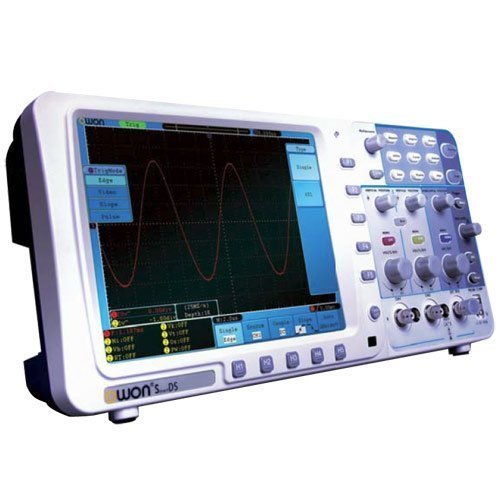
Слика 4.1: Предна страна view of the OWON SDS6062 Digital Storage Oscilloscope, showing the display, control knobs, and function buttons.
4.1 Контроли на предниот панел
The front panel includes the main display, vertical controls (VOLTS/DIV, position), horizontal controls (SEC/DIV, position), trigger controls, and various function buttons for menu navigation, measurement, and utility settings.
4.2 Приклучоци на задниот панел
The rear panel provides connectivity options including the power input, USB host and device ports, LAN port for network connectivity, and a VGA port for external display output.
5. Поставување
Follow these steps to set up your OWON SDS6062 oscilloscope for initial use.
5.1 Поврзување напојување
- Ensure the oscilloscope is turned off.
- Connect the supplied power cord to the power input on the rear panel of the oscilloscope.
- Вклучете го другиот крај од кабелот за напојување во заземјен штекер за наизменична струја.
5.2 Поврзување на сонди
- Align the BNC connector of the probe with the CH1 or CH2 input on the front panel.
- Push and twist the connector clockwise until it locks into place.
- Attach the probe ground clip to the ground terminal of the circuit under test.
- Set the probe attenuation switch (e.g., 1X or 10X) to match the setting on the oscilloscope's input channel menu.
5.3 Почетно вклучување
- Притиснете го копчето за вклучување кое се наоѓа на предниот панел.
- The oscilloscope will perform a self-test and display the startup screen.
- After startup, it is recommended to perform a probe compensation adjustment (refer to Section 7.3).
6. Ракување со осцилоскопот
This section covers basic operation and common functions of the SDS6062.
6.1 Основни мерења
To display a signal:
- Connect a signal source to CH1 or CH2 using a probe.
- Притиснете го AUTOSET button. The oscilloscope will automatically adjust vertical, horizontal, and trigger settings to display a stable waveform.
- Прилагодете го VOLTS/DIV knob to change the vertical scale (voltage по поделба).
- Прилагодете го SEC/DIV knob to change the horizontal scale (time per division).
- Use the vertical and horizontal ПОЗИЦИЈА knobs to move the waveform on the screen.
6.2 Trigger System
The trigger system stabilizes repetitive waveforms and captures single-shot events.
- Ниво на активирање: Користете го НИВО НА АКТИВУВАЊЕ копче за поставување на јачината на звукотtage level at which the trigger occurs.
- Режим на активирање: Access the trigger menu to select modes like Edge, Pulse, Video, or Slope.
- Извор на активирањето: Select the input channel (CH1, CH2, EXT, AC Line) that will be used for triggering.
6.3 Мерни функции
The SDS6062 offers various automatic measurement functions.
- Притиснете го МЕРКА button to display the measurement menu.
- Select desired measurements such as Vpp, Vmax, Vmin, Freq, Period, Rise Time, etc.
6.4 Connectivity (LAN and VGA)
- LAN: Connect an Ethernet cable to the LAN port on the rear panel to connect the oscilloscope to a network. This allows for remote control and data transfer using compatible software.
- VGA: Use the VGA port to connect an external monitor or projector for larger display of waveforms, useful for presentations or collaborative work.
7. Одржување
Правилното одржување обезбедува долготрајност и точност на вашиот осцилоскоп.
7.1 Чистење
Clean the instrument regularly with a soft, damp cloth. Do not use abrasive cleaners or solvents that could damage the casing or screen. Ensure the device is powered off and unplugged before cleaning.
7.2 Складирање
When not in use, store the oscilloscope in a dry, dust-free environment, away from extreme temperatures and direct sunlight. Use the original packaging or a suitable carrying case for protection during transport.
7.3 Probe Compensation Adjustment
Probe compensation should be adjusted to match the oscilloscope's input characteristics. This ensures accurate measurements.
- Connect the probe to CH1 and attach the probe tip to the probe compensation output (usually a square wave test point on the front panel).
- Attach the probe ground clip to the ground terminal.
- Притиснете AUTOSET.
- Use the supplied probe adjust pen to turn the trimmer screw on the probe until the square wave displayed on the screen has flat top and bottom edges (no overshoot or undershoot).
8 Смена на проблеми
Овој дел нуди решенија за вообичаени проблеми со кои може да се соочите.
- Нема приказ: Check power connection, ensure the power button is pressed. Adjust screen brightness if necessary.
- No Waveform: Verify probe connection to the input channel and the circuit under test. Ensure the signal source is active. Press AUTOSET. Check vertical and horizontal scale settings.
- Нестабилна бранова форма: Adjust the trigger level. Check trigger mode and source settings. Ensure the signal is within the oscilloscope's bandwidth.
- Неточни мерења: Perform probe compensation adjustment (Section 7.3). Ensure probe attenuation settings match the oscilloscope.
- Уредот не реагира: Try restarting the oscilloscope. If the issue persists, contact technical support.
9. Спецификации
Technical specifications for the OWON SDS6062 Digital Storage Oscilloscope.
| Параметар | Спецификација |
|---|---|
| Број на модел | SDS6062 |
| Пропусен опсег | 60 MHz |
| Канали | 2 + 1 (External Trigger) |
| Sample Rate (Real-time) | 500 MS/s |
| Должина на рекорд | 10M points |
| Приказ | 8-inch Color TFT-LCD (800x600) |
| Интерфејс | USB Host, USB Device, LAN, VGA |
| AutoScale Function | Да |
| Производител | ОУОН |
10. Гаранција и поддршка
OWON products are designed for reliability and performance. For warranty information, please refer to the warranty card included with your product or visit the official OWON website. For technical support, troubleshooting assistance, or service inquiries, please contact your local OWON distributor or the OWON customer service department. Keep your purchase receipt as proof of purchase for warranty claims.