1. Вовед
This manual provides detailed instructions for the safe and effective operation of the Extech EX355 True RMS Multimeter. The EX355 is a professional digital multimeter designed for a wide range of electrical measurements, including AC/DC voltage, current, resistance, capacitance, frequency, duty cycle, and temperature. It features True RMS for accurate readings of non-sinusoidal waveforms, Non-Contact Voltage (NCV) detection for enhanced safety, Low Impedance (LoZ) mode to prevent ghost voltage readings, and a Low Pass Filter (LPF) for noise reduction in electrical environments.
Please read this manual thoroughly before using the device to ensure proper function and to prevent potential hazards.
2. Информации за безбедност
Always adhere to the following safety precautions to avoid personal injury or damage to the multimeter:
- Прочитајте ги сите упатства: Пред употреба, запознајте се со работата и безбедносните карактеристики.
- Observe all warnings: Pay close attention to all warnings and cautions marked on the meter and in this manual.
- Use proper range: Always select the correct function and range for your measurement.
- Проверете ги тест каблите: Пред секоја употреба, проверете ги мерните сонди за оштетена изолација или изложен метал. Заменете ги доколку се оштетени.
- Do not exceed maximum input limits: Никогаш не применувајте томtage or current that exceeds the specified maximum limits for the meter.
- Avoid live circuits: Do not measure resistance, continuity, or diode on live circuits.
- Бидете внимателни со висок волуменtages: Бидете исклучително внимателни кога работите со вол.tagнад 60V DC или 30V AC RMS, бидејќи тие претставуваат опасност од струен удар.
- Do not operate if damaged: If the meter appears damaged or is not operating properly, discontinue use immediately.
- Замена на батерија: Заменете ги батериите штом ќе се појави индикаторот за слаба батерија за да се обезбедат точни мерења.
- КАТ III 600V: This meter is designed for measurements in CAT III 600V environments.
3. Производот завршиview
The Extech EX355 is a versatile True RMS Multimeter equipped with several advanced features for accurate and safe electrical testing.
Клучни карактеристики:
- 12 Measurement Functions: Includes AC/DC voltage, струја, отпор, капацитивност, фреквенција, работен циклус и температура.
- True RMS Accuracy: Ensures precise readings for both standard and distorted electrical waveforms.
- Бесконтактно волtage (NCV) Откривање: Allows for quick and safe detection of AC voltagд без директен контакт.
- Low Impedance (LoZ) Mode: Prevents false readings caused by ghost voltages in circuits.
- Нископропусен филтер (LPF): Reduces high-frequency noise for stable and accurate measurements in noisy environments.
- Прикажи: 4000 count LCD display with backlight.
- Data Hold, Min/Max, Relative Mode: For capturing and analyzing measurements.
- Автоматско исклучување: Заштедува траење на батеријата.
- Continuity and Diode Test: Неопходен за дијагностика на електрични кола.

Figure 1: The Extech EX355 True RMS Multimeter. This image shows the front view of the multimeter, highlighting its display, rotary dial, function buttons, and input jacks.
4. Поставување
4.1 Инсталација на батерија
The Extech EX355 requires two (2) AA batteries for operation. These are typically included with the device.
- Осигурајте се дека мултиметарот е исклучен.
- Пронајдете го капакот на преградата за батерии на задниот дел од уредот.
- Одвртете ги завртките за прицврстување и внимателно отстранете го капакот.
- Вметнете две AA батерии, почитувајќи ја точната поларност (+ и -) како што е наведено во внатрешноста на преградата.
- Вратете го капакот на преградата за батерии и прицврстете го со завртката/шрафовите.
Забелешка: Replace batteries immediately when the low battery indicator appears on the display to maintain measurement accuracy.
4.2 Поврзување на тест кабли
Always connect the test leads correctly for the desired measurement function.
- За најголем томtage, resistance, continuity, diode, capacitance, and frequency measurements, insert the red test lead into the VΩHzCAP приклучокот и црниот тест кабел во COM џек.
- За мерења на струја до 10A, вметнете ја црвената мерна сонда во 10 А приклучокот и црниот тест кабел во COM џек.
- За мерења на струја до 400mA, вметнете ја црвената мерна сонда во mAµA приклучокот и црниот тест кабел во COM џек.
- Осигурајте се дека тест каблите се целосно вметнати во приклучоците.
5. Упатства за работа
This section details how to perform various measurements using the Extech EX355 multimeter.
5.1 AC/DC Voltagд Мерење
- Поставете го вртливото копче на V~ (AC Voltagд) или V- (DC Voltagд) позиција.
- Поврзете го црвениот тест кабел со VΩHzCAP Џек и црниот тест кабел до COM џек.
- Допрете ги тест сондите до точките на колото каде што волуменот еtagе да се мери.
- Прочитајте го томtagе вредност на екранот.
5.2 Мерење на AC/DC струја
Внимание: Никогаш не го поврзувајте мултиметарот паралелно со волтаиченtagизвор при мерење на струја. Секогаш поврзувајте сериски со товарот.
- Set the rotary dial to the appropriate A~ (AC струја) или A- (DC Current) range (e.g., 10A or mAµA).
- Поврзете го црвениот тест кабел со 10 А or mAµA Џек и црниот тест кабел до COM џек.
- Open the circuit where current is to be measured and connect the test probes in series.
- Прочитајте ја моменталната вредност на екранот.
5.3 Мерење на отпор
Предупредување: Пред мерење на отпорот, проверете дали колото е исклучено од напон.
- Поставете го вртливото копче на Ω (Отпор) позиција.
- Поврзете го црвениот тест кабел со VΩHzCAP Џек и црниот тест кабел до COM џек.
- Touch the test probes across the component or circuit segment to be measured.
- Прочитајте ја вредноста на отпорот на екранот.
5.4 Мерење на капацитетот
Предупредување: Discharge capacitors before measuring to prevent damage to the meter.
- Поставете го вртливото копче на CAP (Капацитет) позиција.
- Поврзете го црвениот тест кабел со VΩHzCAP Џек и црниот тест кабел до COM џек.
- Допрете ги тест сондите преку терминалите на кондензаторот.
- Прочитајте ја вредноста на капацитетот на екранот.
5.5 Мерење на фреквенцијата и работниот циклус
- Поставете го вртливото копче на Hz /% (Frequency/Duty Cycle) position.
- Поврзете го црвениот тест кабел со VΩHzCAP Џек и црниот тест кабел до COM џек.
- Touch the test probes to the signal source.
- Притиснете го Hz /% button to toggle between frequency and duty cycle readings.
5.6 Мерење на температурата
The EX355 includes a general purpose bead wire temperature probe.
- Поставете го вртливото копче на Темп Позиција (Температура).
- Insert the temperature probe into the VΩHzCAP (позитивно) и COM (негативни) приклучоци, почитувајќи го поларитетот.
- Поставете го врвот на сондата за температура на или во предметот што треба да се мери.
- Read the temperature value on the display. The unit can display in Celsius or Fahrenheit.

Figure 2: Using the Extech EX355 to measure temperature in an HVAC vent. The image shows a person holding the multimeter and inserting the temperature probe into an air conditioning vent.
5.7 Неконтактни томtage (NCV) Откривање
NCV mode allows for quick detection of AC voltage без директен контакт, со што се зголемува безбедноста.
- Поставете го вртливото копче на NCV позиција.
- Move the top of the multimeter near a conductor or outlet.
- The NCV indicator light will illuminate and an audible beep will sound if AC voltage is detected. The intensity of the beep and light may increase with stronger fields.
5.8 Low Impedance (LoZ) Mode
LoZ mode helps eliminate false readings caused by ghost voltagес.
- Поставете го вртливото копче на LoZ V позиција.
- Connect the test leads as for standard voltagмерење.
- The meter will present a low impedance load to the circuit, dissipating ghost voltages and providing a more accurate reading of actual voltage.
5.9 Нископропусен филтер (LPF)
The LPF function is used to filter out high-frequency noise, providing stable readings in variable frequency drive (VFD) applications or other noisy electrical environments.
- Set the rotary dial to an AC Voltage (V~) or AC Current (A~) опсег.
- Притиснете го LPF button to activate the low pass filter. The LPF icon will appear on the display.
- Perform your measurement as usual. The meter will now display readings with high-frequency noise attenuated.
- Притиснете го LPF button again to deactivate the filter.
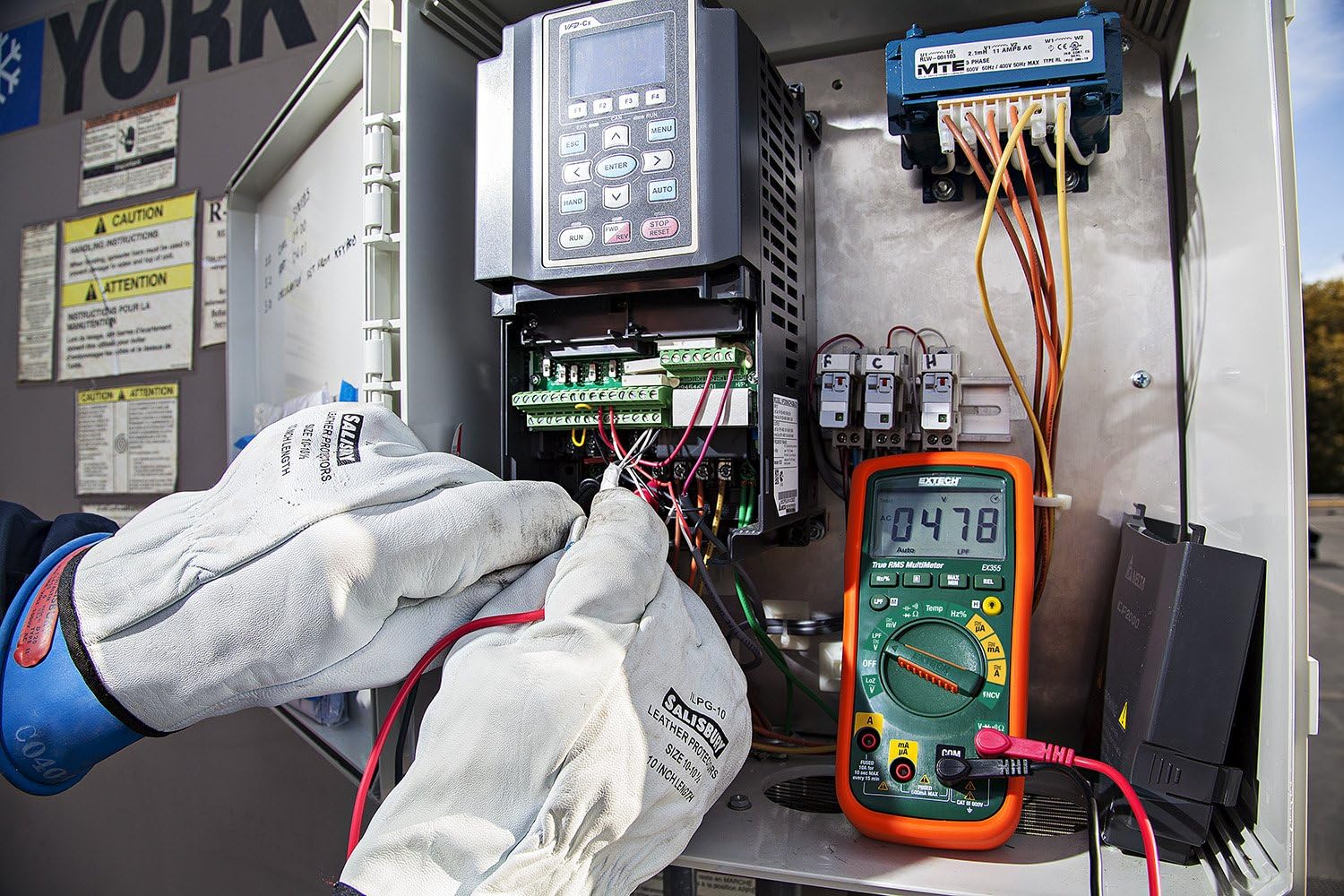
Figure 3: The Extech EX355 Multimeter in use, connected to an electrical control panel. This image demonstrates the multimeter's application in industrial or commercial electrical diagnostics.

Figure 4: The Extech EX355 Multimeter connected to a fuse box. This image illustrates the multimeter being used for testing within a residential or commercial electrical distribution system.
5.10 Data Hold, Min/Max, Relative Mode
- Задржување на податоци: Притиснете го ДРЖИ копче за замрзнување на моменталното отчитување на екранот. Притиснете повторно за да го ослободите.
- Мин/макс: Притиснете го MIN / MAX button to enter Min/Max recording mode. The meter will display the maximum reading. Press again to cycle through minimum and average readings. Hold the button to exit.
- Релативен режим: Притиснете го РЕЛ button to store the current reading as a reference value. Subsequent measurements will be displayed as a difference from this reference. Press again to exit.
5.11 Continuity and Diode Test
Предупредување: Ensure the circuit is de-energized before performing continuity or diode tests.
- Континуитет: Поставете го вртливото копче на Ω (Отпор) позиција и притиснете го ИЗБЕРИ копче додека не се појави симболот за континуитет (♫) appears. A continuous beep indicates a low resistance path (continuity).
- Тест за диоди: Поставете го вртливото копче на Ω (Отпор) позиција и притиснете го ИЗБЕРИ button until the diode symbol (→|) appears. Connect the red lead to the anode and black lead to the cathode for forward bias voltage drop. Reverse leads for reverse bias.
6. Одржување
6.1 Замена на батеријата
Refer to section 4.1 for detailed instructions on replacing the two AA batteries. Always use fresh, high-quality AA batteries.
6.2 Замена на осигурувачите
If the current measurement functions cease to work, the fuse may need replacement. This procedure should only be performed by qualified personnel.
- Ensure the multimeter is powered off and all test leads are disconnected.
- Отстранете го капакот на преградата за батерии и батериите.
- Unscrew the case screws and carefully separate the two halves of the meter casing.
- Locate the blown fuse(s). The EX355 typically uses two fuses: a 0.5A/600V fast-blow fuse for the mA/µA input and a 10A/600V fast-blow fuse for the 10A input.
- Replace the fuse(s) with fuses of the exact same type and rating. Never use a fuse with a different rating.
- Carefully reassemble the meter casing, ensuring all screws are tightened. Reinstall batteries and the battery cover.
6.3 Чистење и чување
- Clean the meter regularly with a damp крпа и благ детергент. Не користете абразиви или растворувачи.
- Ensure the meter is completely dry before use.
- When storing the meter for extended periods, remove the batteries to prevent leakage.
- Чувајте го мерачот на ладно и суво место, подалеку од директна сончева светлина и екстремни температури.
7 Смена на проблеми
| Проблем | Можна причина | Решение |
|---|---|---|
| Нема екран или екранот е слаб | Потрошени или ниски батерии | Заменете ги батериите (видете го делот 4.1). |
| Неточни читања | Incorrect function/range selected; Damaged test leads; External interference; Blown fuse (for current) | Verify function/range; Inspect/replace test leads; Move away from strong electromagnetic fields; Check/replace fuses (refer to Section 6.2). |
| Нема континуиран звучен сигнал | Open circuit; High resistance; Incorrect mode | Ensure circuit is closed; Check for high resistance; Verify continuity mode is selected. |
| Мерењето на струјата не работи | Blown fuse; Incorrect lead connection | Check and replace appropriate fuse (refer to Section 6.2); Ensure leads are in the correct current jacks. |
| NCV не открива voltage | Нема AC voltage present; Weak field; Incorrect mode | Потврди јачина на ACtage with direct contact method; Ensure NCV mode is selected; Move closer to the conductor. |
8. Спецификации
The following table outlines the key specifications for the Extech EX355 True RMS Multimeter:
| Параметар | Вредност |
|---|---|
| Број на модел | EX355 |
| Мерни функции | AC/DC Voltage, AC/DC Current, Resistance, Capacitance, Frequency, Duty Cycle, Temperature, Diode, Continuity |
| Вистински RMS | Да |
| Бесконтактно волtage (NCV) | Да |
| Low Impedance (LoZ) | Да |
| Филтер со низок премин (LPF) | Да |
| Максимален оперативен волуменtage | 600 волти |
| Точност на мерење | +/-0.5% (typical, varies by function/range) |
| Приказ | 4000 Count LCD |
| Извор на енергија | 2 x AA батерии (вклучени) |
| Димензии (Д x Ш x В) | 8.1 x 4.8 x 17 cm (3.2 x 1.9 x 6.7 инчи) |
| Тежина на ставката | 372 g (0.82 lbs) |
| Материјал | ABS |
| Сертификација | IEC 61010-1, CE, CAT III 600V |
| Вклучени компоненти | Test leads, two AA batteries, general purpose bead wire temperature probe |
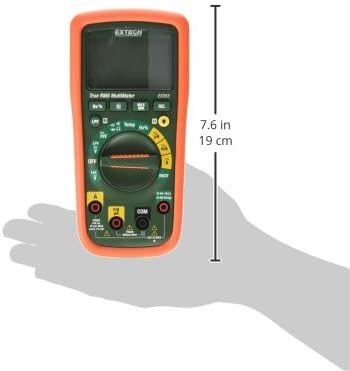
Figure 5: Extech EX355 Multimeter with approximate dimensions shown in inches and centimeters. This image provides a visual reference for the physical size of the device.
9. Информации за гаранцијата
Extech provides a warranty for its products. Specific warranty terms and conditions, including duration and coverage, may vary by region and product. For detailed warranty information, please refer to the warranty card included with your product or visit the official Extech webлокација. Чувајте ја сметката за купување како доказ за какви било гаранциски побарувања.
10. Поддршка за корисници
For technical assistance, troubleshooting, or service inquiries regarding your Extech EX355 Multimeter, please contact Extech customer support. You can typically find contact information, including phone numbers and email addresses, on the official Extech webстраницата или во документацијата што е испорачана со вашиот производ.
Онлајн ресурси: Visit the official Extech website for FAQs, product downloads, and additional support resources.


