1. Вовед и повеќеview
The Trane XL824 Thermostat is a smart climate control device designed to integrate with your home's heating, ventilation, and air conditioning (HVAC) system. Equipped with a built-in Nexia Home Intelligence Bridge, it allows for remote control and scheduling of your thermostat and compatible Z-Wave products. This manual provides essential information for the setup, operation, and maintenance of your Trane XL824 thermostat.
Важна забелешка: This control is specifically designed for Trane & American Standard 3-Wire Communicating Systems. It is not compatible with traditional wired heating and cooling systems using R, W, Y, G, C, etc., type of wiring.
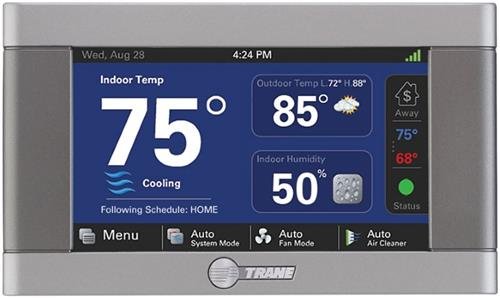
Figure 1: Trane XL824 Nexia Control Product Box. The box displays the Trane logo, model number TCONT824AS52DA, serial number, and indicates it is a 4.3" Color Wi-Fi Control with Z-Wave Bridge, quantity 1, assembled in China, with software version 1.0.0.
Video 1: Trane Thermostat Interface OverviewОва видео дава општ прегледview of a Trane thermostat, demonstrating its touchscreen interface and basic functionalities, which can be helpful for understanding the XL824's operation.
2. Клучни карактеристики
- 4.3" Diagonal Color Touchscreen: High-definition display for intuitive control.
- Built-in Nexia Home Intelligence Bridge: Enables remote control and integration with over 200 additional Z-Wave products.
- Wi-Fi or Ethernet Connectivity: Flexible options for network connection.
- Напредно закажување: Create up to six daily heating and cooling schedules to optimize comfort and energy usage.
- Системска компатибилност: Designed for Conventional 24v Heat/Cool and Dual Fuel systems (Trane & American Standard 3-Wire Communicating Systems only).
- Мулти-Сtagд Контрола: Supports up to 5 Heat Stages and 2 Cool Stages for precise climate management.
- Далечински пристап: Control and monitor your thermostat from any internet-enabled smartphone, tablet, or computer.
3. Поставување и инсталација
Installation of the Trane XL824 thermostat requires specific wiring knowledge for Trane & American Standard 3-Wire Communicating Systems. It is crucial to ensure compatibility with your existing HVAC system before proceeding. If you are unsure about the wiring or compatibility, it is recommended to consult a qualified HVAC technician.
3.1 Барања за жици
- This thermostat requires a 3-wire communicating system.
- It is not compatible with traditional R, W, Y, G, C wiring configurations.
- Пред да започнете со инсталацијата, проверете дали напојувањето на вашиот HVAC систем е исклучено на прекинувачот.
3.2 мрежно поврзување
The Trane XL824 supports both Wi-Fi and Ethernet connectivity for remote access. A high-speed router is required for internet connection. Follow the on-screen prompts after initial power-up to configure your network settings.
4. Упатства за работа
The Trane XL824 thermostat features a user-friendly 4.3" color touchscreen for easy operation. You can adjust settings directly on the device or remotely via the Nexia Home Intelligence app.
4.1 Основни контроли
- Прилагодување на температурата: Use the up and down arrows on the touchscreen to set your desired temperature.
- Системски режим: Изберете помеѓу режимите Греење, Ладење, Автоматско или Исклучено.
- Режим на вентилатор: Choose between On, Auto, or Circulate fan settings.
- Закажување: Access the 'Schedules & Presets' menu to create and manage personalized heating and cooling schedules for different times of the day and week.
4.2 Remote Control via Nexia App
Once connected to your home network, download the Nexia Home Intelligence app on your smartphone or tablet. This app allows you to:
- Прилагодете ги поставките за температура од каде било.
- View current indoor and outdoor temperatures and humidity levels.
- Modify or create new schedules.
- Control other connected Z-Wave devices.
Video 2: Smart Thermostat Features Overview. This video highlights the smart features of a Trane thermostat, including remote control capabilities and integration with smart home systems, enhancing user convenience.
Video 3: Remote AC Control Demonstration. This video demonstrates the convenience of controlling the AC system remotely using a smartphone, a key feature of the Trane XL824 Nexia Control.
5. Одржување
Regular maintenance ensures optimal performance and longevity of your Trane XL824 thermostat and your HVAC system. The thermostat may provide reminders for certain maintenance tasks.
5.1 Air Filter Service
The thermostat can alert you when it's time to check or replace your air filter. A clean air filter is essential for efficient system operation and good indoor air quality. Refer to your HVAC system's manual for specific air filter replacement instructions.
5.2 Чистење на екранот на допир
To clean the touchscreen, access the 'Clean Screen' option in the menu. This will temporarily disable touch input, allowing you to wipe the screen with a soft, damp cloth without accidentally changing settings.
6 Смена на проблеми
If you encounter issues with your Trane XL824 thermostat, try the following basic troubleshooting steps:
- Нема напојување/Празен екран: Check the circuit breaker for your HVAC system. Ensure the thermostat is properly seated on its base.
- Проблеми со поврзувањето: Verify your home Wi-Fi or Ethernet connection is active. Restart your router and the thermostat. Check the Nexia app for status updates.
- Неточни мерења на температурата: Ensure the thermostat's sensors are not obstructed and that it is not exposed to direct sunlight or drafts.
- Системот не реагира: Confirm the system mode (Heat/Cool/Auto) and fan mode are set correctly. If issues persist, a system reset may be required (refer to the full user manual for detailed reset procedures).
For complex issues, contact Trane customer support or a certified HVAC technician.
7. Спецификации
| Карактеристика | Детал |
|---|---|
| Бренд | Тране |
| Број на модел | TCONT824 |
| Тип на контролер | Нексија |
| Тип на дисплеј | LCD, 4.3 Inches Color Touchscreen |
| Поврзување | Wi-Fi, Ethernet, Z-Wave |
| Тип на контрола на температурата | Програмабилна |
| Топлина/ладење Сtages | Up to 5 Heat Stages / 2 Cool Stages |
| Voltage | 24 волти |
| Извор на енергија | Battery Powered (Note: C-wire usually provides continuous power for smart features) |
| Димензии на производот | 6 x 3.5 x 2 инчи |
| Тежина на ставката | 1 фунта |
8. Гаранција и поддршка
For warranty information, please refer to the documentation included with your Trane XL824 Nexia Control or visit the official Trane website. For technical support, product inquiries, or service, please contact Trane customer service.
Онлајн ресурси:


