Упатство за употреба на детектор за метал Garrett ACE 400i
Model: ACE 400i
1. Вовед
The Garrett ACE 400i is an advanced metal detector designed for hobbyists and enthusiasts. It builds upon the success of previous ACE models, offering enhanced features for improved target identification and detection depth. This manual provides comprehensive instructions for assembling, operating, and maintaining your ACE 400i to ensure optimal performance and longevity.
Главните карактеристики вклучуваат:
- Target Conductivity Indication: A numerical display (1-100) helps identify the probable nature of the target.
- Аудио за железо: Allows users to hear discriminated ferrous targets, aiding in distinguishing valuable items from trash.
- Increased Frequency (10 kHz): Provides enhanced detection depth and sensitivity to smaller targets.
- Прилагодување на фреквенција: Helps eliminate interference when detecting near other metal detectors or electrical sources.
- Дискриминација во изрез: Customize discrimination patterns to ignore unwanted metals.
- Pinpoint Function: Precisely locate targets for easier recovery.
- Лесен дизајн: Weighing approximately 1.32 kg, it is comfortable for extended use.

Figure 1: The Garrett ACE 400i Metal Detector, fully assembled. This image shows the main components including the search coil, shaft, control box, and arm cuff.
2. Информации за безбедност
Always exercise caution when operating the metal detector to prevent injury or damage to the device. Adhere to the following safety guidelines:
- Avoid using the detector near active electrical lines or in adverse weather conditions.
- Be aware of your surroundings, especially when digging.
- Надгледувајте ги децата за време на операцијата.
- Do not attempt to detect in areas where digging is prohibited or dangerous.
- Секогаш добивајте дозвола пред да откривате на приватен имот.
3. Вклучени компоненти
Your Garrett ACE 400i package typically includes the following components:
- Garrett ACE 400i Control Box with Shaft
- 18 x 26 cm (7" x 10") PROformance™ DD Search Coil
- Search Coil Cover
- Garrett ClearSound Easy Stow Headphones
- Garrett ACE Environmental Cover-Up (Rain Cover for Control Box)
- AA Batteries (4 required, may or may not be included depending on region/seller)
- Упатство за употреба (овој документ)

Figure 2: Garrett ClearSound Easy Stow Headphones, included with the detector for clear audio signals.

Figure 3: The protective cover for the search coil, designed to prevent scratches and wear during use.
4. Склопување и поставување
Follow these steps to assemble your Garrett ACE 400i metal detector:
- Прикачете ја калемката за пребарување:
Align the search coil with the lower stem. Insert the plastic bolt through the holes on the coil and stem, then secure it with the wing nut. Ensure the coil cable is wrapped snugly around the lower and middle stems.

Figure 4: The DD search coil, which attaches to the lower shaft of the detector.
- Поврзете ја контролната кутија:
Slide the control box onto the upper shaft. Secure it using the provided cam-locks. The new cam-lock rings prevent movement and play over time.

Figure 5: The control box attached to the upper shaft, showing the arm cuff and handle.
- Вметнете батерии:
Open the battery compartment on the control box. Insert four (4) AA batteries, ensuring correct polarity. Close the compartment securely.
- Adjust Length and Arm Cuff:
Adjust the length of the shaft to a comfortable height, allowing the search coil to be parallel to the ground when you are standing upright. Adjust the arm cuff for a snug but comfortable fit on your forearm.
- Поврзете го кабелот за намотување:
Plug the search coil cable connector into the corresponding port on the control box. Ensure a secure connection.
5. Упатства за работа
Familiarize yourself with the control panel and its functions before beginning your search.
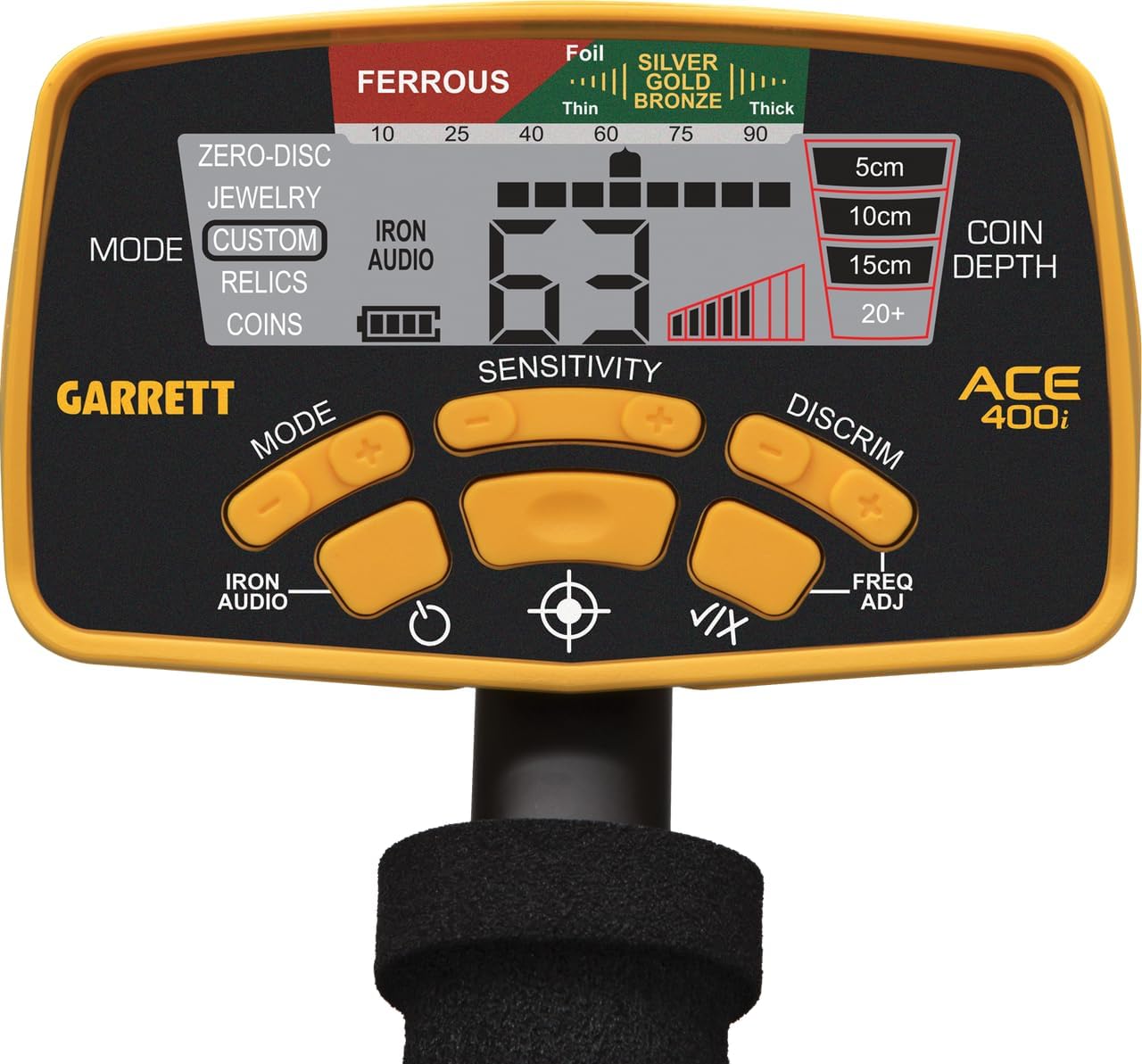
Figure 6: Close-up of the Garrett ACE 400i control panel, showing the LCD screen and various buttons.
5.1. Вклучување/исклучување
Притиснете и задржете го МОЌ button to turn the detector on or off. The detector will power on in the last used search mode.
5.2. Understanding the Display (LCD)
The large LCD screen provides crucial information:
- Target ID Cursor: Indicates the probable target type (e.g., Iron, Foil, Nickel, Zinc, Copper, Silver).
- Digital Target ID (1-100): A numerical value representing the target's conductivity. Higher numbers indicate more conductive targets (e.g., silver coins), while lower numbers indicate less conductive targets (e.g., iron).
- Индикатор за длабочина: Estimates the depth of the target in centimeters (5cm, 10cm, 15cm, 20+cm).
- Индикатор за ниво на батерија: Го прикажува преостанатиот век на траење на батеријата.
- Индикатор за чувствителност: Displays the current sensitivity setting.
5.3. Search Modes
The ACE 400i features five pre-programmed search modes. Press the РЕЖИМ копче за да се движите низ нив:
- Zero-Disc: All-metal mode. Detects all types of metal without discrimination.
- Накит: Designed to ignore iron and small trash items, focusing on jewelry.
- Прилагодено: Allows you to create and save your own discrimination pattern. Use the ДИСКРИМИРАЊЕ и V/X buttons to adjust the NOTCH segments.
- Монета: Optimized for coin hunting, typically discriminating against iron and some foil.
- Relics: Designed to find relics, often with minimal iron discrimination, as many historical artifacts contain iron.
5.4. Прилагодување на чувствителноста
Користете го СЕНЗИТИВНОСТ копчиња (+ и -) to adjust the detector's sensitivity. Higher sensitivity increases detection depth but can also lead to more false signals in mineralized ground or areas with electrical interference. Adjust as needed for stable operation.
5.5. Discrimination (NOTCH and Iron Audio)
- NOTCH Discrimination: In Custom mode, you can eliminate specific target segments from detection. Use the ДИСКРИМИРАЊЕ button to move the cursor and V/X to toggle segments on/off.
- Аудио за железо: Притиснете го ЖЕЛЕЗО АУДИО button to activate this feature. It allows you to hear discriminated iron targets at a low tone, even when they are notched out. This helps in identifying complex targets (e.g., a valuable non-ferrous target next to iron) and avoiding large iron objects.
5.6. Прилагодување на фреквенцијата
The ACE 400i operates at 10 kHz. If you experience interference from other detectors or electrical sources, press the FREQ ADJ button to slightly shift the operating frequency, which can help mitigate interference.
5.7. Pinpoint Function
Once a target is detected, press and hold the ПИНОПИНТ button (target icon). Keep the coil steady over the target. The detector will emit a continuous tone, and the signal strength indicator on the LCD will help you center the coil directly over the target for precise location.
6. Одржување
- Чистење: Wipe down the detector with a damp cloth after each use. Do not use abrasive cleaners or solvents. The control box is rain-resistant but not submersible.
- Грижа за намотките: Always use the search coil cover to protect the coil from scratches and impacts.
- Замена на батерија: Replace batteries when the low battery indicator appears. Remove batteries if storing the detector for extended periods to prevent leakage.
- Складирање: Чувајте го детекторот на ладно и суво место. Избегнувајте екстремни температури.
7 Смена на проблеми
| Проблем | Можна причина | Решение |
|---|---|---|
| Нема моќ | Изумрени или неправилно инсталирани батерии | Заменете ги батериите, проверете го точниот поларитет. |
| Неправилни сигнали / Лажни сигнали | High sensitivity, electrical interference, highly mineralized ground, loose coil cable | Reduce sensitivity, use Frequency Adjustment, tighten coil cable, try a different search mode. |
| Poor depth detection | Low sensitivity, highly mineralized ground, small target | Increase sensitivity (if stable), sweep slower, ensure coil is parallel to ground. |
| Pinpoint not accurate | Sweeping too fast, not holding coil steady | Slow down sweep, hold coil motionless over target when pinpointing. |
8. Спецификации
| Карактеристика | Детал |
|---|---|
| Модел | ACE 400i |
| Производител | Гарет |
| Работна фреквенција | 10 kHz |
| Режими на пребарување | 5 (Zero-Disc, Jewelry, Custom, Coin, Relics) |
| Target ID Segments | 12 (including Iron) |
| Iron Discrimination Segments | 6 |
| Дигитален целен ID | 0 до 99 |
| Sensitivity/Depth Adjustments | 8 нивоа |
| Посочи | Да |
| Барај серпентина | 18 x 26 cm (7" x 10") PROformance™ DD |
| Прилагодлива должина | Yes (approx. 1.06 m - 1.29 m / 42" - 51") |
| Тежина | 1.32 кг (2.9 фунти) |
| Извор на енергија | 4 АА батерии |
| Аудио тонови | 3 (ниско, средно, високо) |
| Оценка за IP | IP67 (Control box is rain-resistant, coil is submersible) |
9. Гаранција и поддршка
For detailed warranty information, please refer to the official Garrett Metal Detectors website or contact your authorized dealer. Warranty terms and conditions may vary by region.
For technical support, troubleshooting assistance, or spare parts, please contact Garrett Customer Service through their official channels. Always provide your product model (ACE 400i) and serial number when seeking support.
Официјални видеа за производи: Не беа достапни официјални видеа за производи од продавачот за вградување во ова упатство.


