Вовед
Welcome to the Jura J80 Automatic Coffee Center. This manual provides essential information for the safe and efficient operation, maintenance, and troubleshooting of your new coffee machine. Please read all instructions carefully before using the appliance for the first time and keep this manual for future reference.

Image: The Jura J80 Automatic Coffee Center, a sleek black machine, is shown from an angled perspective, actively brewing a layered latte into a clear glass. The control panel and spouts are visible.
Инструкции за безбедност
За безбедно работење и спречување на оштетување, почитувајте ги следниве безбедносни мерки на претпазливост:
- Внимателно прочитајте ги сите упатства пред да го користите апаратот.
- Овој уред е наменет само за употреба во домаќинството.
- Не го потопувајте апаратот, кабелот за напојување или приклучокот во вода или други течности.
- Обезбедете волtagе означено на апаратот се совпаѓа со вашето локално напојување пред да го поврзете.
- Избегнувајте контакт со жешки површини. Користете рачки или копчиња.
- Чувајте го апаратот подалеку од дофат на деца.
- Исклучете го апаратот од штекерот кога не го користите и пред да го чистите.
- Не ракувајте со ниеден апарат со оштетен кабел или приклучок, или откако апаратот не функционира или е оштетен на кој било начин.
Поставување
Follow these steps for the initial setup of your Jura J80:
- Отпакување: Carefully remove all components from the packaging. Retain packaging for potential future transport.
- Поставување: Position the coffee machine on a stable, level, and heat-resistant surface, away from direct sunlight and heat sources. Ensure adequate ventilation around the appliance.
- Резервоар за вода: Remove the water tank, rinse it, and fill it with fresh, cold tap water up to the 'Max' mark. Reinsert the tank securely.
- Контејнер за грав: Open the aroma preservation cover and fill the bean container with fresh coffee beans. Close the cover firmly.
- Поврзување за напојување: Connect the power cord to the machine and then plug it into a grounded electrical outlet.
- Почетно плакнење: The machine will prompt you to perform an initial rinse cycle. Follow the on-screen instructions to complete this process. This primes the system and ensures optimal coffee quality.
Оперативни
Your Jura J80 is designed for intuitive operation. Here’s how to brew your favorite beverages:
- Вклучување: Press the power button to turn on the machine. The display will show the readiness status.
- Beverage Selection: Use the display and navigation buttons to scroll through and select your desired beverage, such as Cappuccino, Espresso, Latte Macchiato, Coffee, or Hot Water.
- Прилагодување на поставките: Before brewing, you can often adjust settings like coffee strength and water volume. Follow the on-screen prompts to customize your drink.
- Пиво: Place a cup or glass under the coffee and/or milk spouts. Press the start button for the selected beverage. The machine will automatically grind the beans, brew, and dispense your drink.
- Исклучено: To turn off the machine, press the power button. The machine will perform an automatic rinse before shutting down.
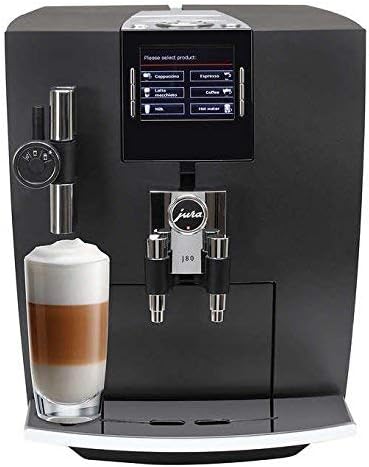
Слика: Предна страна view of the Jura J80 Automatic Coffee Center. The display shows beverage options, and a clear glass with a layered latte is positioned under the milk frother and coffee spout.
Одржување
Regular maintenance ensures the longevity and optimal performance of your Jura J80. The machine will prompt you for necessary cleaning cycles.
- Daily Milk System Cleaning: After preparing milk-based beverages, it is crucial to clean the milk system daily. Failure to do so can lead to blockages and malfunction of the frother. Rinse the frother system with water after each use, and perform a full cleaning with Jura milk system cleaner as prompted by the machine.
- Послужавник за капење и сад за талог од кафе: Empty and clean the drip tray and coffee grounds container regularly, typically when prompted by the machine. Rinse with warm water.
- Integrated Cleaning Program: The machine will periodically request a cleaning program. Use Jura cleaning tablets and follow the on-screen instructions. This is typically a monthly cleaning process.
- Декалирање: The J80 features an intelligent descaling program. When prompted, use Jura descaling tablets and follow the step-by-step instructions on the display.
- Замена на филтер за вода: If you are using a CLARIS water filter, replace it when indicated by the machine to ensure optimal water quality and reduce the frequency of descaling.
Решавање проблеми
If you encounter issues with your Jura J80, consult the following common troubleshooting tips:
- Не се издава кафе:
- Check if the water tank is filled and correctly inserted.
- Ensure the bean container has enough coffee beans.
- Verify that the brewing unit is not blocked.
- Milk Frother Not Working / Poor Foam Quality:
- This is often due to insufficient cleaning. Perform a thorough cleaning of the milk system using Jura milk system cleaner. Disassemble the frother components and soak them if necessary.
- Ensure the milk is fresh and cold.
- Машината не се вклучува:
- Check if the power cord is securely plugged into both the machine and a functional electrical outlet.
- Тестирајте го излезот со друг апарат.
- Пораки за грешка на екранот:
- Note the specific error code or message. Consult the Jura support website or your full user manual for detailed explanations and solutions.
If the problem persists after attempting these solutions, please contact Jura customer support.
Спецификации
| Бренд | Јура |
| Модел | J80 |
| Димензии на производот | 17 x 11.2 x 13.3 инчи |
| Тежина на ставката | 31.9 фунти |
| Капацитет | 14 унци |
| Материјал | Glass (for certain components) |
| Специјална карактеристика | Програмабилна |
| Тип на кафемат | Машина за еспресо |
| Влез со човечки интерфејс | Копчиња |
| UPC | 794151411197 |
| ASIN | B01F96ITWK |
Гаранција и поддршка
For detailed warranty information, technical assistance, or to purchase accessories and cleaning products, please visit the official Jura website or contact Jura customer service directly. Keep your proof of purchase for warranty claims.
Jura Official Webсајт: us.jura.com


