Вовед
The Konftel EGO is a compact and portable personal speakerphone designed for crystal-clear audio conferencing. Featuring OmniSound audio technology, it is suitable for small meetings, individual use, and travel. This manual provides instructions for setting up, operating, and maintaining your Konftel EGO.
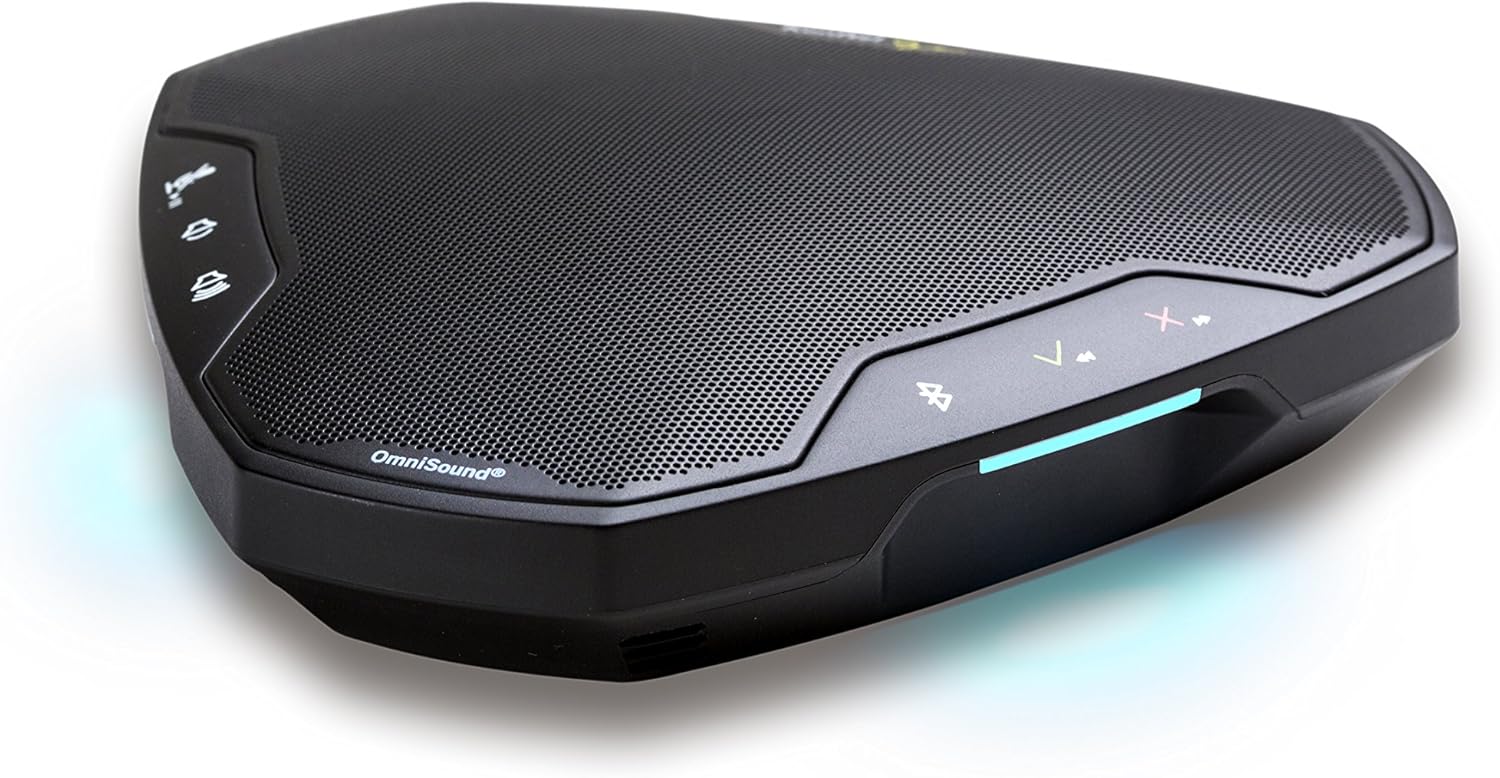
Image: The Konftel EGO in use during a small group meeting, demonstrating its portability and ease of integration into various environments.
Што има во кутијата
- Konftel EGO Conferencing Unit
- Торбичка за носење
- USB кабел
- Упатство за употреба (овој документ)
Производот завршиview
The Konftel EGO features intuitive controls and essential ports for connectivity. Familiarize yourself with the device's layout before use.

Слика: Горе view of the Konftel EGO, highlighting the touch-sensitive control panel and OmniSound branding.

Слика: Заден дел view of the Konftel EGO, displaying the headset port, USB connection, and power button.
Клучни компоненти:
- Контроли на допир: For call answer/end, volume up/down, mute, Bluetooth pairing.
- LCD екран: Прикажува информации за статусот.
- USB порта: For connecting to a computer and charging.
- Порта за слушалки: For connecting a personal headset (disables internal microphone).
- Копче за вклучување: За вклучување/исклучување на уредот.
- NFC Tag: За брзо Bluetooth спарување со компатибилни уреди.
Поставување
1. Полнење на уредот
Before first use, fully charge your Konftel EGO. Connect the supplied USB cable to the USB port on the device and to a computer or a USB power adapter (not included). The LCD screen will indicate charging status. A full charge provides approximately 12 hours of talk time.
2. Поврзување преку USB
- Connect the Konftel EGO to your computer using the supplied USB cable.
- The device will be recognized as an audio device. Select "Konftel EGO" as your speaker and microphone in your computer's audio settings or conferencing application.
- The device will draw power from the USB connection during use.
3. Спарување преку Bluetooth
The Konftel EGO supports Bluetooth pairing with mobile phones and other compatible devices.
Standard Bluetooth Pairing:
- Ensure the Konftel EGO is powered on.
- Притиснете и задржете го Копче Bluetooth on the device until the Bluetooth indicator flashes.
- On your mobile device, go to Bluetooth settings and select "Konftel EGO" from the list of available devices.
- Откако ќе се поврзе, индикаторот за Bluetooth ќе свети постојано.
NFC Pairing (Near Field Communication):
- Проверете дали NFC е овозможен на вашиот мобилен уред.
- Tap your NFC-enabled mobile device against the NFC tag on the Konftel EGO (located near the "Konftel Ego" logo).
- Confirm the pairing request on your mobile device.
Operating the Konftel EGO
Управување со повици:
- Одговори на повикот: Притиснете го Копче за одговор (green phone icon).
- Крај на повикот: Притиснете го Копче за завршување на повикот (red phone icon).
- Исклучи звук на микрофонот: Притиснете го Копче за исклучување (microphone icon). Press again to unmute.
- Прилагодување на јачината на звукот: Користете го Јачина на звук (+) и Намалување на јачината на звукот (-) копчиња.
Музички стриминг:
When connected via Bluetooth, the Konftel EGO can stream music in HD quality from your mobile device. Use your mobile device's controls for playback (play, pause, skip tracks).
Using a Headset:
Connect a 3.5mm headset to the headset port on the Konftel EGO for private conversations. When a headset is connected, the internal microphone and speaker of the EGO are disabled.
Одржување
Чистење:
Wipe the device with a soft, dry cloth. Do not use liquid cleaners or abrasive materials, as these can damage the surface and internal components.
Нега на батеријата:
- Избегнувајте често целосно празнење на батеријата.
- Чувајте го уредот на ладно и суво место ако не го користите подолг временски период.
- Charge the device periodically if stored for a long time to maintain battery health.
Решавање проблеми
| Проблем | Можна причина | Решение |
|---|---|---|
| Нема звук или низок волумен |
|
|
| Не може да се поврзе преку Bluetooth |
|
|
| Микрофонот не слуша звук |
|
|
Спецификации
- Број на модел: 910101081
- Димензии на производот: 5.71 x 5.31 x 1.26 инчи
- Тежина на ставката: 8.1 унци
- Батерија: 1 литиум-јонска батерија (вклучена)
- Поврзување: Bluetooth with NFC, USB
- Аудио технологија: OmniSound with HD audio
- Производител: Konftel
Гаранција и поддршка
For warranty information and technical support, please refer to the official Konftel website or contact your local Konftel reseller. Keep your proof of purchase for warranty claims.
Official Konftel Webсајт: www.konftel.com


