Вовед
This manual provides detailed instructions for the KeylessOption Keyless Entry Remote Car Key Fob and Key Replacement, model LHJ011. It covers product overview, setup, programming, maintenance, and specifications to ensure proper use and functionality.
Производот завршиview
The KeylessOption LHJ011 is a replacement keyless entry remote and key designed to function identically to your vehicle's original equipment. It includes a fully tested remote with a pre-installed battery and an uncut key blade.
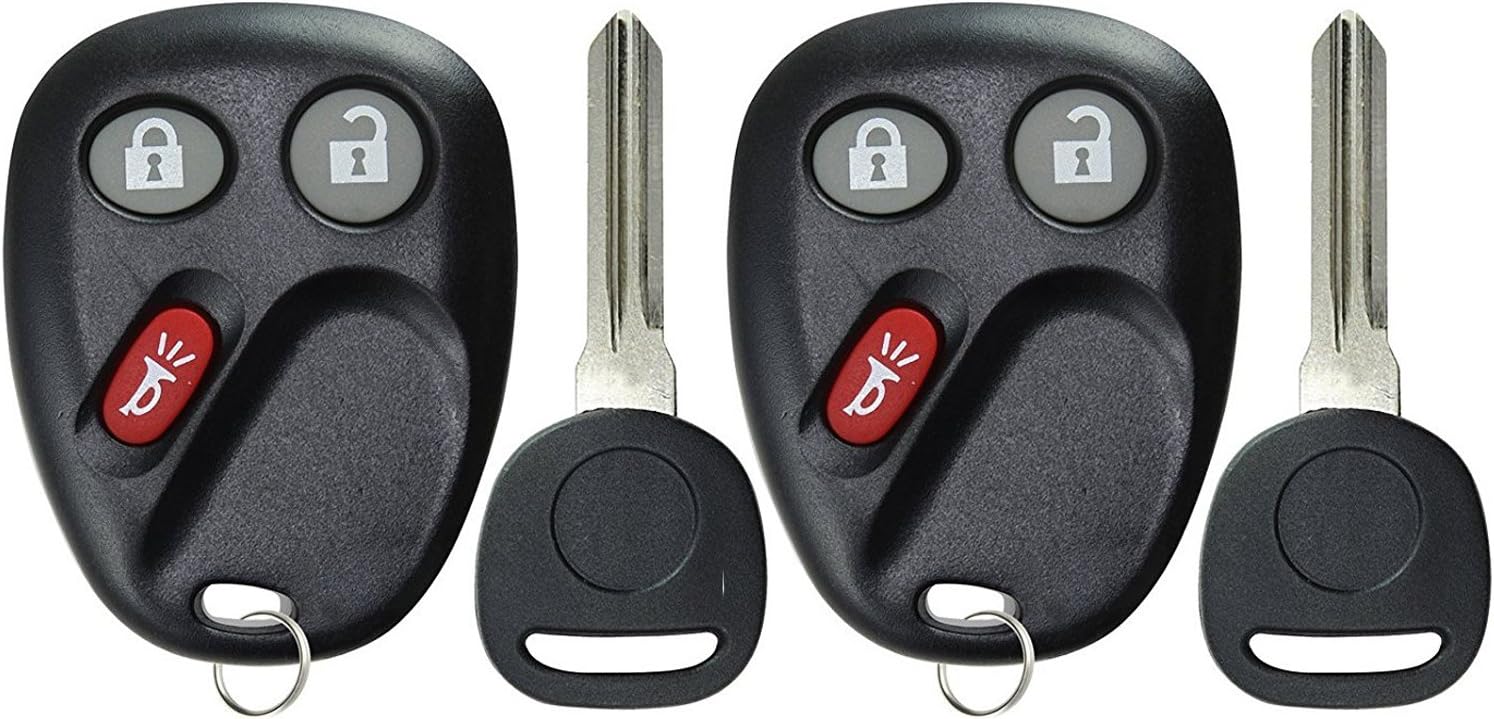
Слика: напред view of two KeylessOption LHJ011 key fobs, each featuring lock and unlock buttons, a red panic button, and an attached uncut key blade. These units are designed for keyless entry and vehicle ignition.

Слика: Назад view of two KeylessOption LHJ011 key fobs, showing the smooth, black plastic casing and the key ring attachment point. This view highlights the compact design of the remote units.
Setup and Key Cutting
Before programming the remote functions, the included key blade must be cut to match your vehicle's original key. This process is typically performed by a professional locksmith or an automotive dealership.
- Сечење на клучеви: Take the new key fob and your original vehicle key to a qualified locksmith or dealership. They will cut the new key blade to match your existing key. This is essential for starting the vehicle.
- Инсталација на батерија: The remote comes with a CR2032 battery pre-installed. If replacement is needed, refer to the maintenance section.
Operating Instructions: Remote Programming
The KeylessOption LHJ011 remote control functions (lock, unlock, panic) are self-programmable for many compatible vehicles. Follow these step-by-step instructions carefully. It is recommended to program all new and existing remotes in a single session.
General Programming Procedure (Example for GM Vehicles, verify specific vehicle instructions):
- Подготовка: Gather all key fobs (new and existing) you wish to program. Ensure all vehicle doors are closed.
- Влезете во режим на програмирање:
- Sit in the driver's seat.
- Држете го ОТКЛУЧИ button on the driver's side door panel.
- While holding the UNLOCK button, insert your newly cut key into the ignition.
- Cycle the ignition to the ON position (do not start the engine), then immediately to ИСКЛУЧЕНО, потоа назад на ON, а потоа и да ИСКЛУЧЕНО повторно.
- Release the UNLOCK button on the door panel. The vehicle's door locks should cycle (lock and unlock) to confirm that the vehicle is now in programming mode.
- Program Remote(s):
- Take the first remote you wish to program (e.g., for Driver 1).
- Истовремено притиснете и задржете го ЗАКЛУЧУВАЊЕ и ОТКЛУЧИ копчиња на далечинското.
- Continue holding these buttons until the vehicle's door locks cycle again (this may take 15 to 30 seconds, or up to 100 seconds). This confirms the remote has been programmed.
- If you have additional remotes (e.g., for Driver 2), immediately repeat the previous step for each remaining remote. Do not exit programming mode between remotes.
- Излезете од режимот на програмирање:
- Once all remotes are programmed, turn the ignition key to the ON position, then to ИСКЛУЧЕНО.
- Open the driver's door. This action typically exits the programming mode.
- Test Remotes: Test all programmed remotes to ensure they function correctly (lock, unlock, panic). The first remote programmed will typically be assigned to Driver 1, and subsequent remotes to Driver 2, if your vehicle supports this feature.
Забелешка: Specific programming procedures may vary slightly by vehicle make and model. Always refer to your vehicle's owner's manual or the manufacturer's recommended programming instructions if these steps do not work.
Одржување
Замена на батеријата
The KeylessOption LHJ011 remote uses one CR2032 coin cell battery. When the remote's range decreases or it stops responding, the battery may need replacement.
- Open the Fob Casing: Carefully pry open the remote's casing. There is usually a small notch on the side where you can insert a flat-head screwdriver or a coin to gently separate the two halves.
- Отстранете ја старата батерија: Note the orientation (+/-) of the existing CR2032 battery. Gently remove it.
- Вметнете нова батерија: Insert a new CR2032 battery with the positive (+) side facing the same direction as the old battery.
- Затвори Casing: Align the two halves of the fob casing и цврсто притиснете ги заедно додека не се заглават безбедно на своето место.
- Тест функционалност: Test the remote's functions (lock, unlock) to ensure the new battery is working correctly.
Забелешка: Отстранете ги старите батерии одговорно во согласност со локалните прописи.
Решавање проблеми
| Проблем | Можна причина | Решение |
|---|---|---|
| Далечинскиот управувач не работи по програмирањето. | Incorrect programming steps, dead battery, or incompatible vehicle. |
|
| Key blade does not turn in ignition. | Key not cut correctly or damaged. |
|
| Дометот на далечинскиот управувач е слаб. | Low battery or environmental interference. |
|
Спецификации
- Модел: LHJ011
- Бренд: KeylessOption
- Број на дел од производителот: КПТ4037
- OEM броеви на делови: 15132198, 15186200, 15186201, 15186203, 15186209, 21997127, 22730827, LHJ011, 10377295, 15132197
- Тип на батерија: 1 x CR2032 (вклучено)
- Материјал: Пластика
- Димензии на производот: Approximately 4"L x 2"W
- Тежина на ставката: Приближно 1.58 унци
- Тип на автомобилско вклопување: Специфично одговарање на возилото
- Број на копчиња: 2 (Lock, Unlock) + Panic
Гаранција и поддршка
Each KeylessOption product includes a warranty card. For specific warranty details, please refer to the included card or contact KeylessOption customer support. Technical support is available with each purchase to assist with programming or operational questions.
For further assistance, please visit the official KeylessOption store or contact their customer service department.
KeylessOption Store: Посетете ја продавницата